

What is Zhixie Liucheng
Zhixie Liucheng is an efficient AI generation tool for operation guides that can automatically capture web operations to generate clear illustrated tutorials. Users only need to operate the webpage normally; after clicking "Start Recording," Zhixie Liucheng intelligently tracks behaviors such as mouse clicks, keyboard input, and page jumps, automatically generating operation guides with screenshots and text descriptions. Zhixie Liucheng supports editing features, allowing users to adjust steps, annotate screenshots, and modify text, making the tutorials better fit their needs. After editing is completed, it can be shared via link or exported to multiple formats such as PDF, Word, and Markdown, facilitating knowledge sharing.
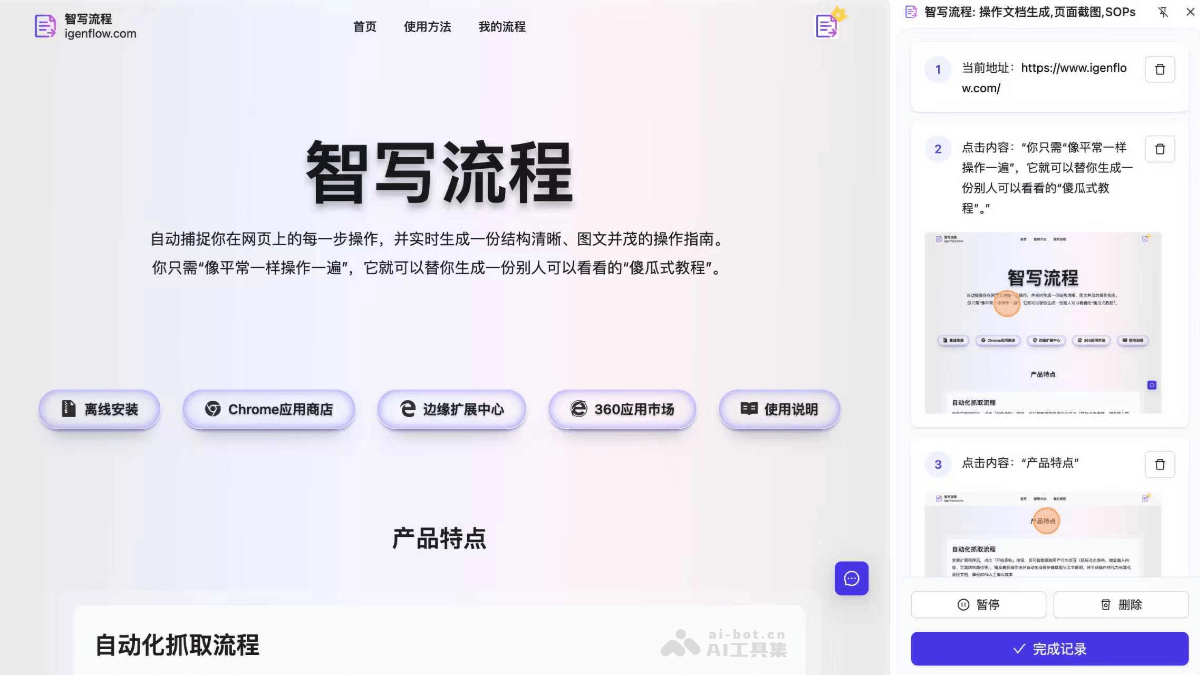
Main Features of Zhixie Liucheng
-
Automated capture of operation processes: After installing the extension, click "Start Recording," and Zhixie Liucheng intelligently tracks interactions such as mouse clicks, keyboard input, and page jumps, generating operation guides with screenshots and text descriptions in real time, reducing manual writing costs by about 80%.
-
Editing and optimization features: Supports flexible editing of generated operation guides, including adding or deleting steps, adjusting order, annotating screenshots, and modifying text descriptions, making the tutorials better fit the needs.
-
Multiple sharing and export methods: Supports generating operation guides as online documents and exporting them as PDF, Word, Markdown, and other formats. They can be shared with others via link, facilitating knowledge sharing.
-
Guidance mode: After sharing a link, others can follow the steps in the guide to perform operations, enabling "foolproof" operation guidance and making it easy to get started quickly.
-
Ease of use: Supports local installation or one-click installation through browser app stores such as 360 Browser, Google Chrome, and Microsoft Edge, with WeChat QR code login, making operation simple and convenient.
How to Use Zhixie Liucheng
-
Install the browser extension: Visit the official website of Zhixie Liucheng https://www.igenflow.com/ , and choose local installation or one-click installation through the browser app stores of 360 Browser, Google Chrome, and Microsoft Edge.
-
Log in to your account: After installation is complete, click the Zhixie Liucheng icon in the upper right corner of the browser and log in by scanning the QR code with WeChat.
-
Start recording operations: After logging in, click "Start Recording," then normally perform the operation process you want to record.
-
Complete recording and generate the guide: After the operations are completed, click "Finish Recording," and Zhixie Liucheng will automatically generate an operation guide containing screenshots and text descriptions.
-
Edit the generated guide: Enter the editing interface to modify and improve the generated guide, including adjusting steps, annotating screenshots, and modifying text.
-
Share or export the guide: After editing is completed, you can choose to share via link or export the guide as PDF, Word, Markdown, and other format files for convenient use.
Application Scenarios of Zhixie Liucheng
-
Employee training: Generate system operation guides for new employees to help them quickly become familiar with work processes.
-
Customer support: Create product manuals and self-service troubleshooting tutorials to improve customer experience.
-
Content creation: Assist in producing software review videos and accompanying illustrated steps to enrich content formats.
-
Internal knowledge sharing: Transform the team's internal operational experience into standardized documentation, making it easy for members to learn from and refer to.
-
Technical Support Documentation: Quickly generate technical support documentation to help users resolve common issues.
-
Project Management: Generate operational process documentation for project teams, ensuring that team members have a consistent understanding and execution of the process.

