

What is Belin Doc
Belin Doc is a free and unlimited AI document translation tool that supports multiple formats such as PDF, DOCX, PPTX, TXT, and EPUB. Belin Doc has built-in OCR functionality that can accurately recognize and translate text in scanned PDFs or images. Belin Doc requires no registration or login; simply open the website and upload a file to use it. Powered by the latest large language models, it ensures translation quality and preserves the original formatting to the greatest extent possible. Belin Doc supports translation between more than 50 mainstream languages and offers a variety of top-tier models to choose from. All uploaded files and translation results are completely deleted from the server within 24 hours to protect user privacy.
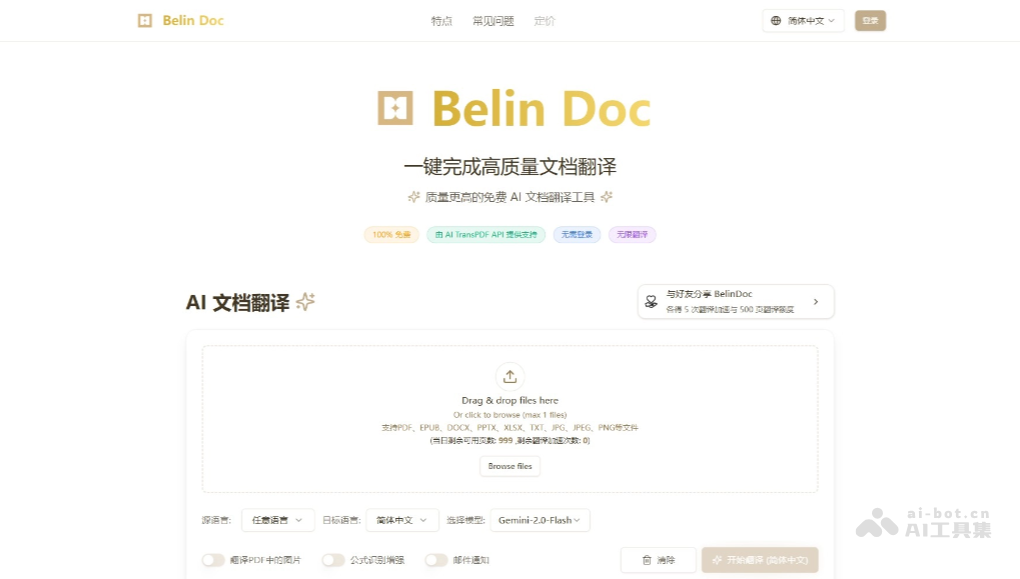
Main features of Belin Doc
-
Supports multiple formats: Can translate multiple file formats such as PDF, EPUB, DOCX, PPTX, XLSX, TXT, JPG, JPEG, and PNG.
-
Powerful OCR functionality: Built-in OCR functionality can accurately recognize and translate text in scanned PDFs or images.
-
Preserves original formatting: Uses a self-developed format parsing and restoration engine, preserving original formatting such as headings, lists, fonts, and image positions to the greatest extent possible.
-
Multilingual translation: Supports translation between more than 60 mainstream languages, including Chinese, English, Japanese, and Spanish.
-
Multiple model choices: Offers a variety of top-tier models for users to choose from, including ChatGPT, Claude, Gemini, and DeepSeek.
-
Zero-cost translation: Completely free, with no usage limits and no hidden fees, suitable for users who need large amounts of translation.
-
Strong formatting preservation: Uses advanced format parsing algorithms, so the translated document format is highly consistent with the original, and supports preserving complex content such as tables and images.
How to use Belin Doc
-
Visit the official website: Visit the Belin Doc official website https://belindoc.com/ 。
-
Upload a file: No registration or login required; directly click the upload button and select the document you need to translate.
-
Select a language: Select the target language in the translation interface; more than 50 mainstream languages are supported.
-
Start translation: Click the "Start Translation" button and the system will automatically translate.
-
Download the result: After translation is complete, click the download button to get the translated document.
-
View the translation: The translated document retains the original formatting, making it convenient to use directly.
Use cases for Belin Doc
-
Students and scholars: Quickly translate foreign-language papers, academic literature, and reference materials to support academic research.
-
Working professionals: Easily handle multinational reports, product manuals, business contracts, and emails to improve work efficiency.
-
Legal/financial/medical professionals: Efficiently translate documents in professional fields while ensuring information security.
-
Content creators: Translate video subtitles and blog articles to expand global readership and increase content reach.
-
General users: Read foreign-language e-books, news, instruction manuals, etc., to meet everyday translation needs.

