
What is Holopix AI
Holopix AI is an online AI design platform launched by Guangzhou Guanghui Technology, built specifically for game, anime, and illustration design. It offers text-to-image, line art-to-image, color block-to-image, pose-to-image, AI image style transfer,one-click background removal, 3D perspective conversion, and other features. Holopix AI supports Chinese-language generation and includes multiple style models (such as indie games, manga, Chinese style, Western style, etc.). It supports custom training of exclusive style models to ensure visual style consistency. Holopix AI provides intelligent editing tools (such as smart replacement, local refinement, lossless 4K quality enhancement, etc.) to help users efficiently create art assets such as game characters, scenes, ICONs, and promotional illustrations.
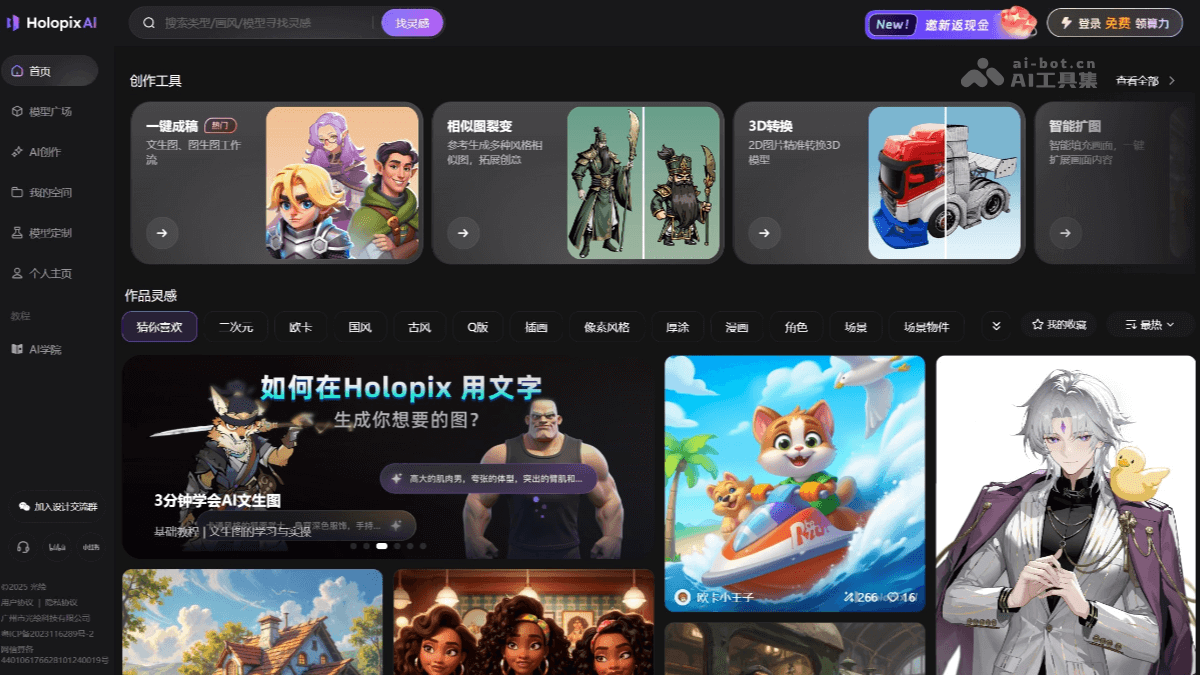
Holopix AI's main features
- One-click final artwork: Supports quickly generating complete game scenes or character designs from line art or color block sketches
- Pose-to-image: Allows customizing character skeleton movements to generate character images that match the pose.
- Style model library: Built-in 30+ style models (such as Chinese style, Western style, manga, 3D realism, etc.), supporting free combination.
- Custom training: Upload personal materials and train an exclusive style model with one click to ensure project style consistency.
- Detail adjustment: Use text descriptions to locally refine and optimize images, for example adjusting embossed textures, the refraction effect of crystal prisms, etc.
- Intelligent editing tools: Includes one-click background removal, smart erasing, HD upscaling (improve image quality to 8K), pixel art conversion, and other features to simplify the post-processing workflow.
- 4K ultra-HD upscaling: Losslessly improves image resolution, suitable for promotional art, printing, and other scenarios.
- Smart image expansion: AI automatically extends the canvas and completes the composition.
- 2D to 3D: Generate a 3D model from a character or item image with one click, supporting 360° perspective preview.
- 3D perspective adjustment: Quickly generate multi-perspective design sheets without any modeling background.
- Similar image variation: Generate variations with a consistent style but different designs based on the original image, quickly building an asset library.
- Smart layer splitting and patching: Automatically split character/prop layers for convenient animation integration.
- Style consistency control: All assets under the same project maintain a unified art style, suitable for characters, ICONs, scenes, etc.
How to use Holopix AI
- Register and log in: VisitHolopix AI's official website. New users receive 50 compute credits on their first login (≈50 images), and free users can generate 30 times per day.
- Choose a creation entry point
- One-click final artwork: Basic generation such as text-to-image, sketch-to-image, line art coloring, pose-to-image, etc.
- Intelligent editing: Background removal, local redrawing, replacement, erasing, 4K upscaling, 3D perspective conversion.
- Model plaza: Choose or train style models (more than 30 types including Chinese style, Western style, anime, etc.).
- My favorites: Save line art, sketches, and style references for easy reuse later.
- Start generating (using text-to-image as an example)
-
Enter "One-click final artwork";
-
Enter a Chinese description in the prompt box, for example: a girl, long brown hair, smiling, white shirt, black short skirt, European and American thick paint style;
-
Select "European and American thick paint" in the style list;
-
Click "Generate", and the image will be produced in about 5–10 seconds.
-
- Advanced Usage Tips
- Line Art to Image: Upload line art, the system automatically recognizes it, and click one-click coloring.
- Pose to Image: Select or upload a pose image, adjust the skeleton, and click to generate a character.
- Similar Image Variations: Upload the original image, select "Composition Reference" or "Style Reference", and click to generate variations.
- Smart Replacement: Select the area to paint over, enter the replacement content (such as a red cape), and click one-click replacement.
- 3D View Conversion: Upload a character image, generate a 3D model, and support 360° rotation viewing.
- Export and Post-Processing: One-click cutout can export a transparent background PNG; supports 4K high-definition export for printing or promotional art; generated images can then be brought into Photoshop for fine-tuning of lighting, shadows, and materials.
Application Scenarios of Holopix AI
- Game Development: One-click batch generation of characters, ICONs, props, and scenes in the same style, ensuring visual consistency.
-
Character Design: Upload an atmosphere sketch, AI automatically extracts the line art and colors it, supports continuous motion frame generation, and provides setting drafts for anime or PVs.
-
Social Media: Use "One-Click Cutout" + "Smart Outpainting" to batch generate emojis, webtoons, and livestream gifts with transparent backgrounds, and create short video materials in one click.
-
Teaching Cases: University game art courses use Holopix to demonstrate "HD-2D scenes", "3D-to-2D characters", etc. Students can complete runnable demos without a deep art background.
-
Individual Creators: Independent developers with zero art foundation can use AI to complete an entire set of European and American casual or healing isometric scenes within 2–3 days, then import them into Godot/UE to package and launch.


