

What is Kira
Kira is an AI image generationand editing tool. Kira has a variety of features, including background replacement,background removal, image inpainting, image quality enhancement, style transfer, and AI image generation, etc. Kira uses intelligent technology to help users process images efficiently, meeting the needs of designers, photographers, and creative workers, and improving creative efficiency and results. Based on a professional development team background and technical advantages, it has unique competitiveness in the field of image processing, providing users with convenient and efficient creative solutions.
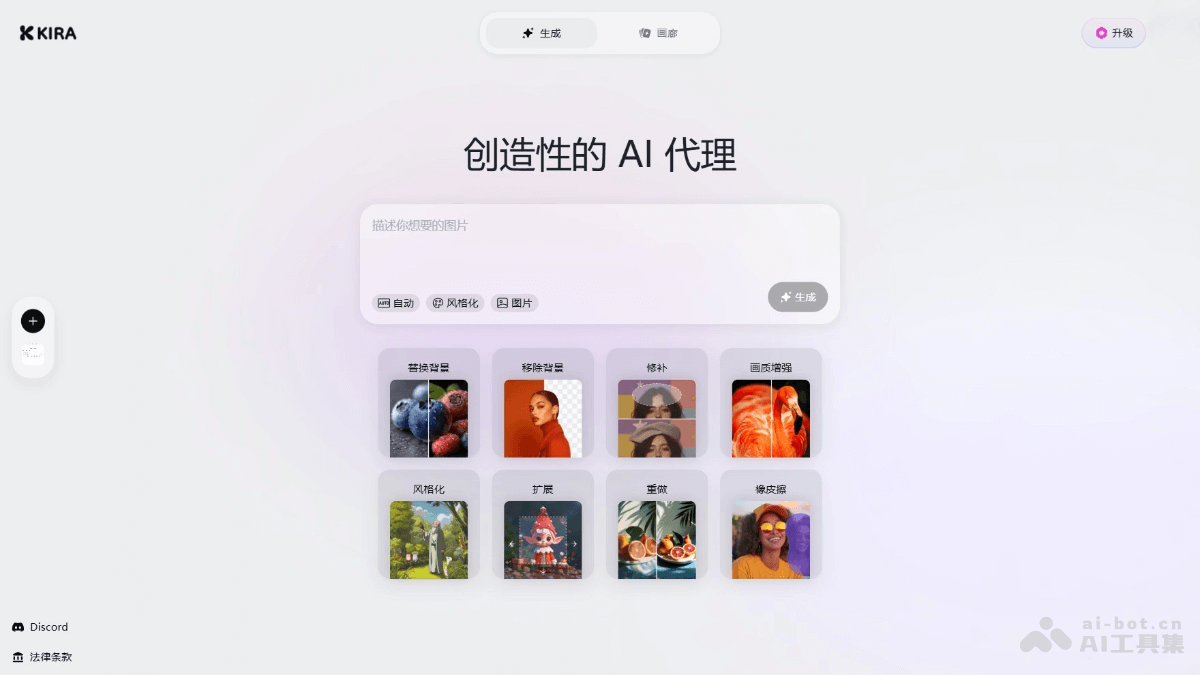
Kira's main features
- Replace background: Replace the background in an image with another image or color, suitable for scenarios such as product display and creative design..
- Remove background: Remove the image background with one click and extract the subject, making it convenient for users to perform subsequent editing or compositing.
- Inpaint: Intelligently fill in or repair missing parts of an image and remove unwanted elements.
- Upscale: Improve the clarity of low-resolution images.
- Expand: Intelligently expand image boundaries and generate additional image areas based on the image content.
- Stylize: Convert images into different artistic styles to meet creative design needs.
- Redo: Use intelligent visual transformation to reconstruct and redefine image content.
- Eraser: Erase specific parts of an image.
- Gallery: A community space showcasing user creations, where users can browse image works generated by other users, get inspiration, or share their own creative results.
- AI image generation: Use text descriptions or reference images to generate entirely new images based on AI models.
How to use Kira
- Visit the official website: Visit Kira's official website https://kira.art/ to complete registration and log in.
- Choose a feature: Choose the corresponding feature module according to your needs, such as "Replace background," "Remove background," "Upscale," "Generate image," etc.
- Upload an image: On the feature page, click the "Upload image" button and select the image you want to process. Supported image formats usually include common formats such as JPG and PNG.
- Replace background: Select a new background image, or choose a preset background color, and Kira automatically recognizes and replaces the original image background.
- Remove background: Click the "Remove background" button, and Kira automatically recognizes and removes the background and extracts the subject.
- Upscale: Select the enhancement level, and Kira automatically improves the image clarity and quality.
- Inpaint: Mark the area that needs repair, and Kira automatically fills in and repairs the flaws.
- Expand: Select the expansion direction and range, and Kira generates new image areas.
- Stylize: Select an artistic style (such as oil painting, watercolor, etc.), and Kira converts the image into the corresponding style.
- AI generation: Enter a text description, and Kira generates an entirely new image based on the description.
- Adjust and Preview: Adjust parameters as needed (such as enhancement level, style intensity, etc.). Preview the processed image to ensure the effect meets expectations.
- Save or Download: Click the "Save" or "Download" button to save the processed image locally or to the cloud.
Kira's Product Pricing
- Basic Plan: $9.99/month, includes 1000 credits
- Pro Plan: $19.99/month, includes 2000 credits, access to more advanced features
- Max Plan: $59.99/month, includes 6000 credits, access to more advanced features
Kira's Use Cases
- E-commerce Operations: E-commerce sellers can quickly remove or replace product image backgrounds and generate professional display images that meet e-commerce platform requirements with one click, enhancing product appeal and store image.
- ID Photo Creation: Users can easily convert ordinary photos into ID photos with blue, white, or red backgrounds that meet requirements, without the need to retake them.
- Creative Design: Designers can convert images into different artistic styles and quickly generate creative assets, inspiring more design ideas.
- Old Photo Restoration: Users can repair scratches and stains on old photos, improve clarity, and give precious memories a fresh new look.
- Social Media Creation: Creators can quickly generate creative image content, enrich social media posting materials, and attract more attention.


