
What is Gaoding AI Enhance Clarity
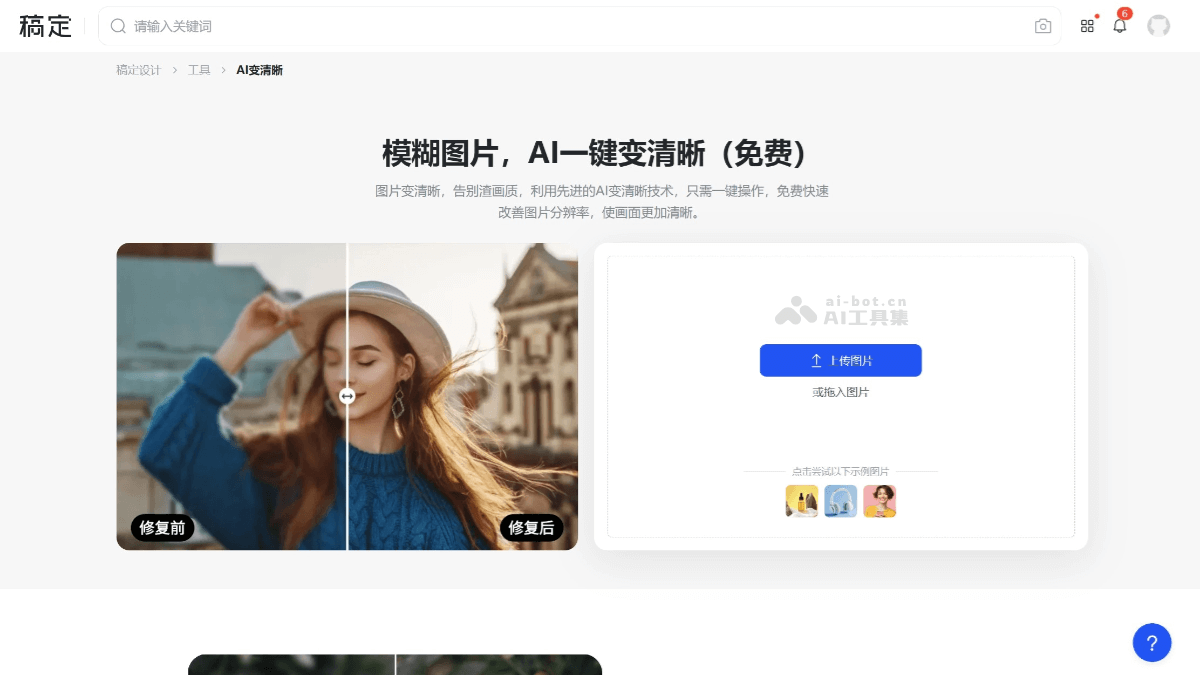
Gaoding AI Enhance Clarity isGaoding Designlaunched AI image restoration tool that can effectively improve the clarity of blurry images. By intelligently analyzing image content, it precisely supplements image information, significantly enhancing image details and resolution, giving blurry photos a completely new look. It is suitable for restoring old photos, optimizing low-resolution images, and repairing slight blur. Users can choose "HD" or "Ultra HD" mode; "Ultra HD" mode can further optimize image details, making the image more lifelike. When enhancing clarity, Gaoding AI Enhance Clarity uses color correction technology to avoid oversaturation and hue shift, keeping image colors natural.
Main features of Gaoding AI Enhance Clarity
- AI intelligent repair: Through advanced AI technology, it can significantly improve the clarity of blurry images and make details richer.
- Restore old photos: It can intelligently repair old photos, improve clarity, and restore faded or damaged parts.
- Optimize low-resolution images: For low-resolution images, the AI Enhance Clarity tool can enlarge the image while maintaining high clarity, meeting the needs of large-size output.
- Preserve original colors: During the clarity enhancement process, the tool uses color correction technology to avoid oversaturation and hue shift, ensuring natural image colors.
- Multiple clarity options: Users can choose "HD" or "Ultra HD" mode to further optimize image details.
- Batch enhance multiple photos: Repair image clarity in batches online, repair blurry photos with one click, optimize image texture details, intelligently and quickly denoise, perform adaptive sharpening enhancement, and improve the overall clarity of images.
How to use Gaoding AI Enhance Clarity
- Visit the Gaoding platform: Visit the Gaoding Design AI Enhance Clarityofficial website。
- Select AI tool: Select AI tools, and among image processing tools, select AI Enhance Clarity.
- Upload image: Select the image you want to enhance clarity for image restoration.
- Select clarity: HD or Ultra HD. The clearer the image, the more Gaoding Beans are consumed. Then click start generating.
- Download image: Click download, select the download image type and size, and save the repaired image.
Application scenarios of Gaoding AI Enhance Clarity
- Old photo restoration: The Gaoding AI Enhance Clarity tool can intelligently repair old photos, greatly improving image clarity while delicately restoring image details.
- Low-resolution image optimization: For low-resolution images, the tool can improve image clarity and resolution through intelligent analysis and supplementation of image information, meeting the needs of large-size output.
- Slight blur repair: The tool can repair slightly blurry images caused by poor shooting equipment or compression, making the image clearer and more natural.
- Social media content optimization: Users can use the tool to improve image clarity, making it more suitable for sharing on social media and enhancing visual effects.
- E-commerce designE-commerce merchants can use AI enhancement tools to optimize product images, improving the visual appeal and market competitiveness of their products.


