

transpic is an AI image-to-illustration redrawing creation platform that makes it convenient for designers to find materials/inspiration and then use them as reference for redrawing creation, and ordinary users can also use this tool to redraw avatars. It is very simple to use. Users only need to upload an image, and with the help of AI, the image can be redrawn into other styles.
Redrawing types supported by transpic
transpic supports redrawing images into 19 different styles,
- Scene/speedpaint category: redrawing styles such as concept scenes, Disney style, concept characters, anime scenes, realistic texture, and environmental art produce better image results.
- Character/role category: redrawing styles such as anime characters, Disney style, character design, concept scenes, concept characters, and realistic texture produce better image results.
- Photo/photography category: redrawing styles such as environmental art, character design, concept scenes, anime characters, concept characters, and oil painting texture produce better image results.
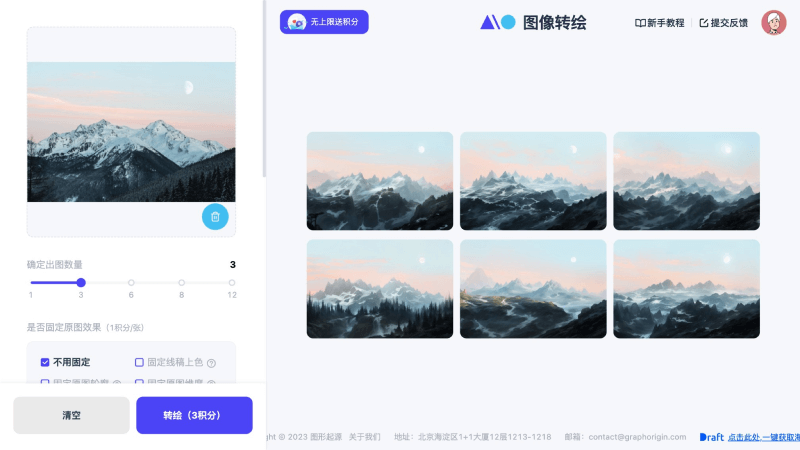
How to use transpic
- Visit transpic's official website and upload an image on the left side.
- Adjust the output similarity (the lower the similarity, the more imaginative the effect).
- Select an output model.
- Finally, click the redraw button.
transpic product pricing
After users log in and register for transpic, they can get 30 credits for image redrawing, and the number of generated images consumes the same amount of credits. In addition, each time you invite a friend to register, you can get 30 credits. You can also choose to top up to get more credits. The top-up ratio is 1 yuan = 10 credits, and top-ups also come with additional credits gifted by the official platform.


