

DingTalk Personal Edition has officially started beta testing. All users can apply to join the test on the DingTalk official website. In actual testing, the application only takes a few minutes. Its personal space is built based on the online collaborative document "wolai" acquired by DingTalk, combined with Alibaba's AI large model. According to the introduction, DingTalk Personal Edition is centered on AI and provides "Jarvis" text-to-text AI and "Muse" text-to-image AI. Users can answer various questions, formulate planning proposals, or draw through natural language conversations.
AI features of DingTalk Personal Edition
- AI document creation assistant: In the personal document space, enter /ai to summon the AI assistant for AI writing, article outline writing, content summary creation, Xiaohongshu recommendation notes, short video scripts, emails, advertising copy, short stories, weekly meeting reports, job descriptions, to-do lists, and more.
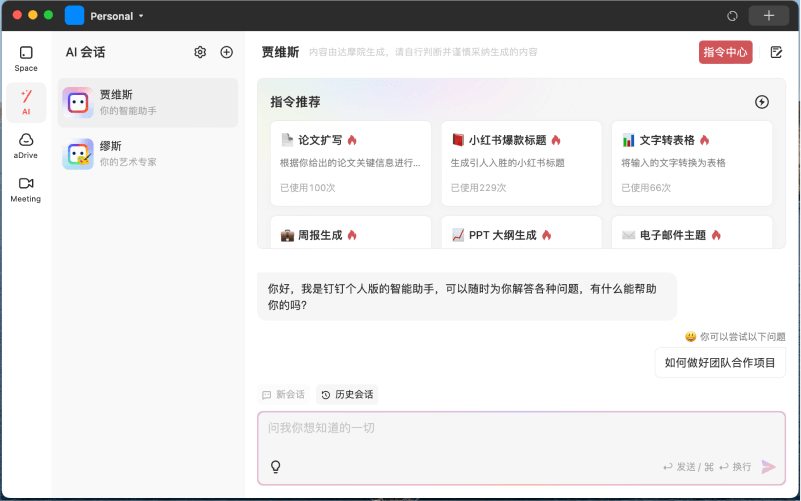
- Jarvis AI chat assistant: Based onTongyi Qianwenlarge model, the Jarvis intelligent assistant can answer various questions for you at any time, and has built-in common instructions and supports creating custom instructions.
- Muse AI drawing: Based onTongyi Wanxiangimage generation large model, Muse AI can performAI image generationin styles such as portraits, photography, games, illustrations, science fiction, architecture, and Chinese style, and also supports creating custom instructions
How to use DingTalk Personal Edition
- Visit the official website of DingTalk Personal Edition and click the Apply for Experience button
- Use the mobile version of DingTalk to scan the QR code to apply. Wait a few minutes and refresh the website. If the upper right corner shows that eligibility has been obtained, it means it can be used
- After the application is approved, you can download the Mac/Windows desktop software from the official website, or directly visitworkspace.dingtalk.comUse AI document features online
- To use Jarvis and Muse, you need to use the desktop software. Click the AI button on the left, and then select the corresponding feature

