

What is Gaoding PPT
Gaoding PPT is a PPT template resource library launched by Gaoding. It offers a variety of beautifully designed PPT template materials, covering different materials, purposes, and industry categories. Users can choose suitable templates as needed to create presentations. Here you can find PPT templates in various styles and themes to meet different presentation needs.
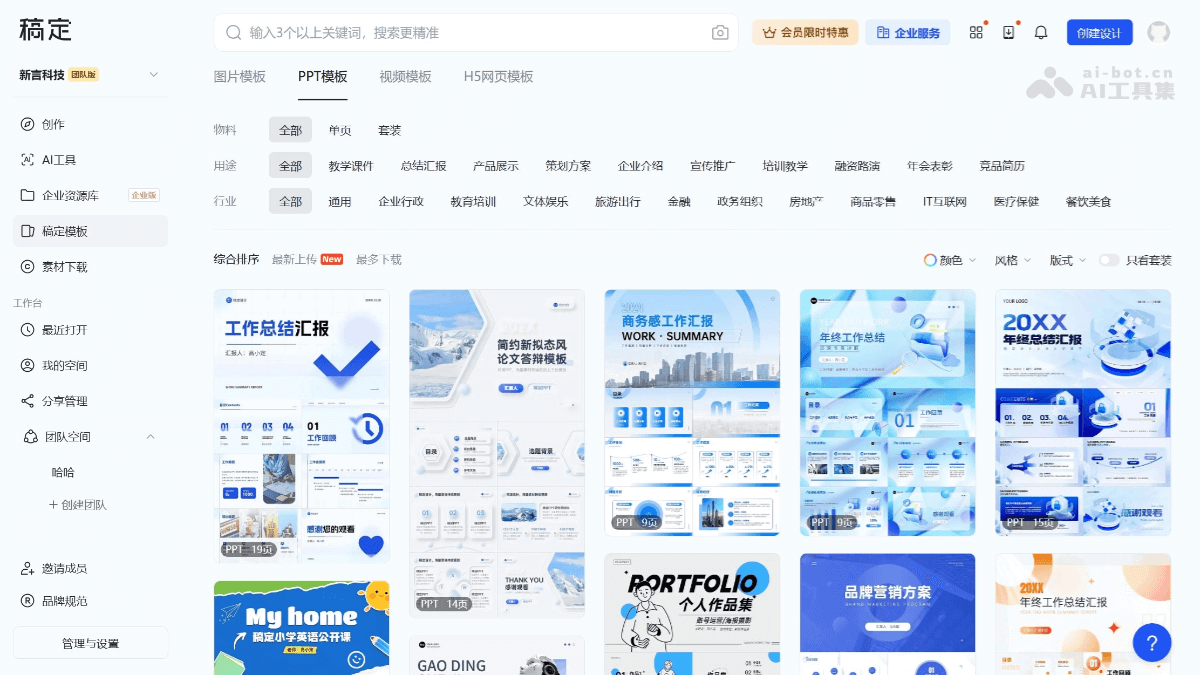
Main features of Gaoding PPT
- Browse templates: Users can view preview images of PPT templates in various styles and themes to quickly understand the design style of each template.
- Select templates: Filter by categories such as material, purpose, and industry to find suitable templates according to your specific needs.
- Covered purposes: Includes purpose templates covering 10 aspects, including teaching courseware, summary reports, product displays, planning proposals, corporate introductions, promotional campaigns, and more.
- Covered industries: Includes templates for more than 12 industry fields, including general templates, corporate, education, culture and entertainment, entertainment, finance, government affairs, internet, retail and food, and more.
- Template styles: Includes nearly 30 different styles, such as layout, 3D, luxury, business, modern, cute, cartoon, and more.
- Download templates: Users can download selected templates for use in their own presentations.
- Edit templates: Gaoding Design provides online editing features, allowing personalized adjustments to templates according to personal preferences and needs.
- Asset integration: Provides other assets related to PPT templates, such as icons, images, etc., to help users enrich their presentation content.
- Search function: Quickly find templates in a specific style or theme through the search function.
How to use Gaoding PPT
- Visit the page: VisitGaoding PPT template section, and enter the PPT template section.
- Browse templates: Browse the template preview images displayed on the page and view templates in different styles and themes.
- Filter templates: As needed, use the filtering features provided on the page to narrow the search scope by categories such as material, purpose, and industry, and quickly find templates that meet your needs.
- Select templates: Click the preview image of a template you are interested in to enter the template details page.
- View details: On the template details page, you can view detailed information about the template, applicable scenarios, user reviews, and more.
- Download or edit online: You can directly click the “Edit Online” button to start editing the template on the web page. If you need to download the template, click the “Download” button and complete the download according to the prompts.
- Personalized editing: During online editing, you can change elements such as text, images, colors, and layout in the template to suit your presentation content. If it is a downloaded template, you can open and edit it using PowerPoint or other presentation software.
- Save and export: After editing is complete, save the changes and export as PPT, PDF, or other file formats as needed.
- Use the template: Use the exported file for presentations or further editing and sharing.
Application scenarios of Gaoding PPT
- Business presentations: business plans, product introductions, market analysis, sales reports, annual summaries, etc.
- Education and academia: course teaching, academic reports, research presentations, student project presentations, graduation defenses, etc.
- Corporate training: employee training, skills improvement, team building, corporate culture promotion, etc.
- Marketing: brand promotion, advertising planning, market research, client proposals, etc.
- Personal presentations: personal resumes, portfolio displays, displays of personal achievements, etc.

