

Fabrie is a whiteboard collaboration platform built for design teams worldwide. The product has launched the AI design assistant Fabrie AI, which helps designers more conveniently gain inspiration, quickly render, and iterate design solutions on the whiteboard. Simply select a preset scenario template, supplement colors, materials, and background details to generate good design renderings.
Product features of Fabrie AI
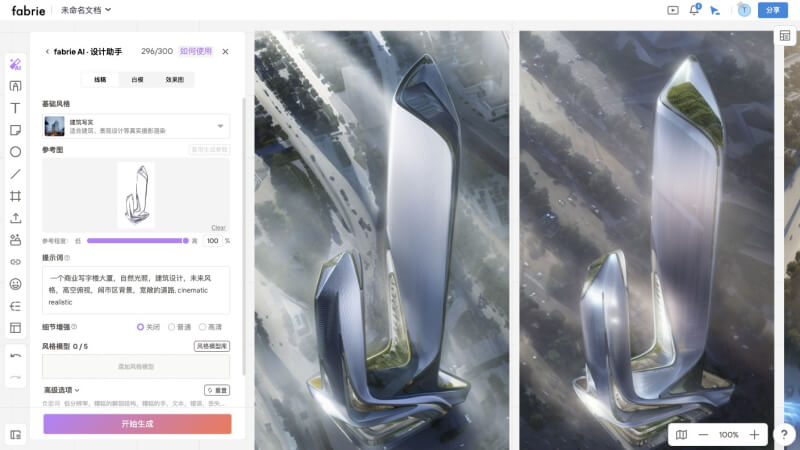
- Supports 3 rendering modes. Users can choose line art, white model, rendering, and other modes for rendering as needed.
- Supports 5 rendering styles, including photo realism, 3D cartoon rendering, realistic portraits, anime style, and architectural realism.
- Provides a massive style model library, including nearly 30 styles of models such as blind box figures, Murphy appliances, future mecha, steampunk, lifestyle products, line sketches, frosted glass style, and more.
- Suitable for design applications in various industries, including interior design, graphic design, fashion design, film and television art, game CG, architecture and landscape, and other industries.
How to use Fabrie AI
- Visit the Fabrie AI official website and click Log In/Sign Up in the upper right corner.
- After successful login, you will enter the whiteboard editing interface. Click the AI icon at the top of the left sidebar.
- Scan the QR code with WeChat and fill out the survey questionnaire, then wait a few minutes to obtain free beta access.
- Then refresh the current page, click the AI icon, and select a rendering mode.
- Select a basic style, upload a reference image, enter a prompt, and adjust other parameters.
- Finally, click the Start Generating button.
Fabrie AI product pricing
Fabrie AI is currently in free beta testing. Users only need to scan the QR code of the WeChat assistant and fill out the questionnaire to obtain free beta access, with a free beta quota of 300 generations per day.


