

"NetEase Cloud Music · X Studio" is an AI singer music creation software newly jointly launched by NetEase Cloud Music and Xiaoice Company, free to use for musicians and music enthusiasts. ThisAI music generatorcan help musicians easily create high-quality AI new-generation music works, and is the first product of its kind jointly created by a mainstream global music platform and an artificial intelligence company.
Main features of NetEase Cloud Music · X Studio
- It supports both Windows and macOS platforms, is equipped with a wealth of cutting-edge Xiaoice artificial intelligence black technologies, and has been customized and tuned through in-depth cooperation between both parties.
- Technologically, it includes Xiaoice singing models, consistent super-natural speech, streaming rendering singing voice synthesis, and visual neural network rendering technologies.
- In terms of singing, it can generate AI dry vocals at a professional singer level within 3 seconds, and can also use parameters to achieve portamento, melisma, vibrato, articulation, rhythm, timbre, or intensity changes in the AI singer, delicately interpreting the work's effect.
- With powerful performance, it supports merging up to 30 AI audio tracks, which means giving every musician a "30-person" choir.
- The software initially launched 12 AI singers and will continue to introduce new ones. The AI singer lineup has highly anthropomorphic and diverse vocal styles, and can adapt to various genres such as pop, folk, guofeng, electronic, and rock.
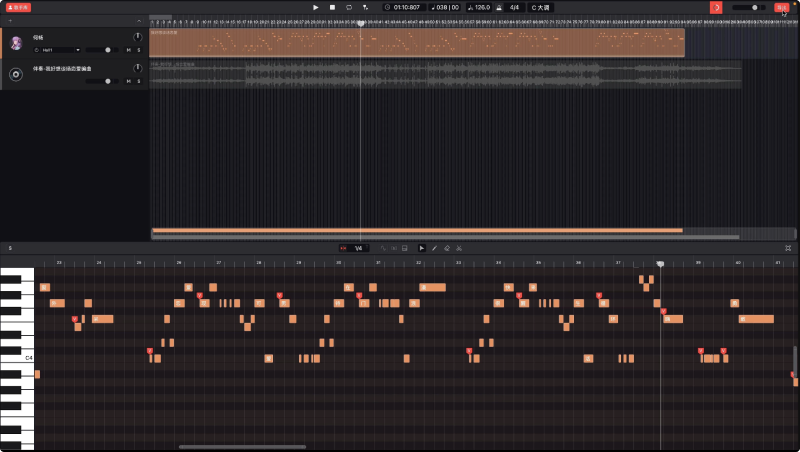
How to use NetEase Cloud Music · X Studio
- Visit the official website of NetEase Cloud Music · X Studio and download the corresponding Windows or Mac client application
- After installation is complete, open the software and log in to the software by scanning the QR code with NetEase Cloud Music
- Click Start Creating to enter the software's main operation interface, and import MIDI and accompaniment audio
- Right-click any note with the mouse, edit all lyrics, enter the lyrics, and click Confirm
- Click the play button, and after loading, you can hear the AI singer's singing effect
- After confirming the effect, click the export button in the upper right corner with the mouse to export the audio
Is NetEase Cloud Music · X Studio free
Currently, NetEase Cloud Music · X Studio software is completely free for musicians and music enthusiasts to use, with no payment required; you only need to download the corresponding client from the official website and log in to your account to use it.


