

What is Panda Office
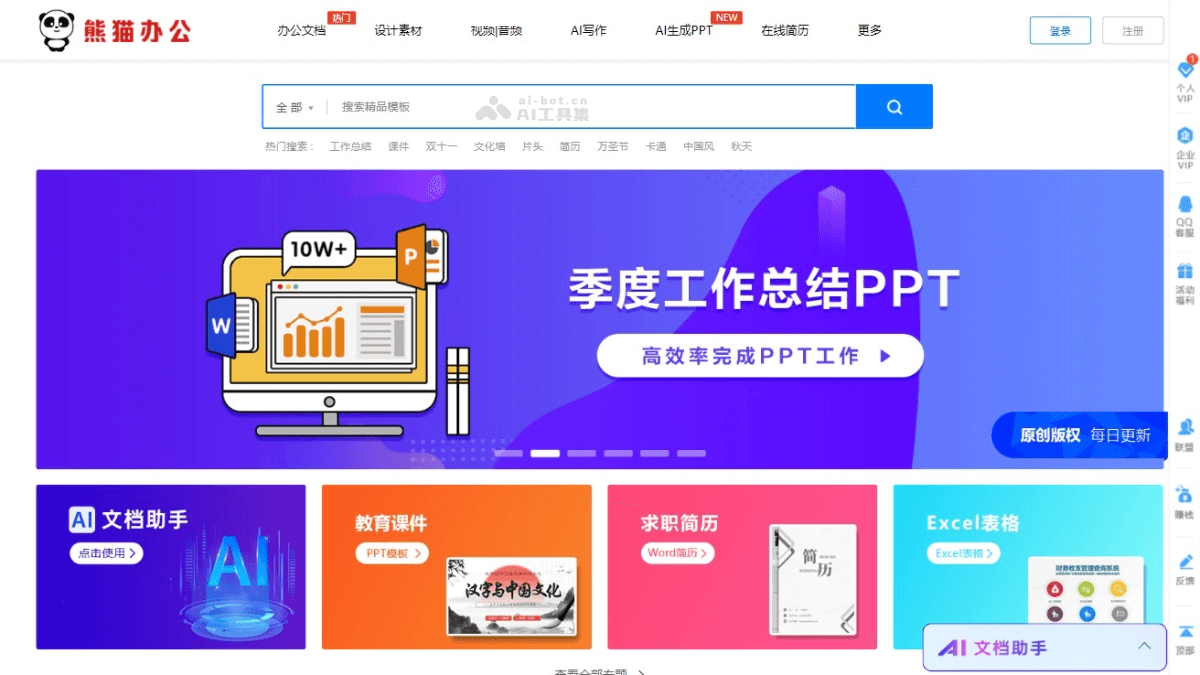
Panda Office is an AI office service platform that integrates AI technology to provide users with a rich collection of office document resources such as PPT templates, Excel templates, and Word templates. The templates cover various work and study scenarios, helping users quickly complete document creation and improve work efficiency. Panda Office's AI features support automatic content generation, further simplifying users' office workflows. Panda Office also provides design elements and a material library, allowing users to easily obtain needed resources such as images, icons, and music when creating presentations or documents. The online collaboration feature allows team members to jointly edit and share documents, enhancing teamwork coordination.
Main features of Panda Office
- Template download: Provides various PPT, Excel, and Word templates for business reports, academic presentations, resume creation, and many other scenarios.
- Smart recommendations: Based on AI technology, recommends suitable templates and design elements according to user needs.
- AIPPT: Helps users quickly generate presentation content and reduce manual editing time.
- AI writing: Based on natural language processing technology, helps users quickly generate, edit, and optimize document content, improving writing efficiency and quality.
- Material library: Provides a rich collection of design materials such as images, icons, fonts, and background music.
- Online collaboration: Supports multiple people editing documents online in real time, improving team collaboration efficiency.
How to use Panda Office
- Register and log in: Visit the Panda Office official website, register, and log in.
- Search for resources: Enter the needed template or material type in the website's search bar, such as "PPT template", "Excel chart", etc., and then search.
- Browse and select: Browse the search results, view preview images of different templates and materials, and select the resources that meet your needs.
- Download resources: Click the selected template or material to enter the details page. The details page provides a download button; click to download it locally.
- Online editing: Panda Office provides an online editing service, allowing you to directly edit downloaded templates on the web page, add or modify content.
- Use materials: For downloaded materials such as images and icons, open and use them in local design software.
Panda Office product pricing
- Personal membership
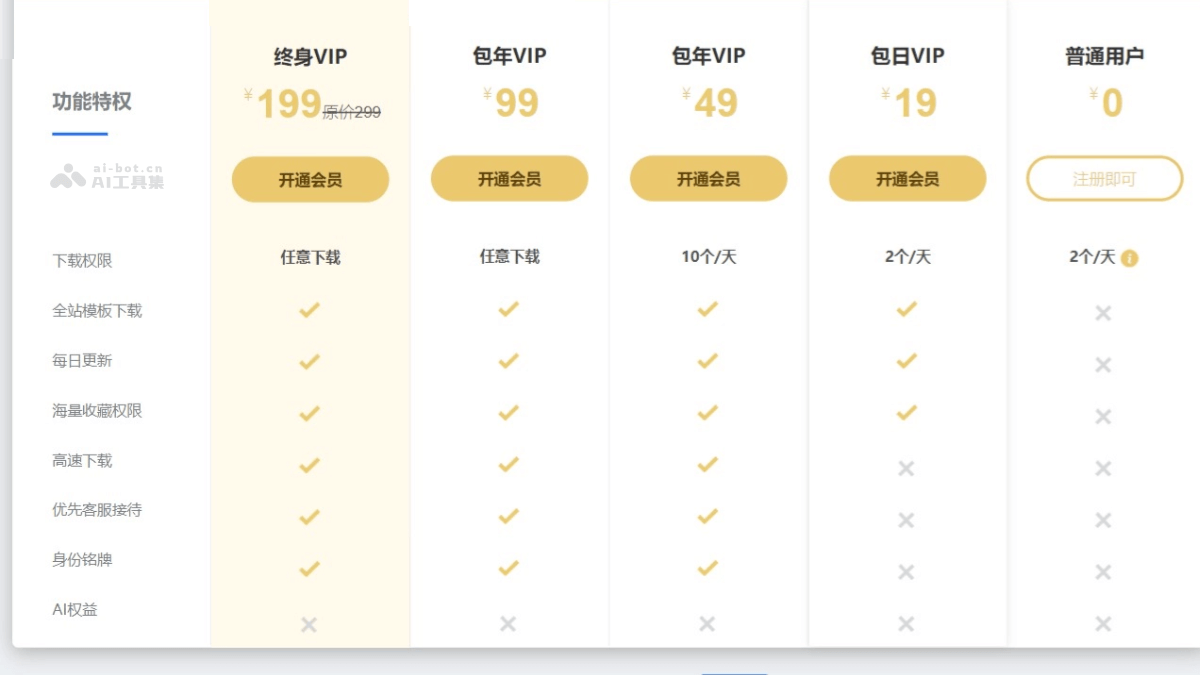
- Regular user : Free. Download 2 templates sitewide per day.
- Daily VIP : ¥19. Download 2 templates sitewide per day; updated daily.
- Annual VIP:¥49. Download 10 templates sitewide per day; enjoy all features of the daily membership.
- Annual Unlimited Download VIP: ¥99. Unlimited sitewide template downloads; enjoy all features of the Annual VIP membership.
- Lifetime VIP : ¥99. Enjoy all features of the Annual Unlimited Download VIP membership.
- Enterprise membership
- Basic version: ¥299/year. Authorization quantity 100. Account for 1 person.
- Standard version: 599 yuan/year. Unlimited authorization quantity. Account for 1-3 people.
- Flagship version: 1299 yuan/year. Unlimited number of licenses. Account for 1–5 users.
- Supreme Edition: 1999 yuan/year. Unlimited number of licenses. Account for 1–10 users.
Application scenarios of Panda Office
- Academic reports: Students and teachers use PPT templates to create academic reports and teaching presentations.
- Business presentations: Corporate employees use PPT templates to prepare presentation documents for business meetings, product introductions, and market analysis.
- Financial reports: Finance personnel use Excel templates to create financial statements, budget analysis, and data summaries.
- Marketing: Marketing personnel use advertising templates and design assets to design advertisements, brochures, and social media content.
- Project management: Project managers use Word templates and Excel templates to create project plans, progress reports, and resource allocation tables.

