

What is Impression Mind Map
As one of the products loved by Evernote users, "Impression Mind Map," with the support of "Impression AI" capabilities, now has the ability to automatically generate mind maps, helping users clarify their thoughts and expand their thinking. Users can use Impression AI for free 20 times per day to experience generating mind maps and outline notes.
In the "Impression Mind Map" desktop client, click the "Impression AI" icon on the left to wake up the AI assistant. Enter the topic you want to explore in the dialog box, click Apply to Map, and the content will be presented in the form of a mind map. In addition, by selecting a node and clicking the "Impression AI" icon in the toolbar, users can also intelligently expand the content of the node, allowing their thoughts to extend infinitely.
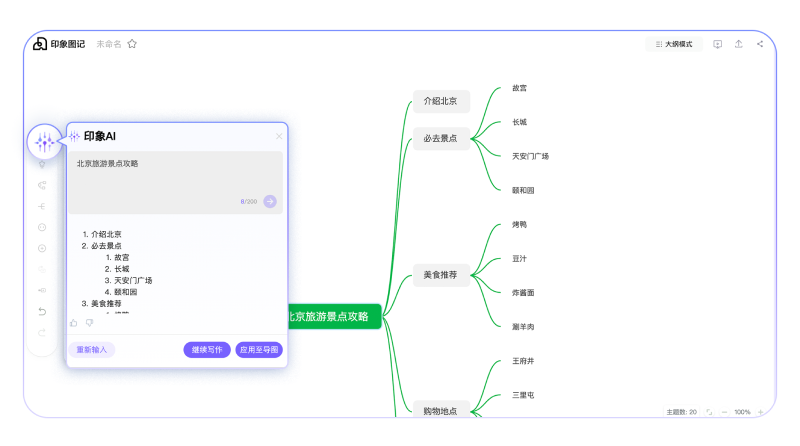
Main features of Impression Mind Map
- AI-generated mind maps: Uses Impression AI technology to automatically generate mind maps based on the topic entered by the user.
- Diverse themes and icons: Provides a variety of practical themes and beautiful icons to help users quickly beautify their maps.
- One-click map-to-outline conversion: Allows users to convert mind maps into outline mode with one click, improving editing efficiency.
- Massive template selection: Has a rich template library covering multiple fields to inspire users.
- Cloud storage and sharing/export: Supports cloud storage, making it convenient for users to access anytime and anywhere, and allows sharing or exporting maps.
- Cross-device sync: Supports multi-device synchronization, ensuring that users can access and manage mind maps on different devices.
How to use Impression Mind Map
- Register and log in: Visit Impression Mind Map'sofficial websiteto register an account and log in.
- Create a new map: After logging in, choose to create a new map. You can start drawing from scratch or choose a template as a starting point.
- Enter a topic: Enter the topic in the center of the map as the core of the mind map.
- Add branches: Add branches around the central topic. Branches can be subtopics, keywords, or concepts.
- Use AI features: Use Impression Mind Map's AI features to automatically generate mind map branches based on the entered topic.
Who Impression Mind Map is for
- Students: For organizing study notes, making study plans, and summarizing review materials.
- Teachers: For lesson preparation, organizing teaching content, and presenting course structure.
- Professionals: Such as project managers, product managers, etc., for project management, requirements analysis, and process planning.
- Creative workers: Such as designers, writers, etc., for inspiration collection, creative ideation, and work structure design.
- Researchers: For literature reviews, research framework construction, and data analysis organization.
- Enterprise teams: For team collaboration, meeting notes, knowledge management, and project sharing.
- Individual users: For personal goal setting, life planning, and daily task management.

