

What is Tongyi Tingwu
Tongyi Tingwu is a work and study AI assistant launched by Alibaba Cloud. Relying on the Tongyi Qianwen language model and audio-video AI model capabilities, it provides users with real-time speech transcription, audio-video file transcription, real-time translation, intelligent extraction of key information, and many other functions, bringing a brand-new experience for recording and reading audio and video content. The tool supports multiple languages, supports automatically distinguishing speakers, and can extract keywords, to-dos, and more, helping users efficiently manage knowledge and information. In scenarios such as meetings, learning, and interviews, Tongyi Tingwu enables users to easily record, organize, and review important content, improving work and study efficiency.
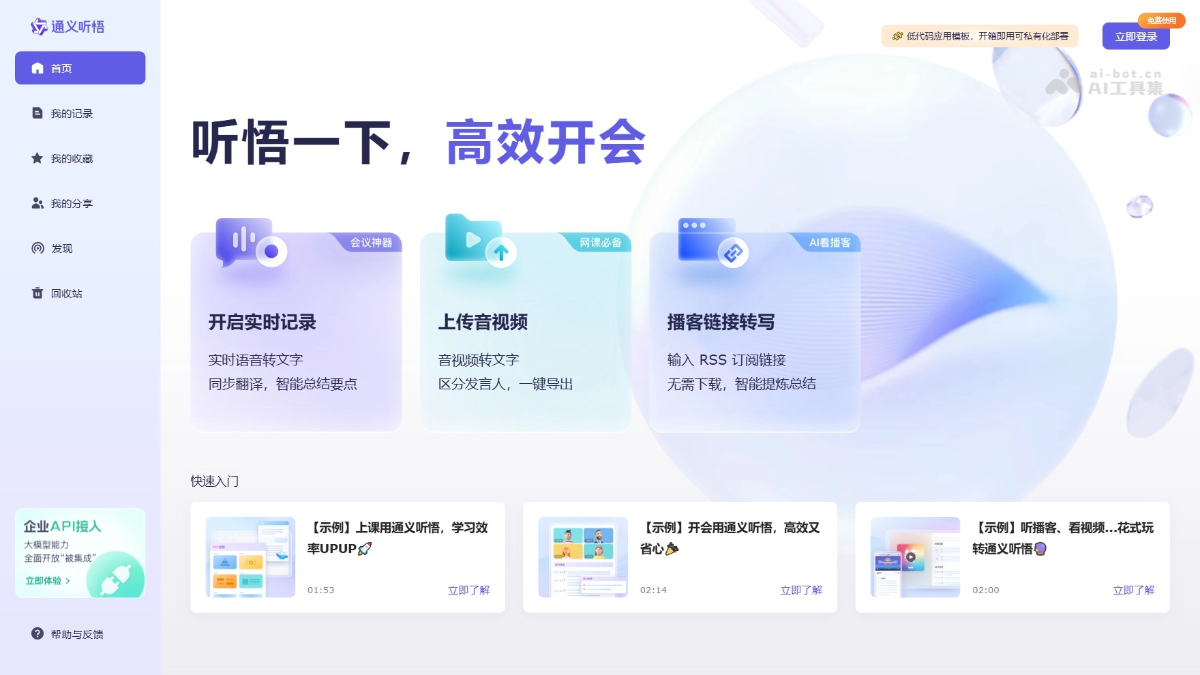
Main functions of Tongyi Tingwu
-
Real-time speech transcription: In scenarios such as meetings and lectures, it can convert speech into text in real time.
-
File transcription: Supports uploading audio or video files and transcribing the content in the files into text.
-
Real-time translation: Provides real-time Chinese-English translation during transcription, helping with cross-language understanding.
-
Intelligent extraction: Automatically extracts key information from transcribed content, such as full-text summaries, chapter overviews, and speaker summaries.
-
Keyword extraction: Automatically identifies keywords in transcribed text, making it easy for users to quickly locate important information.
-
To-do generation: Intelligently identifies and extracts to-dos from transcribed content such as meeting records.
-
Content export: Supports users in exporting transcribed and translated content in multiple formats, such as Word and PDF.
-
Record sharing: Supports sharing transcription records with others via links, social media, and other methods.
-
Note editing: Users can add personal notes to transcribed content for editing and organization.
-
Custom vocabulary: Supports users in adding custom vocabulary to improve the transcription accuracy of terminology in specific fields.
-
Speaker management: Helps users manage information for different speakers, making it easier to identify them when reviewing records.
-
PPT extraction and summarization: Extracts PPT slide content from video files and generates summaries.
- Podcast link transcription: Supports users in entering a podcast RSS subscription link, automatically converting podcast audio content into text and intelligently extracting key information.
How to use Tongyi Tingwu
- Visit the official website: Visit the Tongyi Tingwu official website https://tingwu.aliyun.com/,选择在线体验或用微信小程序、插件等方式体验,完成账号注册和登录。
- Real-time recording: Click the "Start Recording" button to begin real-time transcription of speech content.
- End recording: After recording ends, click "Stop Recording," and the system automatically saves the transcribed content.
- File transcription: Click "File Transcription" and select an audio or video file from local storage or Alibaba Cloud Drive. Select the transcription language for the file and start transcription. After transcription is complete, you can view and edit the transcribed content on the page.
- Translation function: In real-time recording or file transcription, click the "Translate" button and select the target language (such as Chinese-English translation). The system automatically translates the content and supports exporting the translation results.
- Intelligent extraction: After transcription is complete, the system automatically generates a full-text summary, chapter overview, and speech summary.
- Extract keywords: The system automatically extracts keywords; click a keyword to quickly locate the related content.
- Generate to-do items: The system automatically identifies and generates to-do items for easy follow-up.
- Export content: Click the "Export" button and select the content to export (such as the original text, notes, translations, etc.) and the format (such as Word, PDF, SRT subtitle files, etc.).
- Share records: Click the "Share" button to share records via a public link, WeChat, DingTalk, etc.
Application scenarios of Tongyi Tingwu
-
Corporate office: Enable real-time speech transcription and translation in meetings, training, and customer interviews to improve information recording and communication efficiency.
-
Online education: Provide real-time subtitles and knowledge point summaries for online courses, enhancing the learning experience and the convenience of course review.
-
Content creation: Help content creators quickly extract text from audio or video for article writing or material organization.
-
Legal industry: Provide accurate speech transcription services in court records, evidence organization, and case analysis.
-
Media industry: Reporters and editors quickly transcribe interview recordings, speeding up the writing and publishing of news articles.

