

What is Mozhuan Writing?
Mozhuan Writing is an AI writing assistant released by the artificial intelligence company Mobvoi following its wildly popular AI dubbing software "Moyin Studio"AI writing assistant, easily helping you with word choice and sentence construction, polishing your writing, rewriting the style, extracting copy, proofreading copy, saving notes, searching for words, and offering many other AI creation features such as multilingual translation. Through this AI writing platform, you can greatly free up manpower, spark creative inspiration, and take your writing to the next level.
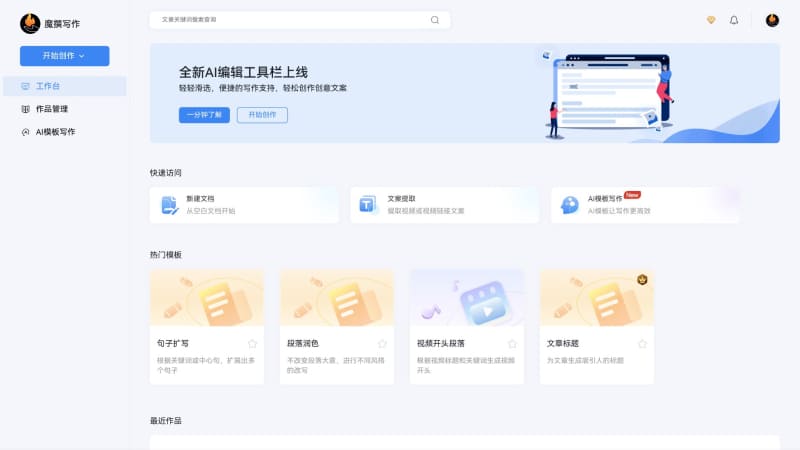
Main features of Mozhuan Writing
- One-click intelligent generation of high-quality content: enter an article title, choose a tone and style, and generate professional copy in just a few simple steps
- Capable of handling a variety of creation scenarios, helping users with many types of articles such as news reports, technology articles, business analysis, and academic papers
- Intelligent assisted creation for rewriting and polishing, supporting selected text for intelligent polishing, rewriting, proofreading, and replacement, making your word choice and sentence construction more precise
- Fast extraction of audio and video copy, supporting conversion of audio and video files or online short videos into text content with high accuracy
- Built in with a rich set of AI writing templates, including marketing copy, short video scripts, new media operations, e-commerce product descriptions, and more
Pricing of Mozhuan Writing
Mozhuan Writing offers a free basic version and a paid professional version. The prices for the paid membership are as follows:
- Monthly membership 47.6 yuan per month (original price 68 yuan, 30% off)
- Half-year membership 244.8 yuan (original price 408 yuan, 40% off)
- Annual membership 326.4 (original price 816 yuan, 60% off)
How to use Mozhuan Writing
- Visit the official website of Mozhuan Writing (x.moyin.com), click Try Now or the avatar in the upper right corner to log in/register
- After successful login, you will be automatically redirected to the workspace interface. Click New Document or choose an AI template
- Fill in the content you want in the input box of the corresponding template, then click Start Generating to begin AI writing
- You can also invoke Mozhuan AI in the document editing area for operations such as continuation and rewriting
Frequently Asked Questions
Does Mozhuan Writing offer a free trial?
Mozhuan Writing offers a free experience version. The free version has basic writing assistance capabilities and enjoys some features such as AI writing, intelligent polishing, real-time error correction, sentence rhetoric, and text translation under a word count limit, which can meet lightweight writing needs.
What large model is Mozhuan Writing based on?
Mozhuan Writing is based on Mobvoi's self-developed large language model "Sequence Monkey".
Which platforms does Mozhuan Writing support?
Mozhuan Writing can be used through the browser web version and the WeChat mini program platform.


