

What is Immersive Translate
Immersive Translate is abilingual side-by-side'sweb translation plugin, supporting bilingual side-by-side translation of web pages, PDFs, EPUB e-books, and video subtitles. It has multiple top translation engines built in, such as DeepL, OpenAI, Google Translate, etc., and users can freely choose according to their needs. Featured functions include hover translation and input box translation, providing a convenient interactive experience.
Main functions of Immersive Translate
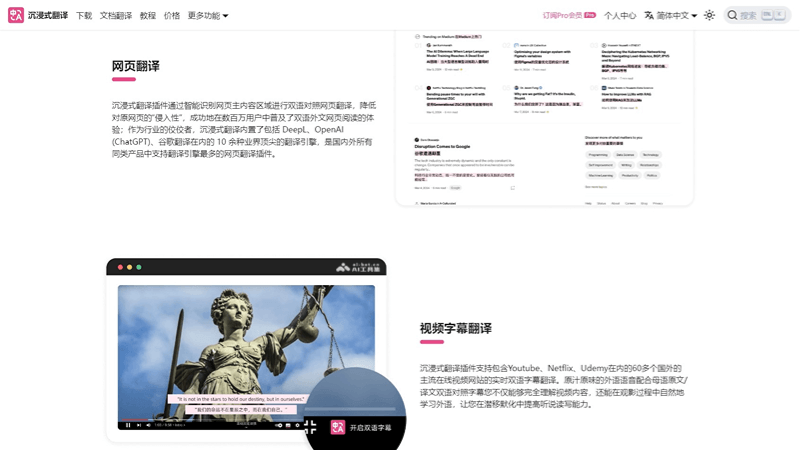
- Bilingual side-by-side web page translation: intelligently recognizes web page content and provides a comparison between the original text and the translation, helping users better understand foreign-language web pages.
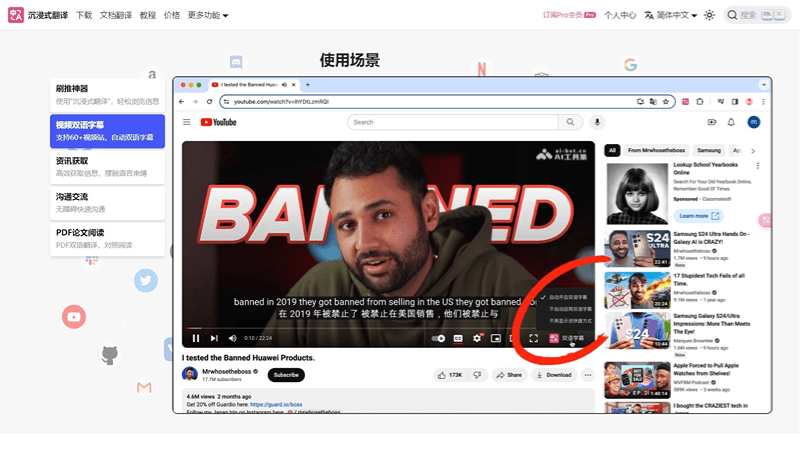
- Bilingual video subtitle translation: supports real-time bilingual subtitles on mainstream video websites, enhancing the viewing experience while also learning a foreign language.
- PDF document translation: translates content while preserving the original document format, suitable for academic papers and business documents, etc.
- PDF PRO advanced translation: designed specifically for complex PDFs, such as documents containing formulas and charts, ensuring accurate formatting after translation.
- EPUB e-book translation: with one click, translates foreign-language EPUB e-books into bilingual or target-language versions, improving the reading experience.
- Hover translation: hover the mouse over a web page paragraph to display the translation, making it convenient to quickly understand the content.
- Input box translation: after entering text in a web page input box, quickly press the spacebar three times in succession to translate, suitable for scenarios such as search and writing.
- Support for multiple translation engines: users can choose different translation engines according to personal preference, such as DeepL, OpenAI, Google Translate, etc.
Official website address of Immersive Translate
- Official website address:https://immersivetranslate.com/
How to use Immersive Translate
- Download and install:Visit the official website of Immersive Translate.Download the corresponding plugin version according to the browser you use (such as Chrome, Firefox, Edge, etc.).Install the plugin in the browser.
- Enable the browser extension:Find the Immersive Translate plugin in the browser's extensions or plugin management page.Make sure it has been enabled.
- Choose a translation engine:Open the settings or options of Immersive Translate.From the list of provided translation engines, choose your preferred translation service, such as DeepL, OpenAI, Google Translate, etc.
- Web page translation:Visit a foreign-language web page.Click the Immersive Translate icon in the browser toolbar.Choose the translation option, and the plugin will automatically translate the web page content and provide a bilingual side-by-side view.
- PDF and EPUB translation:For PDF or EPUB files, it is usually necessary to upload the file in the Immersive Translate interface.Select the translation language, then wait for the translation to complete.Download the translated file or view it directly in the browser.
- Video subtitle translation:When watching videos on supported video websites, use the Immersive Translate plugin.Turn on the bilingual subtitle function as needed.
- Hover translation:Hover the mouse over text on a webpage, press a preset shortcut key (such as Ctrl),view the displayed translation.
- Input box translation:Enter text in an input box on a webpage,quickly press the spacebar three times in succession, and the entered text will be automatically translated into the target language.
Who Immersive Translate Is For
- Language learners: students or self-learners who need bilingual comparison to improve their language comprehension and vocabulary.
- Researchers and scholars: professionals who frequently need to read foreign-language academic papers or materials to obtain the latest research results.
- International business professionals: business professionals involved in cross-border transactions or who need to understand foreign-language contracts and reports.
- Technical developers: developers who need to access and understand foreign technical documentation, forums, and communities.
- Content creators: creators who need to draw inspiration or material from foreign-language websites while hoping to preserve the original meaning of the content.

