

What is TTSMaker
TTSMaker is a freeAI text-to-speech toollaunched by MakVoice, providing AI dubbing services in multiple languages and various voice styles. Users can enter text, choose a language and voice, and then convert it into natural and fluent speech with one click. The platform supports 50+ languages and 300+ voice packs, meeting personalized dubbing needs. TTSMaker also provides advanced settings, such as adjusting speech rate and pitch, as well as voice changing and inserting pauses. Users can use it for free and own 100% copyright of the synthesized audio, making it suitable for scenarios such as video dubbing, audiobooks, education and training. TTSMaker also provides API services and user support to ensure convenience and privacy security.
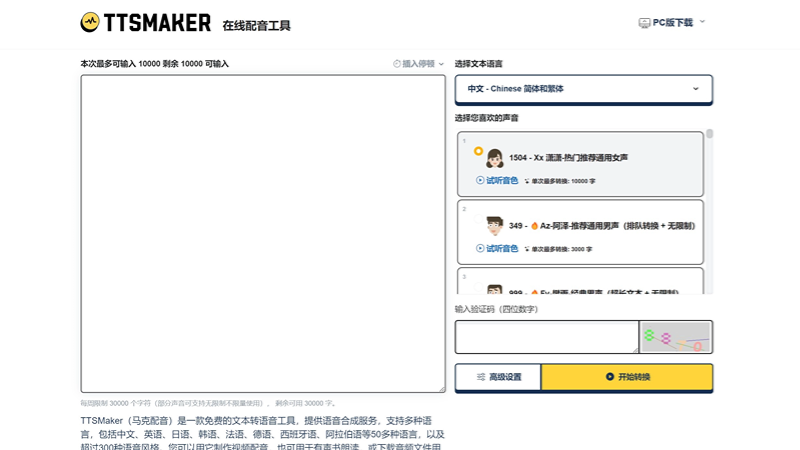
Main features of TTSMaker
-
Text-to-speech: Convert the text entered by the user into speech, supporting online playback and downloading audio files.
-
Multi-language support: Provide more than 50 language options to meet the needs of different users.
-
Multiple voice packs: Each language provides more than 300 different voice pack styles, and users can choose according to their preferences.
-
Advanced settings: Allow users to adjust speech rate, volume, pitch, etc., as well as perform voice changing, inserting pauses, and other custom settings.
-
Free quota: Provide a free conversion quota of 30,000 characters per week, and some voices do not count toward this limit.
-
Commercial license: Users own 100% copyright of the synthesized audio files and can use them for personal and commercial purposes.
How to use TTSMaker
-
Visit the website: Open a browser and visit (ttsmaker.cn)。
-
Enter text: Enter the text content you want to convert into speech in the provided text box.
-
Choose language and voice: Select the language of the text from the drop-down menu, then choose your preferred voice style. TTSMaker provides multiple languages and more than 300 voice packs to choose from.
-
Advanced settings: If you need to make more detailed adjustments to the voice, you can click advanced settings to adjust speech rate, volume, pitch, etc.
-
Start conversion: Click the "Start Conversion" button, and TTSMaker will begin converting your text into speech. The conversion time depends on the length of the text, and longer text may take more time.
-
Preview and download: After conversion is complete, you can preview the generated speech online. Click the download button to save the audio file to your device.
Who TTSMaker is for
-
Content creators: Video bloggers, podcast producers, and social media influencers can use TTSMaker to add dubbing to their multimedia content.
-
Educators: Teachers and trainers can use TTSMaker to create teaching materials, such as assisted learning tools or language learning exercises.
-
Corporate marketers: Enterprises can use TTSMaker to generate voice content for product introductions, advertising promotions, or customer service notifications.
-
Audiobook creators: Convert text books or articles into audio format for people with visual impairments or those who like listening to books.
-
Language learners: Learners can use TTSMaker to practice pronunciation and listening, especially when learning uncommon or unfamiliar languages.
-
People with disabilities: People with visual impairments or reading difficulties can use TTSMaker to convert text content into speech, making it easier to access information.


