

What is TextToSpeech
TextToSpeech is completely freeAI text-to-speech tool, supporting languages from more than 50 countries and over 8,000 voices. Users can easily enter text, select a language and voice style, adjust the speed and volume, and then generate natural-sounding, high-quality speech. TextToSpeech requires no login and supports cross-device use, including PC and mobile browsers. The generated speech can be used anywhere, such as on social platforms, and it is currently completely free with no usage limits.
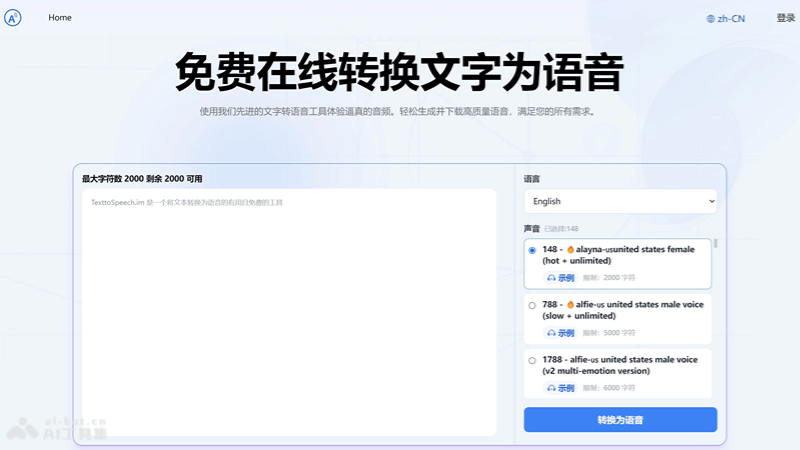
Main features of TextToSpeech
-
Text-to-speech: Convert the text entered by the user into natural and fluent speech output.
-
Multilingual support: Provide language options for more than 50 countries to meet the needs of users in different regions.
-
Voice selection: With more than 8,000 different voices, users can choose according to personal preference or a specific scenario.
-
Custom settings: Allow users to adjust speech parameters such as speed and volume as needed.
-
Online preview: After generating speech, users can preview the effect online and download it after they are satisfied.
How to use TextToSpeech
-
Visit the website: Open a browser and visit the official TextToSpeech website (texttospeech.im)。
-
Enter text: Enter the text you want to convert into speech in the provided text box. Note that you should avoid using emoji, because they will be converted into corresponding text.
-
Select language and voice: Select the language and voice you need from the drop-down menu. TextToSpeech provides a variety of languages and voices for you to choose from.
-
Adjust settings: Adjust settings such as speech speed and volume as needed to obtain the best listening effect.
-
Generate speech: Click the "Generate" or similar button to start the text-to-speech conversion process.
-
Online preview: After generation is complete, you can use the online player to preview the generated speech and make sure it meets your expectations.
-
Download speech: If you are satisfied, you can download the generated speech file to your device for further use.
Application scenarios of TextToSpeech
-
Self-media content creation: Create narration or commentary for videos, podcasts, or social media posts.
-
Audiobooks and e-books: Convert e-books or documents into audiobooks, making them convenient for people with visual impairments or those who like listening to books.
-
Education and learning: Help students learn languages or read textbooks aloud, improving learning efficiency.
-
Corporate promotion: Create audio versions of product introductions, advertising promotions, or company news.
-
Assistive technology: Provide speech output of textual information for people with limited vision or reading difficulties.


