
What is Langlang Dubbing
Langlang Dubbing is an intelligenttext-to-speech tool, providing speech synthesis services. It supports more than 30 languages including Chinese, English, German, and French, as well as more than 10 emotional styles such as happy, sad, and excited. The platform is feature-rich and easy to use, supports SSML tags, and enables advanced functions such as polyphonic characters and multi-speaker dubbing. Langlang Dubbing provides a truly free version, with many well-known AI voices such as Xiaoxiao, Xiaochen, MacArthur, Yunxi, and Yunyang, helping you easily complete video narration, novel promotion, or advertising, and meeting the dubbing needs of different users.
Main features of Langlang Dubbing
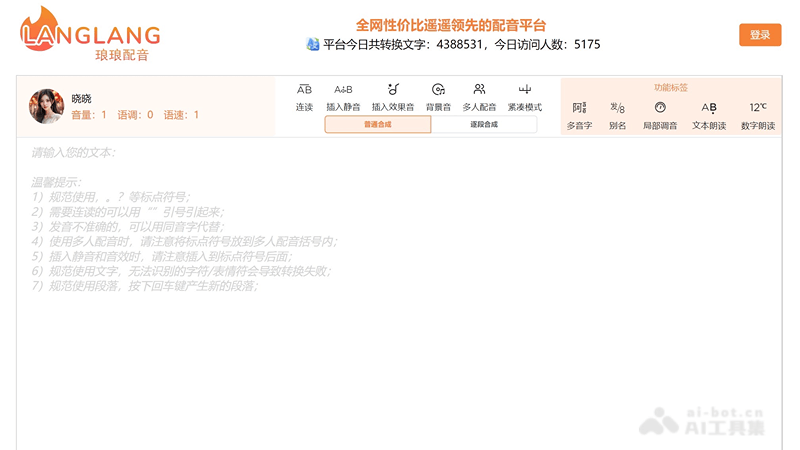
- Text-to-speech: Convert user-entered text into speech, supporting multiple languages and dialects.
- Multilingual support: Provide dubbing options in multiple languages such as Chinese, English, Russian, Korean, German, Indonesian, and French.
- Multiple emotional expressions: Support multiple emotional styles, such as happy, angry, surprised, and scared, to adapt to different dubbing needs.
- SSML tag support: Allow users to exercise more detailed control over speech through SSML (Speech Synthesis Markup Language) tags, such as adjusting speech rate, volume, and inserting pauses.
- Multi-speaker dubbing: Support multiple speakers dubbing at the same time, suitable for dialogue or multi-role dubbing scenarios.
- Background music and sound effects: Users can add background music and sound effects to dubbing to enhance the expressiveness of the audio.
How to use Langlang Dubbing
- Visit the website: Open a browser and visit the official website of Langlang Dubbing (lang123.top)。
- Choose a speaker: Choose a speaker or language option you like on the platform.
- Enter text: Enter the text content you want to convert into speech in the provided text box.
- Adjust settings: Adjust various speech settings as needed, such as speech rate, volume, and pitch. You can also use SSML tags to further customize the speech effect.
- Add sound effects and background music(if needed): Choose background music or sound effects to add atmosphere to your dubbing.
- Preview: Before generating speech, use the platform's preview function to check whether the pronunciation and effect of the text meet expectations.
- Generate speech: Click the generate or convert button, and the platform will generate speech according to your settings.
- Download speech: After generation is complete, you can preview the generated speech online and download it to your device.
- Use the speech: Use the downloaded speech file in your projects, such as video dubbing, audiobooks, and podcasts.
Who Langlang Dubbing is suitable for
- Self-media creators: Individuals or teams who need to add dubbing to video content.
- Audiobook producers: Authors or publishers who convert text content into audiobooks.
- Advertising and marketing professionals: Create dubbing for advertisements, promotional videos, or marketing materials.
- Educational institutions: Teachers or trainers create audio versions of teaching materials or course content.
- Corporate internal training: The enterprise produces voiceovers for internal training materials.
- Podcast and radio hosts: Podcast creators or radio DJs who need to quickly produce voice content.


