
What is Xinliu
Xinliu is an AI search assistant launched by Alibaba based on the Xingchen large modelAI search assistant, which improves users' knowledge acquisition efficiency through intelligent technology. It integrates nearly 30 million academic paper resources, covering authoritative journals such as Nature, IEEE, and ArXiv, and supports functions such as academic Q&A, AI intensive reading, paragraph summarization, intelligent translation, and terminology explanation, helping researchers and students quickly understand and analyze paper content. Xinliu provides the DeepSeek channel, with web search assisting the thinking process, and features general Q&A, slow reasoning, and a private knowledge base, making it suitable for various scenarios such as market research, document analysis, and content creation. Users can use Xinliu through the web version, mobile app, or Chrome browser extension to enjoy an efficient and intelligent knowledge management experience.

Main Features of Xinliu
-
AI Intelligent Search and Q&A
-
General Q&A: Supports a wide range of Q&A needs, including market research, event summaries, document analysis, and more. Xinliu's answers display search sources, making the answers more credible.
-
Slow Reasoning: For complex questions, it supports multi-round thinking and in-depth analysis, helping users engage in dialectical thinking.
-
Academic Q&A: Integrates nearly 30 million academic paper resources (including Nature, IEEE, ArXiv, etc.), and supports AI intensive reading, paragraph summarization, intelligent translation, and terminology explanation.
-
-
Academic Research Assistance
-
Paper Resources: Provides rich academic paper resources that can be read directly without downloading.
-
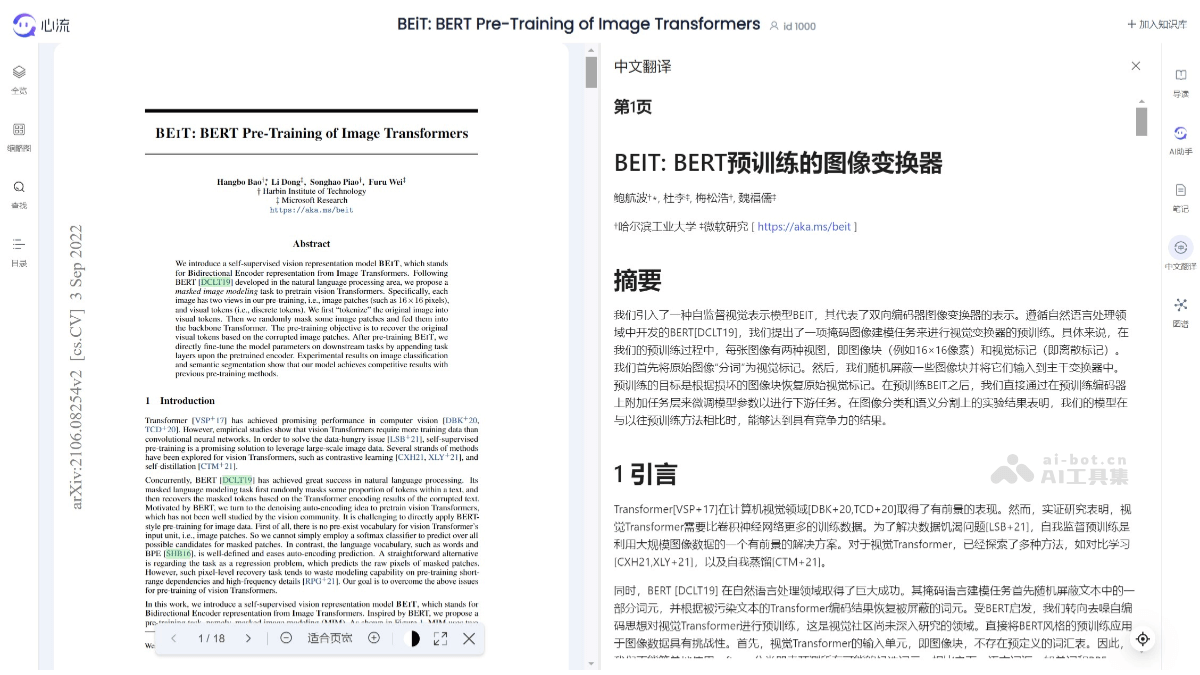
AI-Assisted Reader: Supports long-text summarization, translation, and short-text explanation, helping users quickly understand paper content.
-
Citation Jumping: Clicking the citation marker in a paper directly displays the abstract of the cited paper.
-
Paper Intensive Reading Feature: Users can select paragraphs and invoke AI capabilities for summarization, translation, or explanation, and save the results to notes.
-
-
Knowledge Management and Creation Assistance
-
Private Knowledge Base: Users can upload their own literature or documents, and Xinliu will conduct targeted searches and analysis based on this content, improving literature reading efficiency.
-
Note-Taking Feature: Users can save AI-generated content to notes for easy viewing and review at any time.
-
Content Creation Assistance: Supports generating podcast content, converting text answers into two-person dialogue podcasts, making the content more vivid.
-
- Answer-to-Podcast Generation: Converts text content into podcasts, suitable for users who do not want to read text.
- Xinliu Mode: Provides a wireless canvas design, suitable for presentations or brainstorming scenarios.
- Web Search: Through the DeepSeek channel, combined with web search to assist users in thinking.
How to Use Xinliu
- Visit the Platform: Visit the Xingchen Xinliu official website (iflow.cn), then register and log in using your mobile phone number.
- Enter a Search Question: After logging in, enter the question you want to ask in the input box and send it.
- Get Results: Wait for Xinliu to retrieve information and answer.
- Update Results: After answering, you can regenerate the answer, view extended topics, ask follow-up questions, and more.
- Use the long text feature: Users can click Read on the left to read and analyze long papers.
- Use the Heartflow browser extension
- Install the extension: Install the Heartflow extension in the Chrome browser.
- Activate the extension: Click the extension icon on a webpage to activate the Heartflow feature.
- Use the features: You can directly use search, Q&A, or translation features on webpages to enhance your browsing experience.
Who Heartflow Is For
- Researchers: Heartflow can help researchers quickly retrieve and analyze large amounts of academic papers and professional literature, improving research efficiency.
- University teachers and students: Teachers can use Heartflow to assist with teaching and academic research, while students can use it to assist with learning and writing papers.
- Working professionals: For working professionals who need to process large amounts of information, write reports, or conduct data analysis, Heartflow can provide effective information retrieval and analysis tools.
- Legal professionals: Heartflow's long text processing capability makes it a powerful assistant for legal professionals analyzing legal documents and cases.
- Technical developers: Software developers and engineers can use Heartflow to obtain the latest technical information, solve programming problems, and read and understand technical documentation.