

Mapify is an AI mind mapping tool launched by Xmind, based on the company's earlier acquisition ofChatMindIt has been rebuilt and upgraded, and can intelligently and quickly convert text, web pages, videos, and other content into structured mind maps. Through Mapify's AI assistant, users can generate a mind map with one sentence, and edit and modify it. Mapify also supports internet connectivity, can obtain online information in real time, and helps users efficiently organize and present complex information, improving work and learning efficiency.

Mapify's product features
- AI search mind map generation: AI intelligently integrates real-time online search results to generate a mind map, with source reference links attached within the nodes.
- Video conversion: Supports conversion of video content such as YouTube and includes a timestamp display feature, turning video information into an easily digestible mind map format.
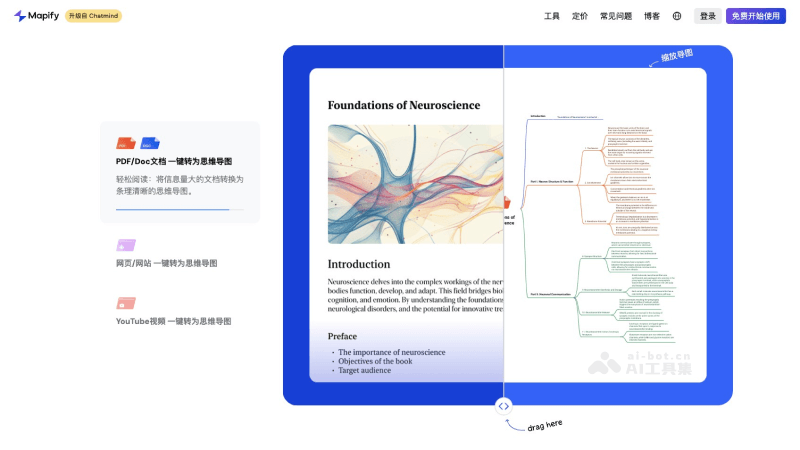
- Document conversion: Supports one-click conversion of document formats such as PDF and Word into mind maps, helping users structure large amounts of text information.
- Web page conversion: Can convert web page content into mind maps, making it easy for users to quickly understand and remember web page information.
- Audio conversion: Supports conversion of recording files and podcast link content, enabling users to quickly understand the core information of audio content.
- AI conversation: Through the AI conversation feature, users can interact with the mind map to query, modify, and expand it.
- Multi-format export: Supports exporting mind maps to multiple formats, such as PDF, images, etc., making it easy to share and archive.
- Slide presentation: Supports presenting the generated mind map in slide form.
How to use Mapify
- Visit the official website: Open a browser and visit Mapify's official website (mapify.so).
- Register an account: Register a new account on the website, or log in directly if you already have an account.
- Select content type: After logging in, select the corresponding option according to the type of content to be converted, such as document, web page, or video.
- Upload or enter a link: If it is a document, you can upload the file directly; if it is a web page or video, you need to enter the corresponding URL link.
- AI analysis: After submitting the content, Mapify's AI will analyze the provided material and extract key information.
- Generate a mind map: The AI will automatically generate the initial structure of the mind map based on the extracted information.
- Edit and optimize: Users can edit and optimize the automatically generated mind map, adjust the layout, add notes, modify colors and fonts, etc.
- Use AI templates: Built-in AI templates can be selected to quickly beautify and standardize the appearance of the mind map.
Mapify's product pricing
- Free trial version: Mapify offers a free trial. After registering, users will receive 10 AI credits for free to try out and explore the features.
- Basic version: Billed annually at $5.99 per month, includes 1,000 AI credits per month, conversion of PDFs/documents into mind maps, conversion of web pages/YouTube videos with subtitles into mind maps, mind map editing, slide playback, export as images/PDF/Markdown/SVG
- Pro version: Billed annually at $11.99 per month, you get 2,000 AI credits per month, enjoy all the benefits of the Plus plan, plus: use powerful models, custom summary instructions, timestamped summaries of YouTube/audio, AI text-to-image generation, recommended icons for topics within nodes, image-to-mind map, audio-to-mind map
- Unlimited plan: Billed annually at $17.99 per month, you get unlimited AI credits (fast models only), enjoy all the benefits of Pro, plus: priority access to new features, participation in product co-creation, an exclusive member community, exclusive member events, and priority support

