

What is ChatPPT
ChatPPT is launched by Biyou Technology for PPT users,AI PPT generation software. Through conversational interaction, users only need to input a topic or content description to quickly generate high-quality PPT presentations. ChatPPT supports multiple generation methods, including uploading local PPTs for beautification and one-click intelligent layout to improve visual effects. ChatPPT is driven by the self-developed Wernicke+LLM dual models, generating accurate and efficient content that can significantly save users' time and effort. ChatPPT offers an online experience version and an Office plugin version to meet the needs of different scenarios, making it an efficient office tool for professionals.
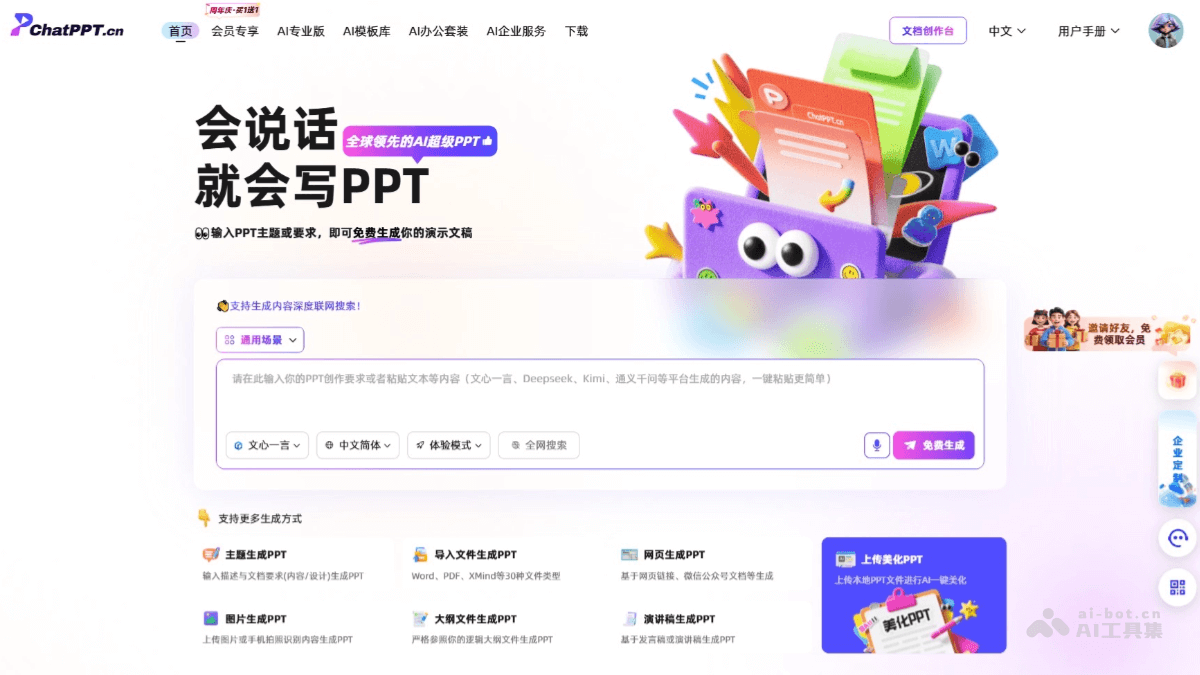
Main features of ChatPPT
- AI-generated PPT: Input a topic or requirements, and ChatPPT quickly generates a complete PPT presentation.
- Intelligent layout and beautification: Supports one-click PPT beautification, automatically optimizes layout, color schemes, and charts, and provides multiple design styles to ensure excellent visual effects for the generated PPT.
- Diverse generation methods: Provides multiple generation methods, including topic generation, file import generation, webpage generation, image generation, outline file generation, and speech script generation, meeting the needs of different scenarios.
- Collaboration features: Supports multi-user online collaborative editing of PPTs, provides version control features, facilitates team collaboration, and ensures efficient collaboration and data security.
- Multiple versions available: Provides an online experience version and an Office plugin version to meet the needs of different usage scenarios.
- AI drawing and image matching: Automatically generates images related to PPT content; users input descriptions or select topics, and AI generates corresponding images.
- AI icons: Provides an AI-generated icon library, allowing users to select or generate icons related to the PPT theme as needed.
How to use ChatPPT
- Visit the official website: Visit ChatPPT's official website:https://chatppt.cn/。在线体验,选择直接登录。插件体验,下载并安装插件。
- Choose a generation method: Choose a generation method, such as inputting a topic, importing files, webpage links, image recognition, outline files, or speech scripts, to flexibly generate PPTs according to your needs.
- Generate PPT: Click the "Free Generate" button, and ChatPPT generates a PPT based on the input or uploaded content.
- View and download: After generation is complete, preview the PPT online and save it locally.
- Beautify PPT (optional): If you are not satisfied with the generated PPT, click "Upload and Beautify PPT" to upload a local PPT file for intelligent beautification.
ChatPPT product pricing
- Regular users: Enjoy basic AI PPT generation services, including partial advanced commands and limited access to the personal knowledge base.
- Annual VIP membership (buy 2 years get 2 years free): 398 yuan, get 4 years of membership benefits, including multi-device synchronization, an extra-large knowledge base, long document parsing, dual membership gifts, unlimited generation and beautification, use of advanced commands, multi-file import, and local PPT beautification.
- Annual VIP membership (buy 1 year get 1 year free): 199 yuan, get 2 years of membership benefits, enjoying the same service content as buy 2 years get 2 years free.
- Student card: Students can receive 1 year of SVIP membership benefits for free after verification.
- Super Office AI exclusive membership: 199.9 yuan/year, enjoy 1 year of membership benefits, including AI office mouse, AI energy points, multi-device synchronization, long document parsing, dual membership gift, unlimited generation and beautification, advanced instruction use, multi-file import, and local PPT beautification.
ChatPPT Application Scenarios
- Workplace Reporting: In the workplace, quickly generate professional and visually appealing PPTs, helping users efficiently present work results and improve reporting efficiency.
- Education and Training: For teachers and trainers in the education field, easily create course explanation PPTs, training materials, and learning resources to assist the teaching process, making knowledge transfer more vivid and efficient.
- Industry Analysis: In the business field, generate detailed market research reports, industry trend analyses, and competitive analysis PPTs, providing strong support for corporate strategic decision-making and helping enterprises stand out in competition.
- Product Promotion: In the product promotion stage, create attractive product introduction PPTs, marketing plans, and customer case sharing, helping enterprises and sales teams better demonstrate product advantages and promote sales conversion.
- Academic Research: Academic researchers can quickly generate PPTs for paper presentations, academic speeches, and phased results of research projects, assisting academic exchange and making complex academic content easier to understand and share.

