

Peanut Image is an AI image editor designed specifically for e-commerce sellers. It uses deep learning technology to provide features such as smart cutout, image translation, image editing, smart removal, and product image generation. Users can precisely cut out images with one click, translate text in images into multiple languages, adjust image color and size, remove blemishes, and generate exquisite product display images. This tool provides sellers with a comprehensive, efficient, and convenient image editing solution, aiming to simplify the image processing workflow and improve the operational efficiency of cross-border e-commerce merchants.
Main Features of Peanut Image
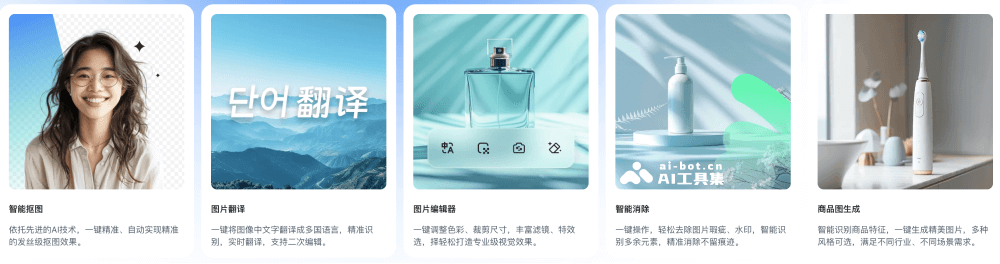
- Smart Cutout: Using advanced AI algorithms, Peanut Image can accurately identify objects in images and automatically separate them from the background. This technology is especially suitable for images that require fine processing, such as the edges of hair in portraits, complex patterns, or the outlines of small objects. Users can obtain high-quality cutout results without manual operation, greatly saving time and improving work efficiency.
- Image Translation: Supports one-click translation of text in images into multiple languages, achieving accurate recognition and real-time translation. The translated content supports secondary editing to ensure translation accuracy and adaptability. This feature is especially suitable for cross-border e-commerce, enabling the text information in images to be quickly translated into the language required by users to adapt to different markets and language needs.
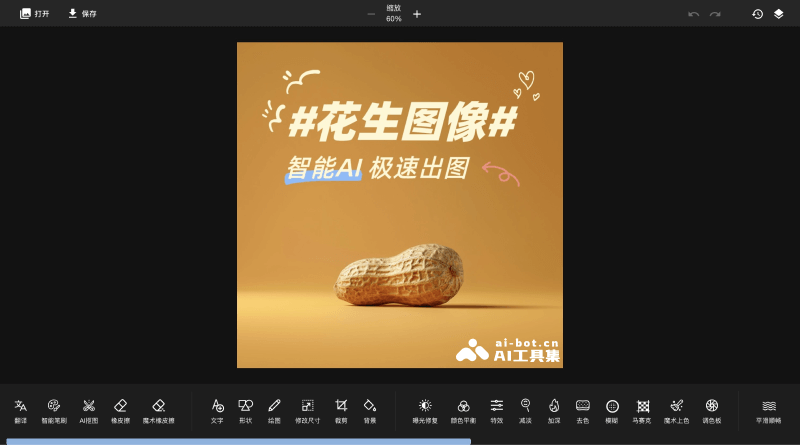
- Image Editor: Peanut Image provides a series of image editing tools, including adjusting color parameters such as brightness, contrast, and saturation, as well as basic operations such as cropping and rotating. Users can also apply various filters and effects, such as blur, sharpen, and color overlay, to enhance the visual effect of images. The editor's interface is intuitive and easy to use, so even beginners can quickly get started and create professional-level images.
- Smart Removal: For unwanted elements in images, such as watermarks, date stamps, irrelevant background objects, etc., the smart removal feature can remove them with one click. Through intelligent recognition technology, this feature ensures that the main parts of the image are not damaged during the removal process, maintaining the integrity and aesthetics of the image.
- Product Image Generation: The product image generation feature of Peanut Image can help merchants quickly create attractive product images. By intelligently identifying the key features of products and combining them with templates and styles selected by users, it automatically generates high-quality, exquisite product display images, helping merchants efficiently create professional-level product displays.
Application Scenarios of Peanut Image
- Product Display: E-commerce sellers can use the smart cutout and product image generation features to create product images without backgrounds, or generate attractive product display images for online stores or social media marketing.
- Advertising Creation: Marketing teams can use the image editor and smart removal features to create eye-catching advertising images, remove unwanted elements, or adjust images to fit different advertising sizes and formats.
- Social Media Content: Social media managers or individual users can use Peanut Image to enhance the visual appeal of posts, including adjusting image colors, applying filters, and cropping sizes to suit different social platforms.
- Cross-Border E-Commerce Localization: For merchants targeting international markets, the image translation feature can help them translate the text in product images into the language of the target market, thereby better communicating with local consumers.
- Brand promotional materials: Enterprises can use Peanut Image to design and edit brand brochures, posters, and other marketing materials, ensuring the professionalism and appeal of the images.


