
What is Shushu Jobs
Shushu Jobs is an AI job-seeking and recruitment platform focused on providing efficient and intelligent recruitment solutions for job seekers and enterprises. Through the AI Smart Recruiter Rat feature, it can quickly understand job seekers' needs, precisely filter and recommend positions that meet requirements, and provide real-time job-seeking advice. The AI Resume Rat feature can intelligently optimize resumes, analyze strengths and weaknesses, and generate personalized resume templates, helping job seekers stand out. The platform is based on the DeepSeek real-time internet engine and covers national university employment websites, corporate recruitment sites, and various vertical recruitment channels, breaking down information barriers and improving job-seeking efficiency. It has a strong security protection mechanism, automatically verifies enterprise information, intercepts fake recruitment, and protects job seekers' rights and interests.
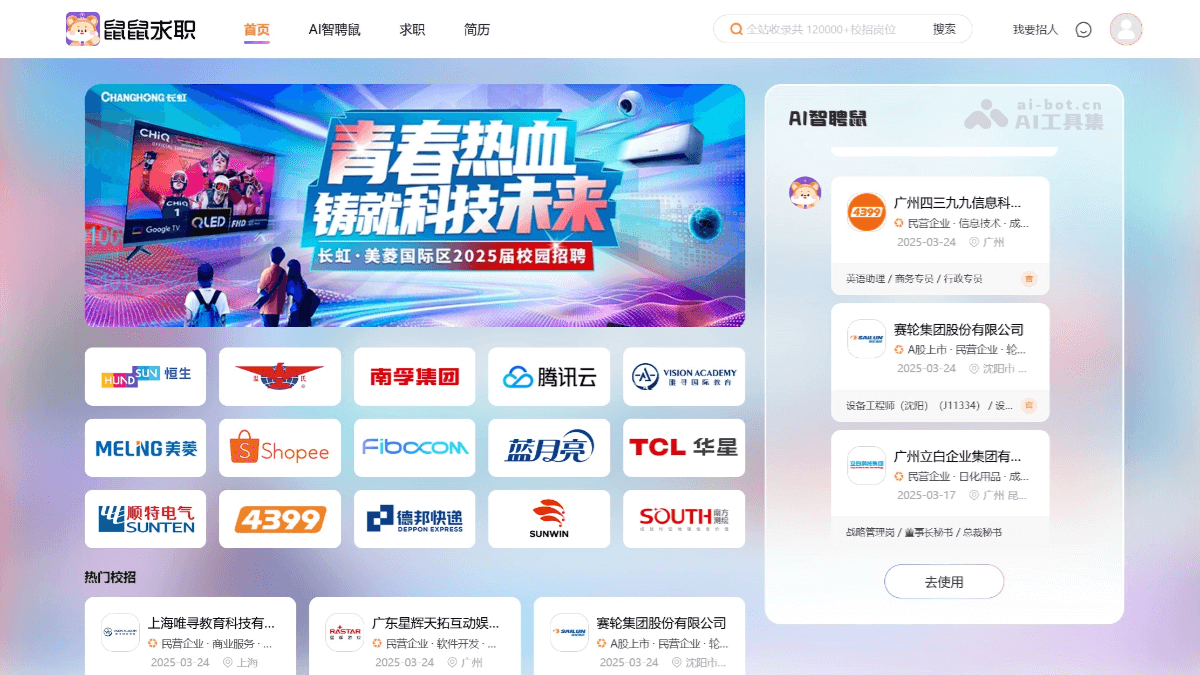
Main features of Shushu Jobs
- AI Smart Recruiter Rat: It can quickly understand job seekers' needs, precisely filter job information that meets requirements, and provide reasonable job-seeking advice. It can search job positions across the entire internet in real time, break down information barriers, and help job seekers quickly find their desired jobs.
- AI Resume Rat: It can intelligently optimize resumes, analyze job seekers' strengths and weaknesses, and provide targeted suggestions according to job requirements. It automatically generates personalized resume templates, provides industry case references, and helps job seekers create more competitive resumes.
- Job recommendation and subscription: Job seekers can subscribe with one click to target industries or job types, and the system will automatically push newly added job information from across the internet, eliminating the need to check recruitment websites or corporate official websites one by one and saving job-seeking time.
- Job-seeking security protection: The platform has established a traceability system and automatically connects to the enterprise credit information publicity system, etc. It can verify enterprise qualifications, intercept fake recruitment and "fake state-owned enterprises," "shell companies," etc., and protect job seekers' job-seeking safety.
- Multi-platform job posting: Recruiters can post job information in batches to multiple recruitment platforms, achieving one-stop recruitment, improving recruitment efficiency, and saving time and energy.
- AI-generated and optimized JD: Based on AI technology, it generates and optimizes job descriptions (JD), making them more attractive and precise, better matching target job seekers, and improving recruitment results.
- Intelligent resume screening: The system can quickly screen massive resumes, identify candidates who meet job requirements, help recruiters save screening time, and improve recruitment efficiency.
How to use Shushu Jobs
- Visit the platform: Visit Shushu Jobs'official website, log in with a password to complete registration.
- How job seekers use it
- Complete personal information: After logging in, enter the personal center and click the "Edit Resume" button. Fill in personal information as prompted, including name, gender, contact information, educational background, work experience, project experience, skill certificates, etc.
- AI Resume Rat feature, upload an existing resume, and AI will automatically parse and optimize the content, generating a more professional resume template.
- Search and filter jobs: Enter keywords in the search box on the homepage, such as "software engineer," "marketing," etc., and click search. The search results page will display a list of positions related to the keywords, which can be further filtered by conditions such as region, salary range, work experience, and educational requirements. Click on a position of interest to enter the position details page and view detailed content such as the job description, job requirements, and company information.
- Submit Resume: On the position details page, click the "Apply Now" button. Select the resume version to submit (if there are multiple resumes), confirm that the submission information is correct, and click "Confirm Submission." After successful submission, you can view the submission status in "Submission Records" in the personal center.
- Receive Feedback: The recruiter will screen after receiving the resume. If interested in the job seeker, they will send an interview notification through the platform. Job seekers can view interview notifications, company replies, and other information in the "Message Center" in the personal center, and respond promptly.
- How Recruiters Use It
- Enter Company Information: Including company name, unified social credit code, contact person name, contact information, etc., to complete registration.
- Post a Position: After logging in, enter the enterprise backend management page and click the "Post a Position" button. Fill in the position information, including position name, salary range, work location, job description, job requirements, etc.
- AI-Generated Optimized JD Feature: After entering the basic position information, AI will automatically generate an optimized job description. After confirming that the position information is correct, click the "Publish" button, and the position information will be published to the platform.
- Screen Resumes: On the enterprise backend management page, click the "Received Resumes" tab to view resumes submitted by job seekers.
- AI Intelligent Screening Feature: The system will automatically screen out resumes that meet the conditions based on the position requirements. Click on a resume of interest to view detailed content, including the job seeker's basic information, educational background, work experience, etc.
- Contact Job Seekers: If interested in a job seeker, you can send an interview notification through the platform or contact the job seeker directly. On the resume details page, click the "Send Interview Notification" button, enter the interview time, location, contact person, and other information, and click "Send." You can also click the "Send Site Message" button to send a message to the job seeker for further communication.
- Use of Other Features
- Position Subscription: Job seekers can click the "Subscribe to Positions" button on the search results page and select the position type or industry to subscribe to. The system will automatically push newly added positions that meet the subscription conditions.
- Job Search Safety Protection: When job seekers submit resumes, the system will automatically verify the company's qualifications. If any abnormalities are found, it will promptly remind the job seeker to ensure job search safety.
- AI Job Search Assistant: On the platform homepage or in the personal center, click the "AI Job Search Assistant" button and enter a question or need, such as "resume optimization suggestions," "interview tips," etc. AI will provide professional answers and suggestions.
Application Scenarios of Shushu Job Search
- Campus Recruitment Job Search for Fresh Graduates: Shushu Job Search uses AI technology to help fresh graduates quickly screen out campus recruitment positions suitable for them and provide resume optimization and job search suggestions.
- Job Changes for Working Professionals: Shushu Job's AI Smart Hire feature can accurately recommend matching positions based on job seekers' past experience and skills, saving time and effort.
- Corporate Campus Recruitment: Shushu Job's AI intelligent screening feature can quickly identify candidates who meet job requirements, improving recruitment efficiency.
- Social Recruitment: Shushu Job's AI technology can perform precise matching based on job requirements and candidate resumes, helping recruiters quickly find suitable candidates.
- Cross-Regional Job Search: The Shushu Job platform covers job information nationwide, helping job seekers quickly find job opportunities in their target cities.