
What is Screenshot to Code
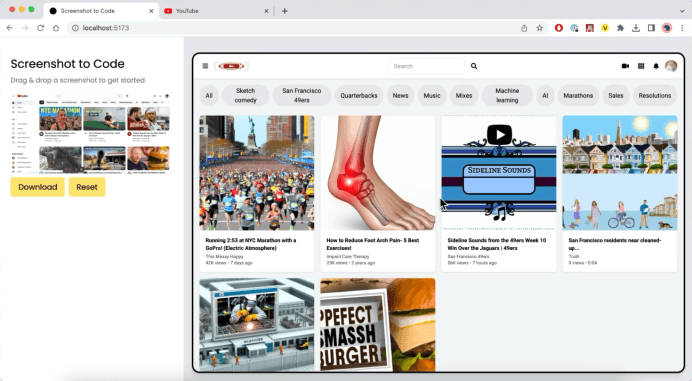
Screenshot to Code is an open-source project that uses artificial intelligence technology (GPT-4V and DALL-E 3) to convert users' screenshots into front-end webpage code, and has gained 34,000 stars on GitHub. The project's core function is to automate the coding process of webpage design, enabling developers to quickly generate the corresponding HTML, CSS, and JavaScript code by providing a screenshot of a webpage, saving front-end developers time and effort.
Official website entry:https://screenshottocode.com/
GitHub repository:https://github.com/abi/screenshot-to-code
Main features of Screenshot to Code
- Intelligent code generation: Using the GPT-4 Vision model, the project can analyze screenshots provided by users and automatically generate the corresponding HTML, CSS, and JavaScript code, quickly converting design mockups into runnable webpage code.
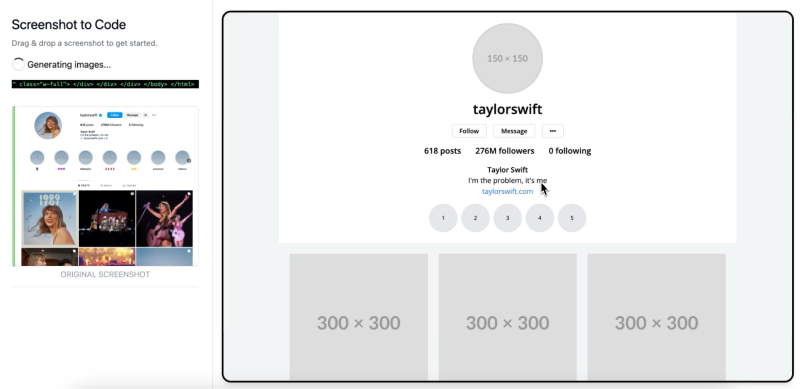
- Similar image generation: The project also combines DALL-E 3's image generation capabilities, and can automatically create images similar to the original screenshot based on the <img> tags in the generated HTML code, and embed these images into the webpage to maintain the page's visual consistency.
- Real-time code updates: Users can view the generated code in real time in the application, and can adjust styles or update missing parts of the code through interaction with the AI to meet specific design requirements.
- Flexible configuration options: The application provides configuration options, allowing users to choose the front-end technology to use (such as HTML + Tailwind, React + Tailwind, Bootstrap, Vue + Tailwind) and whether to enable DALL-E image generation and features
- URL webpage cloning: In addition to manually uploading screenshots, it allows users to enter a URL to automatically take a screenshot in order to clone an online website.
- Edit generated code: Screenshot to Code has a built-in code editor that allows developers to modify the generated code, fine-tune the output, correct any anomalies, or add their own coding style
- Effect preview and code export: The tool provides a real-time preview feature, allowing users to view the effects of edits and modifications in real time, and supports downloading or copying the final code
- Supports local deployment: Users can choose to deploy the project locally on their own computer so that it runs on their own machine, which provides convenience for users who want to use the tool in a local environment.
How to use Screenshot to Code
Method 1: Run Screenshot to Code using the online hosted version
- Visit the Screenshot to Code official website (screenshottocode.com), then register/log in
- Click the settings icon on the left, enter the OpenAI API key
- Select the technology/framework to be used for the code you want to generate, upload or paste your screenshot
- Wait for recognition and code generation. The generated code can be updated, modified, and downloaded
Method 2: Run Screenshot to Code through local deployment
- Clone the GitHub project repository to your local computer:
git clone https://github.com/abi/screenshot-to-code.git - Configure the backend and API key:
- Install the Poetry package manager:
pip install poetry - Navigate to the project's backend directory:
cd backend - Set the OpenAI API key:
echo "OPENAI_API_KEY=your-key" > .env - Install backend dependencies: run
poetry installcommand to install all Python dependencies - Start the backend server:
poetry run uvicorn main:app --reload --port 7001
- Install the Poetry package manager:
- Install frontend dependencies:
cd frontendSwitch to the frontend directory, then useyarninstall dependencies, and useyarn devcommand to run - Access the application in a browser: use any browser to visit
http://localhost:5173to start using Screenshot to Code
Screenshot to Code product pricing
- Free version: Screenshot to Code offers a free and open-source version that users can deploy locally on their own, or they can use the official online hosted version by entering their own OpenAI API key.
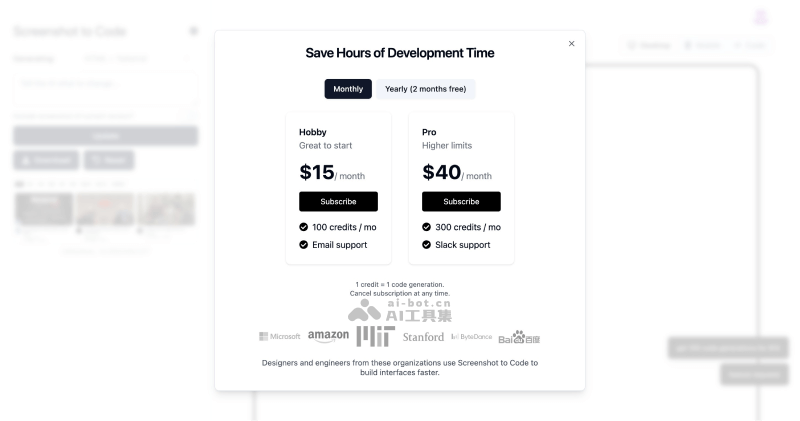
- Paid version: For users without an API key, the official hosted version of Screenshot to Code also offers paid subscription plans: the Hobby plan at $15 per month (providing 100 credits/month), and the Pro plan at $40 per month (providing 300 credits per month), with 2 months free on annual billing.
Frequently Asked Questions
Is Screenshot to Code free?
Screenshot to Code is free and open-source, and you can use it for free by entering your own OpenAI API key.
What large model is Screenshot to Code based on?
Screenshot to Code uses GPT-4 Vision to generate code and DALL-E 3 to generate similar images.
What code can Screenshot to Code convert screenshots into?
Screenshot to Code can convert screenshots into HTML + Tailwind, React + Tailwind, Bootstrap, Vue + Tailwind, Ionic + Tailwind code, as well as SVG format.