
What is ScreenAI
ScreenAI is a screen-reading AI vision-language model launched by Google researchers, specifically designed to understand and process user interfaces (UIs) and infographics. The model is based on the PaLI architecture, combining visual and language processing capabilities, and draws on Pix2Struct's flexible collage strategy, enabling it to understand and generate text related to on-screen UI elements, such as question answering, UI navigation instructions, and content summarization.
- arXiv research paper:https://arxiv.org/abs/2402.04615
- GitHub PyTorch implementation:https://github.com/kyegomez/ScreenAI
ScreenAI's main features
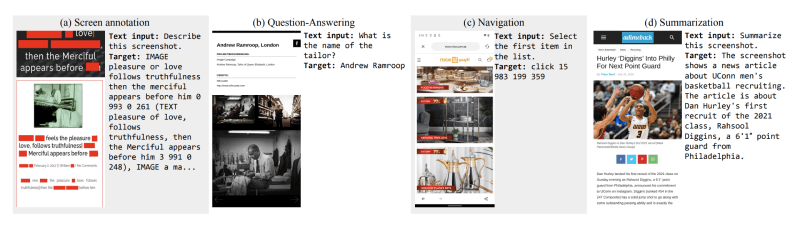
- Screen information understanding: ScreenAI can recognize and understand the content of UI elements and infographics, including their types, positions, and relationships with one another.
- Question answering (QA): ScreenAI can understand the acquired visual information and answer questions about the content of UIs and infographics.
- UI navigation: ScreenAI can interpret navigation instructions (such as "back") and identify the appropriate UI elements for interaction. It can understand user intent and navigate accurately within the interface.
- Content summarization: ScreenAI can concisely summarize screen content, and can extract and condense the core points of screen information.
- Adapting to different screen formats: ScreenAI can process screenshots of different resolutions and aspect ratios, and can adapt to the screen formats of different devices such as mobile devices and desktops.
ScreenAI's technical principles
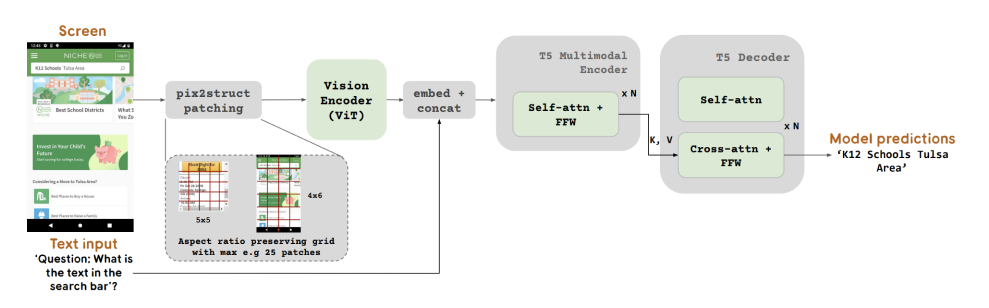
- Multimodal encoder: Inspired by the PaLI architecture, ScreenAI uses a multimodal encoder block, which consists of two main parts: a visual encoder and a language encoder. The visual encoder is based on the Vision Transformer (ViT) architecture and is used to convert input screenshots into a series of image embeddings. The language encoder processes text information related to the screenshots, such as labels and descriptions of user interface (UI) elements.
- Image and text fusion: In the multimodal encoder, image embeddings and text embeddings are combined so that the model can simultaneously understand visual content and the language information related to it. This fusion enables ScreenAI to handle complex screen interaction tasks.
- Autoregressive decoder: The output of the encoder is passed to an autoregressive decoder T5, which is responsible for generating text output and can generate natural language responses based on the input image and text embeddings.
- Automatic data generation: To train ScreenAI, the researchers used automatic data generation technology. They used the PaLM 2-S language model to generate synthetic training data, which includes screen patterns and corresponding question-answer pairs. This method improves the diversity and complexity of the data while reducing dependence on manual annotation.
- Image segmentation strategy: ScreenAI uses Pix2Struct technology to handle screenshots of different resolutions and aspect ratios. This technology allows the model to generate image patches in arbitrary grid shapes based on the shape of the input image and a predefined maximum number of patches, thereby enabling the model to adapt to various screen formats.
- Model configuration and training: ScreenAI has model versions of different sizes, including models with 670M, 2B, and 5B parameters. These models use different starting points during the pretraining stage, for example, starting from PaLI-3's multimodal pretraining checkpoint. The combination of pretraining tasks and fine-tuning tasks enables the model to be trained and optimized on a wide range of tasks.