
What is ScreenAgent
ScreenAgent is a computer control agent developed by a research team at the College of Artificial Intelligence of Jilin University. The agent is built based on a vision-language model (VLM) and can interact with a real computer screen. The researchers constructed a "plan-execute-reflect" workflow to guide the agent in continuous interaction with the computer screen. The core function of ScreenAgent is to manipulate the graphical user interface (GUI) by observing screen screenshots and outputting corresponding mouse and keyboard actions, thereby executing complex multi-step tasks.
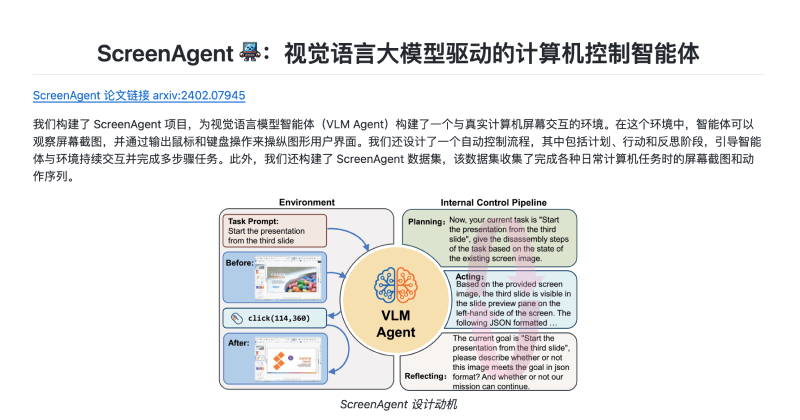
ScreenAgent Official Website Entry
- Official GitHub code repository:https://github.com/niuzaisheng/ScreenAgent
- Arxiv research paper entry:https://arxiv.org/abs/2402.07945
ScreenAgent Workflow
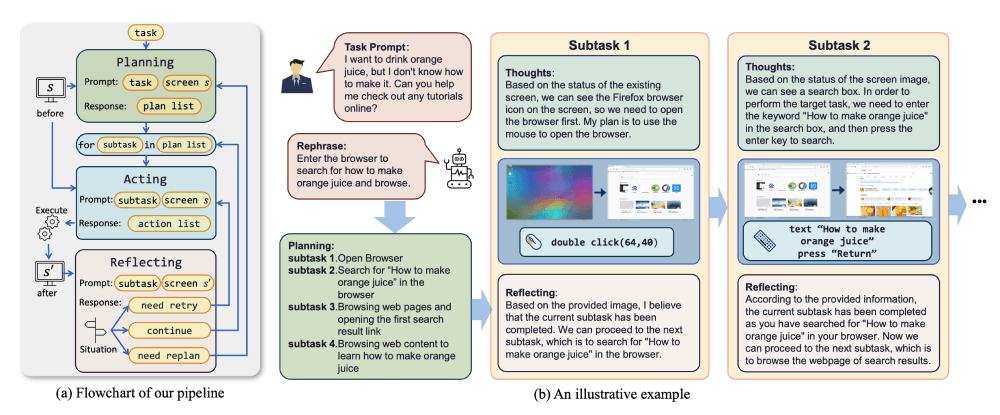
- Screen Observation: ScreenAgent can observe and understand screenshots on the computer screen. This feature is implemented through the VNC protocol, allowing the agent to view real-time images of the desktop operating system.
- Action Generation: Based on the observed screen screenshots, ScreenAgent can generate corresponding mouse and keyboard actions. These actions are output as JSON-formatted command sequences, including moving the mouse, clicking, double-clicking, scrolling, dragging, and keyboard input, etc.
- Task Planning: ScreenAgent can decompose complex tasks into a series of subtasks according to the user's task prompt, and plan the corresponding action sequence for each subtask. This involves understanding, decomposing, and strategizing the task.
- Executing Actions: After the planning stage, ScreenAgent executes the planned subtasks by sending mouse and keyboard action commands to the computer to achieve the user's goal.
- Reflection and Evaluation: After executing actions, ScreenAgent evaluates the execution results and decides whether to retry the current subtask, continue to the next subtask, or adjust the entire plan.
ScreenAgent Technical Principles
- Vision-Language Model (VLM):
- VLM is a model that combines visual and language processing capabilities. It can understand image content and generate corresponding natural language descriptions.
- In ScreenAgent, VLM is used to parse screen screenshots, understand the user's task prompt, and plan a series of actions to complete the task.
- Reinforcement Learning Environment:
- ScreenAgent interacts with a real computer screen through the VNC protocol, creating a reinforcement learning environment. In this environment, the agent can observe screen states (state space), execute actions (action space), and receive rewards based on execution results (reward function).
- Control Workflow:
- Planning: The agent decomposes the task according to the current screen screenshot and task prompt, and plans a series of subtasks and corresponding action sequences.
- Acting: Based on the output of the planning stage, the agent manipulates the computer interface by sending mouse and keyboard action commands.
- Reflecting: The agent evaluates the results after executing actions and decides whether to retry, continue, or adjust the plan.
- Dataset and Evaluation:
- The ScreenAgent dataset contains screen screenshots and action sequences when completing various daily computer tasks, and is used to train and evaluate the model.
- CC-Score (Vision Language Computer Control Score) is a fine-grained evaluation metric used to measure the performance of agents in computer control tasks.
- Model Training:
- The ScreenAgent model learns how to effectively plan, execute, and reflect to complete complex computer control tasks by training on the ScreenAgent dataset. During the training process, various techniques are employed, such as supervised learning, reinforcement learning, and the human feedback loop (RLHF), among others.