
What is Retake
Retake is an app focused on photo editing and restoration, offering a series of features based on artificial intelligence technology, including super-resolution upscaling, low-resolution portrait restoration, super noise reduction, low-light enhancement, and portrait anime stylization. Its key feature is that all AI computations are performed locally, with no need to upload photos to the cloud, providing a good user experience and demonstrating the commercial potential of AI in the field of image processing. Users can upload multiple photos, and the AI technology will analyze these photos and synthesize a perfect photo, satisfying users' pursuit of their ideal photos.
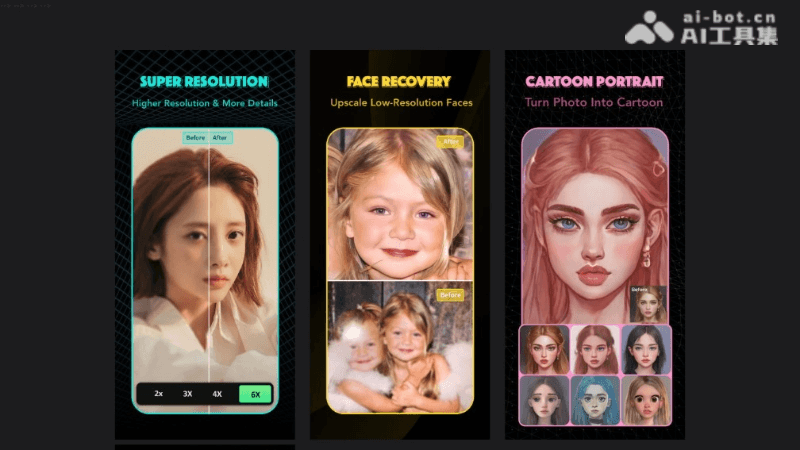
Main Features of Retake
- Super-Resolution Upscaling: Losslessly upscale photos while automatically enhancing image quality to HD, improving to high resolution.
- Low-Resolution Portrait Restoration: Based on AI technology, automatically restores lost details in images, recovers facial details, and improves photo quality.
- Detail Restoration: Performs HD restoration on low-quality photos, making even extremely low-resolution images clear.
- Smart Photo Restoration: Includes super noise reduction, deblurring, and low-light enhancement, improving the overall quality of photos.
- Light Enhancement: Performs light enhancement on photos taken under backlit and low-light conditions, improving the photo effect.
- Portrait Anime Stylization: Transforms portrait photos into cartoon anime effects, offering a variety of style choices.
- Multi-Photo AI Synthesis: Users upload multiple photos, and the AI synthesizes them to create a perfect photo effect.
Retake Project Address
- Product Official Website:https://youthpe.com/retake/
- Apple App Store:https://apps.apple.com/cn/app/retake
How to Use Retake
- Download and Install: Download and install the Retake AI app from the app store.
- Register and Log In: After opening the app, register or log in as prompted. Some features require a membership subscription to use.
- Select a Feature: In the app interface, there are different feature options, such as super-resolution, portrait restoration, smart restoration, etc. Select the feature you need to use.
- Upload Photos: According to the requirements of the selected feature, upload the photos you want to edit or restore. Multi-photo AI synthesis requires uploading multiple photos.
- Adjust Settings: After uploading photos, you can adjust settings as needed, such as upscaling factor, restoration strength, etc.
- Apply AI Editing: After selecting the settings, apply AI technology to edit or restore the photos. In some cases, manual fine-tuning may be required.
Retake's Target Audience/Application Scenarios
- Photography Enthusiasts: For photography enthusiasts who pursue photo quality, the super-resolution upscaling and detail restoration features provided by Retake AI can help them improve the clarity and quality of their photos.
- Professional Photographers: When encountering undesirable lighting during shooting or needing to restore old photos, Retake AI's smart restoration and light enhancement features can provide professional-level assistance.
- Designers and Creative Professionals: Designers who need to convert photos into different styles can use creative tools such as Retake AI's portrait anime stylization.
- General Users: Ordinary users can also quickly improve photos taken with their mobile phones through Retake AI, enhancing the image quality for everyday sharing.
- Historical photo restorer: For users who need to repair and preserve old photos, the old photo restoration feature provided by Retake AI can restore precious memories.