
ReplaceAnything is an open-source AI image content replacement framework launched by the Alibaba Institute for Intelligent Computing. Utilizing advanced artificial intelligence technology, it can intelligently replace objects in photos or images. Users can perform simple operations by simply selecting the part of the image they want to keep and entering a prompt or description to replace the image area they want to change, such as changing a person's hairstyle, clothing, background, etc. This technology provides more possibilities for image editing and content creation, while also offering ordinary users a convenient and fun image processing tool.
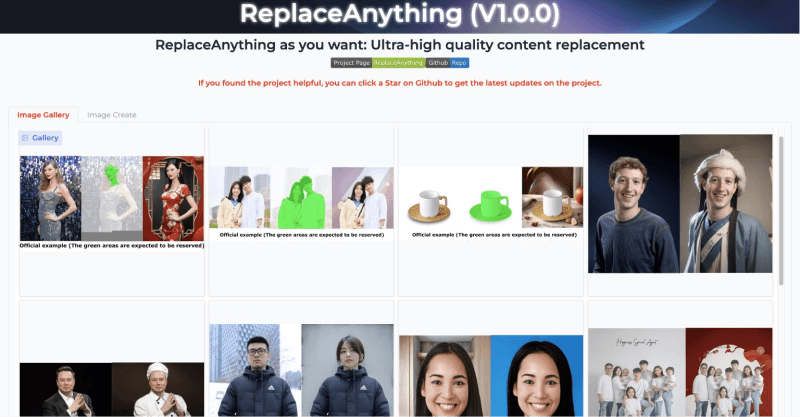
Application scenarios of ReplaceAnything
- Clothing replacement: In the fashion and retail industries, it can be used to display how different clothing styles look on models, or to provide virtual try-on features on e-commerce platforms.
- ID photo background replacement: Users can easily change the background of selfie images without going to a specialized photography store, and can replace them with ID photos in different color requirements.
- Face replacement: In entertainment and social media, users can replace faces in photos with other people or cartoon characters to create fun effects.
- Product scene image replacement: Merchants and designers can change the background of product images to adapt to different marketing scenarios and advertising needs.
How to use ReplaceAnything
Currently, users can experience and use ReplaceAnything online through the ModelScope Model Community or the Hugging Face community.
- Visit the ModelScope demo https://www.modelscope.cn/studios/damo/ReplaceAnything/summary or Hugging Face demo https://huggingface.co/spaces/modelscope/ReplaceAnything
- In "Input Image," upload or select an image from the Example images.
- Click the mouse to select the object in the image that you want to keep.
- Enter the corresponding parameters, such as prompt, etc., and click Run to generate.
- In addition, background replacement is supported. After uploading the target style background and adjusting it, you can generate.
ReplaceAnything project homepage:https://aigcdesigngroup.github.io/replace-anything/