
What is ReadPaper
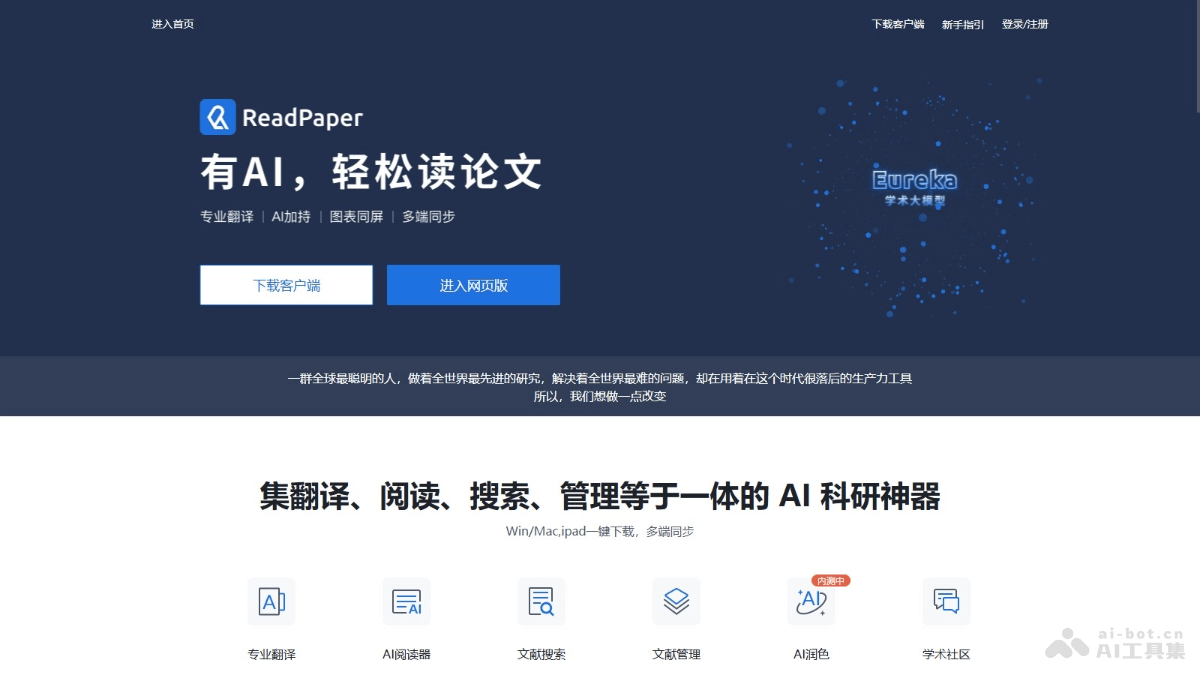
ReadPaper is an AI-driven platform for reading, translating, and managing academic papers, providing tools for efficient research and collaboration. ReadPaper offers literature management, AI reader, literature search, and academic community services to help researchers manage literature, read papers, search materials, and conduct academic exchanges more efficiently. ReadPaper is based on AI technology and supports automatic synchronization, intelligent parsing, word-selection translation,full-text translationand other functions, dedicated to improving the productivity of research work.
Main Features of ReadPaper
- Literature Management: Supports automatic multi-device synchronization and powerful personal literature search.
- AI Reader: Provides AI-assisted reading, word-selection translation, and full-text translation.
- Literature Search: Provides search capabilities for over 200 million papers, with support for various filters and sorting.
- Academic Community: Supports creating private groups to facilitate paper sharing and discussion among research group members.
- AI Polishing: Provides professional large-model polishing services focused on the academic research field.
- Import and Export Functions: Supports local upload, browser plugin import, Word plugin, and BibTeX generation.
How to Use ReadPaper
- Download and Install: Visit the ReadPaperofficial website. Choose and install the appropriate client for your device; Windows, Mac, and iPad are supported.
- Register and Log In: Open the ReadPaper client. Create a new account or log in with an existing account.
- Literature Management:
- Import literature: local upload, browser plugin import, or directly import literature using the plugin in Word.
- Manage literature: classify and manage literature using folders and tags.
- Synchronize literature: ensure literature is synchronized and updated across different devices.
- Use the AI Reader:
- Open literature: open the literature you want to read in ReadPaper.
- Use AI features: use AI-assisted reading, word-selection translation, full-text translation, and other functions to assist in understanding the literature content.
- Notes and highlights: take notes and highlight important content while reading.
- Literature Search: Search for literature on a specific topic or keyword in ReadPaper. Filter and sort results to find the most relevant literature.
- Participate in the Academic Community: Create or join private groups to share and discuss literature with research group members. Ask questions or answer other researchers' questions in the public community.
- AI Polishing: Use the AI polishing function to optimize the language of papers or reports.
- Data Security: Ensure research data security; ReadPaper provides encrypted data storage and multiple backups.
- Export and Citation: Export literature citations with support for multiple citation formats, making it convenient to cite in papers.
ReadPaper Product Pricing
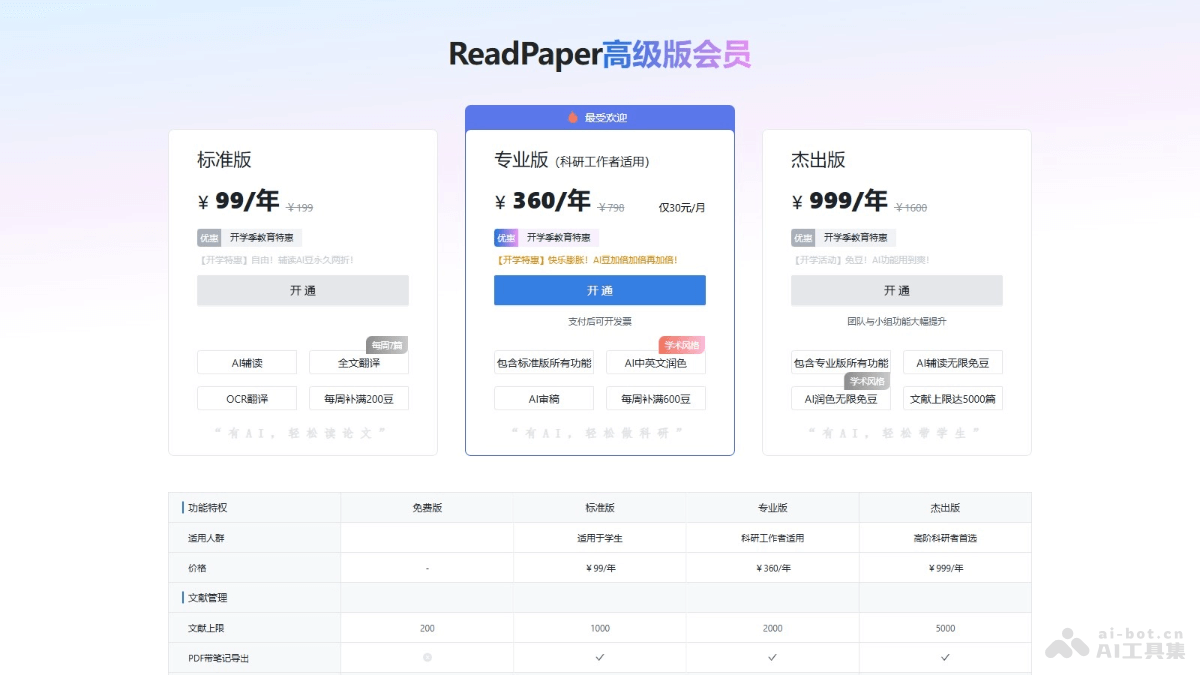
- Free Version: Literature limit of 200 papers, full-text translation once per week, limited to 10 pages each time
- Standard Version: 99 yuan/year, literature limit of 1,000 papers, full-text translation: 7 times per week, limited to 50 pages each time, AI beans replenished to 200 per week
- Professional Edition:360 yuan/year,Document limit 2,000, full-text document translation 21 times per week, limited to 100 pages each time, AI Beans replenished to 600 per week
- Outstanding Edition: 999 yuan/year, document limit 5,000, full-text document translation: unlimited, limited to 100 pages each time, AI Beans: replenished to 1,500 per week
ReadPaper use cases
- Document reading and management: Researchers read and manage large amounts of academic literature, using the AI-assisted reading feature to quickly understand document content.
- Academic research: When conducting academic research, researchers search for research papers in related fields and use the AI review feature to improve paper quality.
- Paper writing and polishing: Students and researchers improve the language quality of papers, ensuring academic rigor and readability.
- Team collaboration: In team projects, team members conduct group discussions and collaboratively manage project literature.
- Education and learning: Students and teachers organize course materials and use the AI-assisted reading feature to support learning complex concepts.