
What is QRBTF
QRBTF is an AI QR code generator launched by the Latent Cat team. Based on generative AI technology, combined with ControlNet and Stable Diffusion, it generates QR codes with unique styles according to the keywords and parameters entered by the user. Users can adjust parameters such as control strength, image restoration ratio, size, margin ratio, and error correction level to generate QR codes that are both aesthetically pleasing and scannable. QRBTF supports multiple output formats such as SVG, JPG, and PNG, and is suitable for various scenarios including brand marketing, digital content links, and interactive experiences.
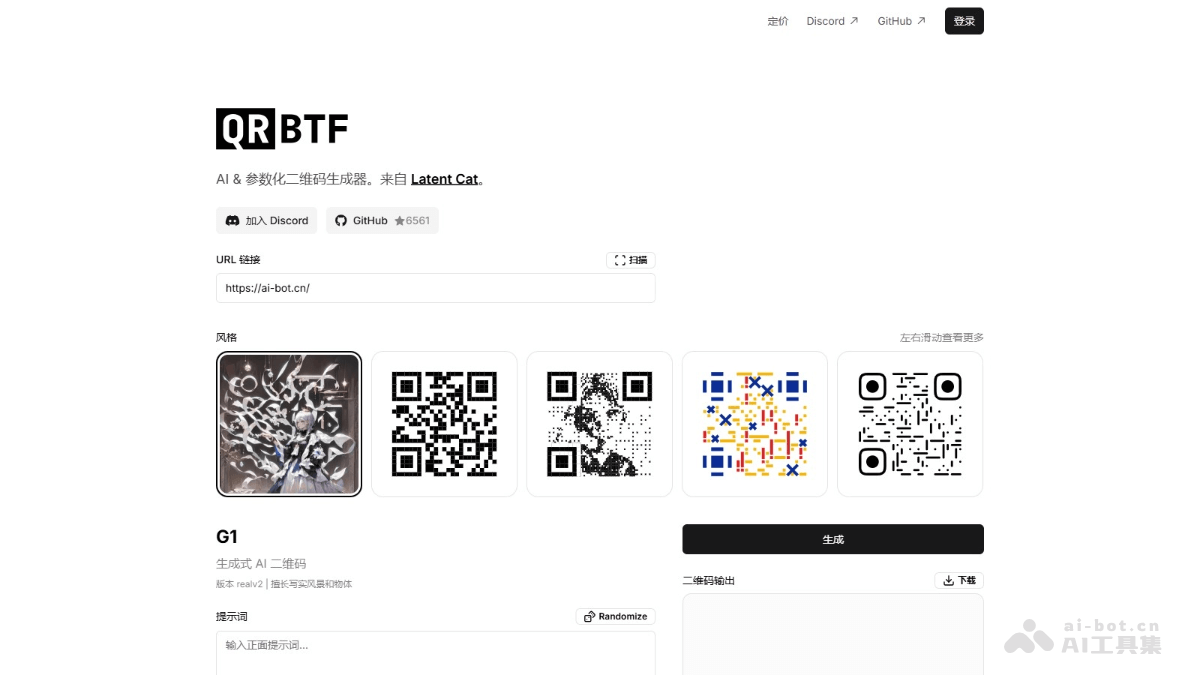
Main Features of QRBTF
- AI-generated QR codes: Based on prompts entered by the user, AI technology is used to generate QR codes with unique styles and designs.
- Parametric customization: Provides a variety of parameter adjustment options, such as control strength, image restoration ratio, size, margin ratio, and error correction level, so users can generate personalized QR codes according to their needs.
- Support for multiple output formats: The generated QR codes support common formats such as SVG, JPG, and PNG, meeting usage needs in different scenarios.
- Scan testing feature: Users can test whether the generated QR code is readable, ensuring it can be scanned normally on different devices and platforms.
- Link encoding: Supports encoding link information such as URLs into the QR code, making it convenient for users to scan the QR code and quickly access the target webpage or resource.
How to Use QRBTF
- Visit the official website: Open a browser and visit the QRBTF official website。
- Enter the link: In the "URL link" input box, enter the link you want to encode.
- Enter the prompt: In the "Prompt" input box, enter keywords describing the style of the QR code you want to generate.
- Enter the negative prompt: If you want to exclude certain elements, enter content in the "Negative prompt" input box.
- Adjust parameters:
- Control strength: Adjust the readability and aesthetics of the QR code.
- Image restoration ratio: Makes image details clearer. For complex scenes, it is recommended to set it to 0.3~0.5; for simple scenes, lower it or turn it off.
- Size: Adjust the size of the QR code.
- Margin ratio: Adjust the proportion of the QR code in the entire image.
- Error correction level: The longer the link, the higher the error correction level that needs to be selected for easier scanning.
- Positioning point style: Choose square, circular, or minimized positioning points to improve QR code recognition or hide QR code elements.
- Generate the QR code: Click the "Generate" button, and the system generates the QR code according to the entered prompt and parameters.
- Test the QR code: After generating the QR code, use a mobile phone or other device to scan the QR code and test whether it can be read normally and redirect to the target link.
- Download or share: If the QR code can be scanned normally, choose to download the QR code or share it directly with others.
QRBTF Product Pricing
- Trial: Free, quick generation, 10 free generations.
- Pro membership: $20 per month, fast generation, unlimited generations under rate limits, generation using a Discord Bot, community and email support.
QRBTF use cases
- Brand promotion: Generate branded QR codes for use in advertisements, brochures, etc., to attract users to scan for more information and enhance brand image.
- Event management: At events or exhibition venues, use for check-in, information registration, etc., to improve organizational efficiency.
- Content sharing: Generate QR codes from digital content links and share them across online and offline channels for users to access quickly.
- Creative design: Combine QR codes with artwork for exhibitions, decoration, etc., to add creativity and artistic appeal.
- Education and training: Generate QR codes for teaching resources so students can scan to access learning materials, enriching the learning experience.