
What is Qingwu Subtitles
Qingwu Subtitles is an AI subtitle extraction tool based on Whisper. Using advancedspeech recognitiontechnology, it quickly and accurately extracts speech content from videos and generates precisely timed subtitles. Qingwu Subtitles supports multiple subtitle formats (such as .srt, .vtt, .lrc, etc.), can connect to translation platforms for multilingual translation, and meets the publishing needs of different platforms. The software is fully localized, stores data locally, does not require an internet connection, and protects user privacy. Qingwu Subtitles is suitable for individual users and subtitle production teams, and can effectively improve subtitle production efficiency and save time and effort.
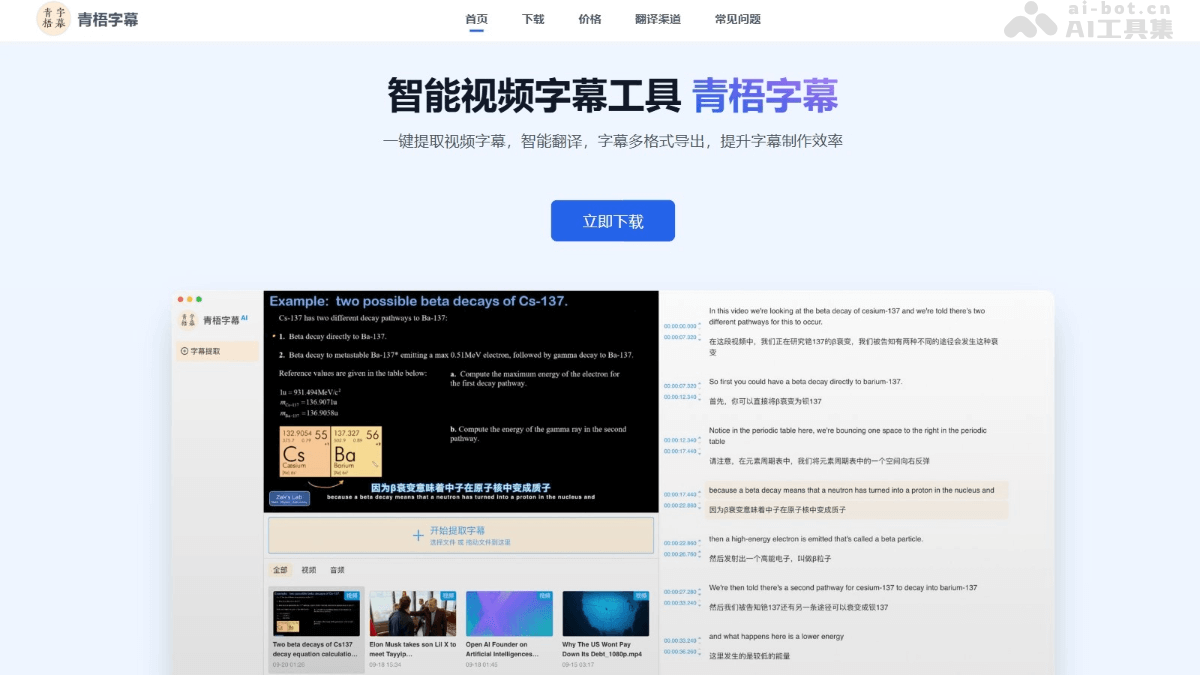
Main features of Qingwu Subtitles
- Intelligent subtitle extraction: Based on AI speech recognition technology, it quickly and accurately extracts speech content from videos and automatically generates subtitle text with precise timing. It supports speech recognition in multiple languages, ensuring high-precision extraction.
- Subtitle editing and proofreading: Extracted subtitles can be freely edited and proofread. Users can adjust subtitle content, timeline, or format to meet personalized needs.
- High-quality translation: Integrates multiple professional translation platforms, supports multilingual translation, and translates extracted subtitles into different languages, facilitating international video distribution.
- Multi-format export: Supports multiple mainstream subtitle formats (such as .srt, .vtt, .lrc, .txt, etc.), and can flexibly combine monolingual or bilingual subtitles to meet the publishing needs of different platforms.
- Localization and privacy protection: All data processing is completed locally, no internet connection is required, and data is stored locally, ensuring user privacy and security.
- Cross-platform support: Supports Windows and macOS (including M series and Intel processors), with good compatibility, allowing users to use it on different operating systems.
How to use Qingwu Subtitles
- Download and installation:
- Visit the official website: Visit Qingwu Subtitles'official website, and download according to the operating system version (Windows, MacOS).
- Open-source version: Visit theGitHub repository, and install dependencies and compile and run according to the project instructions.
- Launch the program: Open the Qingwu Subtitles application. For the official website version, complete login according to the prompts (the open-source version does not require login). 3. Subtitle extraction
- Import video: Click the "Import Video" button and select the video file from which subtitles need to be extracted.
- Select language: Before extraction, select the speech language in the video (such as Chinese, English, etc.).
- Subtitle editing and proofreading: After extraction is complete, check the timeline in the video corresponding to each subtitle line to ensure the subtitles are synchronized with the speech.
- Edit subtitles: If there are errors in the subtitles or adjustments are needed, directly modify the subtitle content in the editing panel, or adjust the timeline to ensure more precise subtitle display timing.
- Subtitle translation (optional): If subtitles need to be translated into other languages, connect to a third-party translation platform (such as Baidu Translate, Youdao Translate, etc.).
- Subtitle export: Select the export format, choose the appropriate format according to your needs, and save the subtitle file locally.
Qingwu Subtitles Product Pricing
- Pro Version: Free trial, all features available, new accounts receive a 3-day free trial, and each account can periodically apply to extend the trial.
- Pro VIP – 1 Year: ¥79, all features available, no usage restrictions during the VIP membership period.
- Pro VIP – 1 Day: ¥1.4, all features available, suitable for temporary emergency use.
- Pro VIP – 7 Days: ¥5.9, all features available, suitable for short-term projects.
Qingwu Subtitles Use Cases
- Video Creators: Quickly add accurate subtitles to self-made videos, improving content readability and viewer experience, especially suitable for self-media, Vlogs, and instructional video production.
- Foreign Language Learners: Extract and translate subtitles from foreign language videos, assist language learning, help understand video content, and improve listening and reading skills.
- Subtitle Translation Teams: Efficiently extract original subtitles and translate them, support multiple languages and multiple export formats, improve subtitle production efficiency, and save time and labor costs.
- Film and Television Enthusiasts: Quickly generate subtitles for film and television works without subtitles, improving the viewing experience, especially suitable for niche or self-made film and television content.
- Enterprises and Institutions: Used for making subtitles for promotional videos and product introduction videos, supports multilingual translation, helps international dissemination of content, and expands global audiences.