
What is Pubmed pro
PubMed pro is a professional medical literature search platform that provides literature search, subscription, management, and AI academic Q&A services. PubMed pro can display a journal's IF impact factor and quartile, and supports PDF full-text links. Users can bookmark literature and achieve cloud-based synchronized management. PubMed pro offers PDF text selection translation, keyword subscription push notifications for the latest literature, literature-based AI Q&A, and other features to help researchers efficiently obtain and manage academic resources.
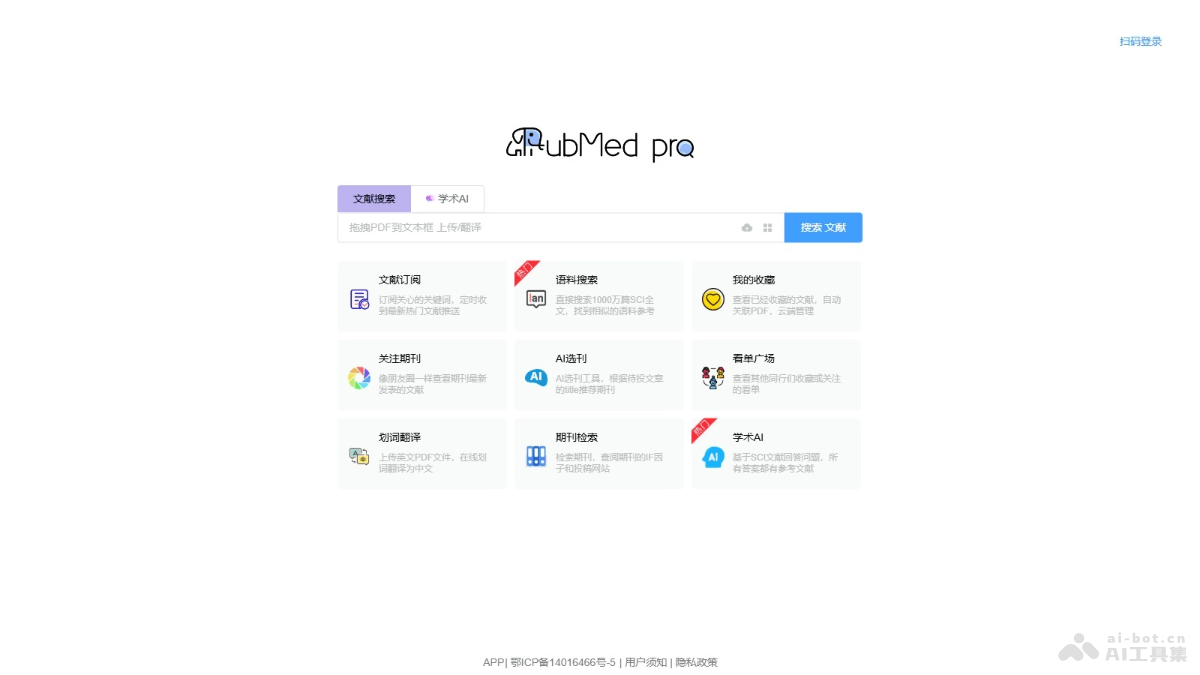
Main features of Pubmed pro
- Literature search: Provides a literature search feature, allowing users to find relevant literature.
- Academic AI: Answers questions based on SCI literature, and all answers are supported by references.
- Literature subscription: Users can subscribe to keywords they care about and receive scheduled push notifications of the latest popular literature.
- Corpus search: Directly search 10 million SCI full texts to find similar corpus references.
- My favorites: View literature that has already been bookmarked, automatically associate PDFs, and manage in the cloud.
- Follow journals: View the latest literature published by journals like a social feed.
How to use Pubmed pro
- Visit the website: Visit the Pubmed proofficial website 。
- Register/Log in: If you are a new user, you need to register an account. If you are an existing user, simply log in.
- Literature search:
- Enter the keywords, author, title, DOI, or other information you want to search for in the search box.
- Click the search button or press Enter to search.
- View results: View the search results list, where you can see information such as the literature title, authors, abstract, journal name, and impact factor.
- Filtering and management:
- Use the filtering feature to further narrow down the search results.
- Click on the title of literature you are interested in to view detailed information and bookmark it.
- Bookmarking literature:
- Click the bookmark button on the literature details page to add the literature to your favorites.
- Bookmarked literature will be automatically synchronized to your account, making it easy to access on different devices.
- PDF text selection translation:
- If you need to read English PDF literature, use Pubmed pro's PDF text selection translation feature.
- Upload a PDF file, select the text you need to translate, and the system can provide the translation result.
- Set up literature subscription:
- In personal settings, set up keyword subscriptions.
- Choose research areas or keywords you are interested in, set the push frequency, and the system will periodically push relevant literature.
- Academic AI Q&A: Use the academic AI Q&A feature, and users ask questions. The AI provides answers based on existing literature and lists the cited literature sources.
Application scenarios of PubMed pro
- Literature search: Medical researchers and students can quickly search relevant literature in the database.
- Academic research: Researchers can obtain the latest research results and track academic developments.
- Journal selection: When preparing to submit a manuscript, authors can use the AI journal selection tool to recommend suitable journals based on the article title.
- Reference management: users manage their own reference library with the favorites feature and sync it across different devices.
- Academic writing: when writing academic papers, researchers use the reference and corpus search features provided by PubMed pro to support arguments and write references.