
What is Prompt Optimizer
Prompt Optimizer is an open-source AI prompt optimization tool that helps users quickly write high-quality prompts and improve the quality of AI output. One-click prompt optimization, supports multi-round iterative improvements, enhancing the accuracy and relevance of AI responses. Supports optimization of system prompts and user prompts, meeting different usage scenarios. Supports real-time comparison of original prompts and optimized prompts, intuitively showing the optimization effect. Supports OpenAI,Gemini, DeepSeek, Zhipu AI,SiliconFlow and other mainstream AI models. Pure client-side processing, data interacts directly with AI service providers without going through an intermediate server, ensuring data security. Supports the Model Context Protocol (MCP) protocol and can integrate with MCP-compatible applications such as Claude Desktop.
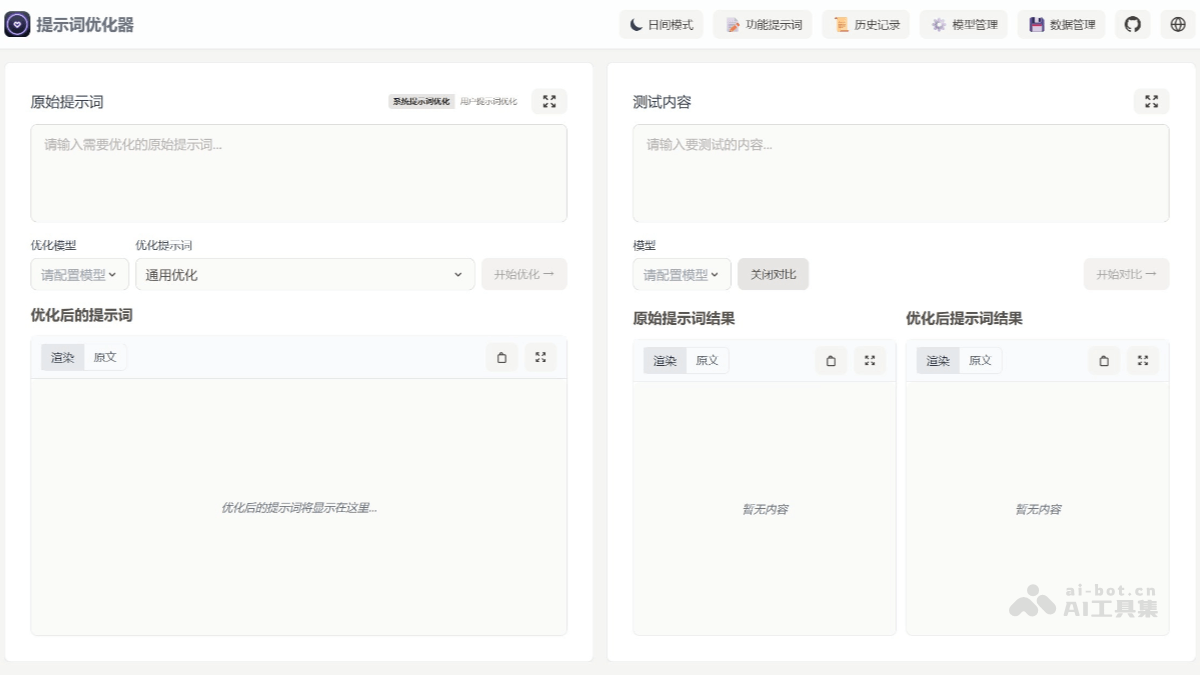
Main features of Prompt Optimizer
-
Intelligent optimization: One-click prompt optimization, supports multi-round iterative improvements, enhancing the accuracy and relevance of AI responses.
-
Dual-mode optimization: Supports optimization of system prompts and user prompts, meeting different usage scenarios.
-
Real-time comparison: Supports real-time comparison of original prompts and optimized prompts, intuitively showing the optimization effect.
-
Multi-model integration: Supports mainstream AI models such as OpenAI, Gemini, DeepSeek, Zhipu AI, and SiliconFlow.
-
Secure architecture: Pure client-side processing, data interacts directly with AI service providers without going through an intermediate server, ensuring data security.
-
Multi-platform support: Provides multiple usage methods such as Web app, desktop app, Chrome extension, and Docker deployment.
-
Access control: Supports password protection to ensure deployment security.
-
MCP protocol support: Supports the Model Context Protocol (MCP) and can integrate with MCP-compatible applications such as Claude Desktop.
Prompt Optimizer project address
- Github repository:https://github.com/linshenkx/prompt-optimizer
How to use Prompt Optimizer
-
Use the online version: Directly visit https://prompt.always200.com to use it. All data is stored locally in the browser, safe and reliable.
-
Vercel deployment: Can be deployed to your own Vercel with one click, or after forking the project, import it in Vercel. You need to configure environment variables such as
ACCESS_PASSWORDand the API keys of various AI service providers. -
Download desktop app: Download the latest version from GitHub Releases. There are two formats: installer and compressed package. The installer supports automatic updates.
-
Install Chrome extension: Install from the Chrome Web Store, click the icon to open the prompt optimizer.
-
Docker deployment: Run the container through Docker commands. You can configure environment variables such as API keys and access passwords. Users in China can use Alibaba Cloud image acceleration.
-
Docker Compose deployment: After cloning the repository, you can create a
.envfile to configure API keys, etc., and then usedocker compose up -dto start the service. -
MCP Server usage: When running through Docker, the MCP Server starts automatically and can be accessed via
http://ip:port/mcp. You need to configure environment variables such asMCP_DEFAULT_MODEL_PROVIDERetc., and can be integrated and used in applications that support MCP, such as Claude Desktop. -
API Key Configuration: It can be configured through the "Model Management" tab in the interface, or through environment variables during Docker deployment. The corresponding API key must be filled in according to the AI model being used.
-
Local Development: After cloning the project, install the dependencies and run the development command to start local development.
Application Scenarios of Prompt Optimizer
-
AI Content Creation Optimization: Helps content creators optimize creative prompts used for AI models such as ChatGPT and Claude, improving the quality and creativity of generated content.
-
Automated Office Instruction Enhancement: Improves the accuracy and contextual understanding of AI automated office assistants when executing tasks, making instructions clearer and more accurate.
-
Multi-turn Dialogue Design: Rewrites instruction prompts used to build AI Agents, improving multi-turn interaction and making conversations more natural and smooth.
-
Programming Code Prompt Construction: Generates more precise programming-related prompts, improving the accuracy and efficiency of code output.
-
AI Teaching and Training Assistance: Helps educational institutions or individuals optimize the structure of AI prompts used for teaching in courses, improving teaching effectiveness.