
What is PrintVerse
PrintVerse is an online AI 3D model generation platform that supports users in uploading images or text to generate 3D models. The platform supports converting real person photos into cartoon figurine-style 3D models, making it convenient for users to perform 3D printing. Users can preview 3D model effects on the platform and download files in STL or OBJ format. PrintVerse's goal is to simplify the 3D creation and printing process, allowing more people to easily create personalized 3D objects.
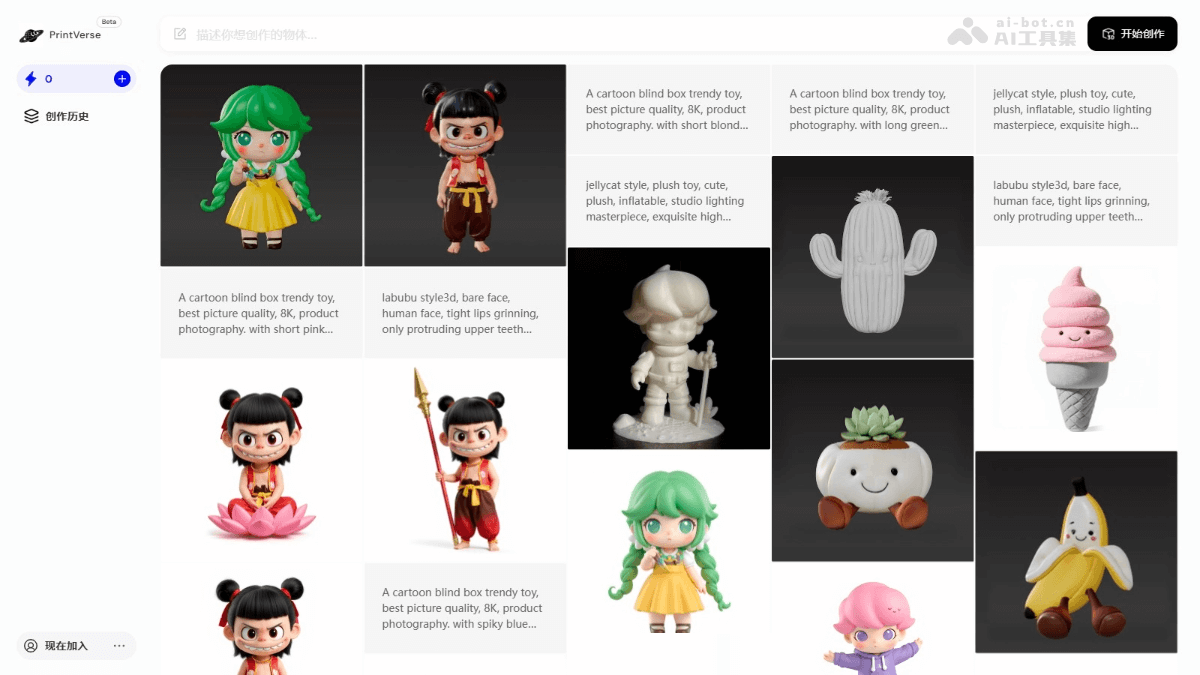
PrintVerse's Main Features
- Image Generation: Users upload images, select different creative style templates, and generate 3D models.
- Text Generation: The system automatically generates 3D models based on text descriptions.
- 3D Printing Parameter Suggestions: Provides 3D printing parameter suggestions for users' generated 3D models, including model height, nozzle size, layer height, etc.
- Multiple File Downloads: Supports downloading in STL and OBJ formats, making 3D printing convenient.
- Creation History: Supports users in viewing their creation history, managing and re-editing previous works.
How to Use PrintVerse
- Register and Log In: Visit PrintVerse'sofficial website, and follow the prompts to complete registration and login.
- Start Creating:
- Image Generation: Upload a reference image.
- Text Generation: Enter a description of the object you want to create.
- Select a Creative Style Template: Choose a suitable style from the provided templates, for example, "Real Person Photo to Cartoon Figurine Style".
- Generate Images: Set the number of images to generate. Click the "Generate Now" button and wait for the platform to process and generate the images.
- Confirm Images: View the generated image effects and click the "Generate 3D Model" button.
- Generate 3D Model: The platform will generate a 3D model based on the confirmed images. View the model effects in the 3D model preview area.
- Download 3D Model Files: Click the "Download STL File" or "Download OBJ File" button to save the model file locally.
PrintVerse's Application Scenarios
- Personalized Gifts: Convert photos into 3D models and make them into unique gifts.
- Educational Tools: Create 3D models of scientific models or cultural relics to assist teaching.
- Artistic Creation: Convert 2D artworks into 3D, expanding creative space.
- Entertainment Industry: Create character and prop models for games or movies.
- Product Prototypes: Quickly generate product models for design and testing.