
What is PPTAgent
PPTAgent is an innovative framework launched by the Chinese Information Processing Laboratory of the Institute of Software, Chinese Academy of Sciences. Based on a two-stage editing method that mimics the human workflow, it automatically generates high-quality presentations from documentsgenerates high-quality presentations. PPTAgent analyzes reference presentations, extracts structural patterns and content patterns, drafts outlines based on code actions, and generates slides, ensuring content consistency and alignment. PPTAgent leverages the capabilities of large language models (LLMs) to decompose the presentation generation process into an iterative editing workflow, improving the coherence and adaptability of generated presentations and better handling complex formatting issues. PPTAgent introduces the PPT Eval evaluation framework, which comprehensively evaluates the quality of generated presentations from three dimensions: content, design, and coherence, providing valuable resources and insights for future presentation generation research.
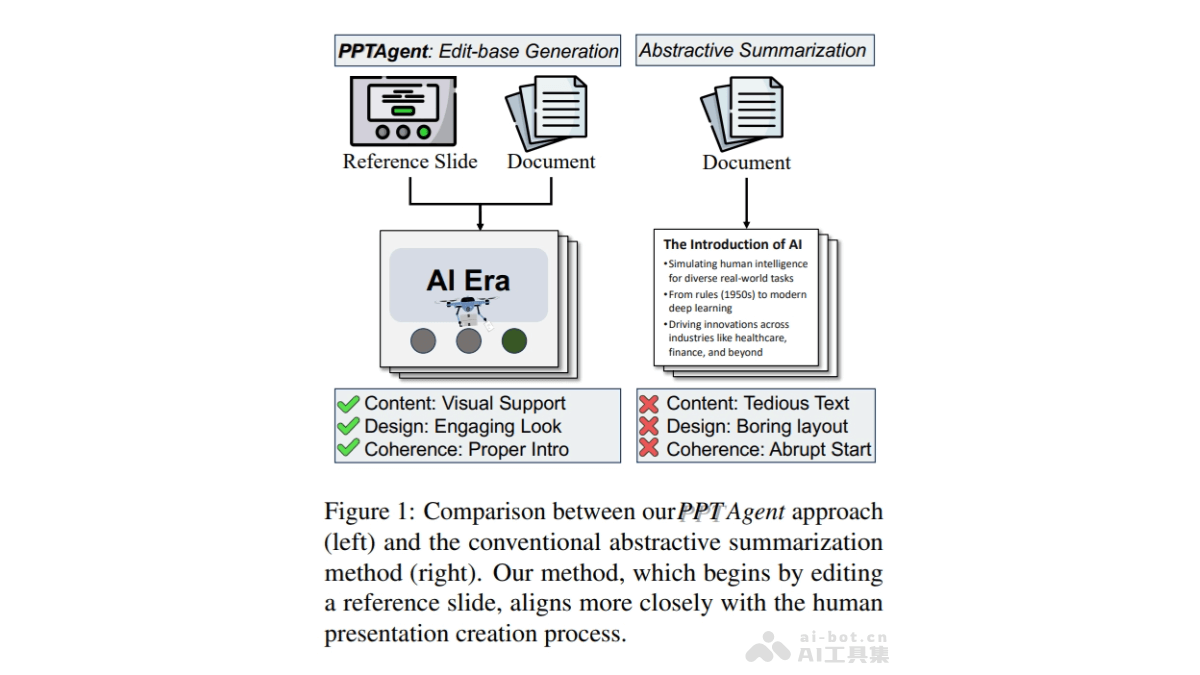
Main Features of PPTAgent
- Analyze reference presentations: Understand their structural patterns and content patterns.
- Draft outlines: Based on the analysis results, create detailed presentation outlines.
- Generate slides: Based on code actions, transform outlines into specific slide content, ensuring content consistency and alignment.
- Edit and revise: Provide a feedback mechanism to edit and self-correct generated slides, improving the quality of generated presentations.
- Comprehensive evaluation: Based on the PPT PPT Eval framework, evaluate the quality of generated presentations from three dimensions: content, design, and coherence.
Technical Principles of PPTAgent
- Stage 1: Presentation Analysis
- Slide clustering:
- Divide slides into two categories: slides that support the presentation structure (such as opening slides) and slides that convey specific content (such as bullet point slides).
- Use different clustering algorithms to cluster slides based on textual or visual features. For structural slides, use an LLM to infer the functional role of each slide; for content slides, use hierarchical clustering methods based on image similarity.
- Pattern extraction:
- Further analyze the content patterns of slides to ensure the purposefulness of editing.
- Use the context-awareness capabilities of LLMs to extract diverse content patterns. Each element is represented by category, modality, and content, and the pattern of each slide is extracted based on the LLM's instruction-following and structured output capabilities.
- Slide clustering:
- Stage 2: Presentation Generation
- Outline generation:
- Guide the LLM to create a structured outline containing multiple entries. Each entry specifies the reference slide, the relevant document section index, and the title and description of the new slide.
- Use the planning and summarization capabilities of LLMs, combined with document content and semantic information from reference presentations, to generate coherent and engaging outlines that guide the subsequent generation process.
- Slide generation:
- Under the guidance of the outline, generate new slides by iteratively editing reference slides.
- Implement five specialized APIs to support LLMs in editing, deleting, and duplicating text elements, as well as editing and deleting visual elements.
- Convert slides from the original XML format to an HTML representation, making it easier for LLMs to understand and operate on them.
- The LLM receives two kinds of input: the source document text based on partial indices and captions of available images. New slide content is generated according to the content pattern.
- The LLM uses the generated content, the HTML representation of the reference slide, and the API documentation to produce executable editing actions. These are executed in a REPL environment; the system detects errors during execution and provides real-time feedback, and the LLM iteratively refines the editing actions based on intermediate results, enhancing the robustness of the generation process.
- Outline generation:
PPTAgent's project address
- GitHub repository:https://github.com/icip-cas/PPTAgent
- arXiv technical paper:https://arxiv.org/pdf/2501.03936
Application scenarios of PPTAgent
- Education: Teachers quickly generate presentation slides for course explanations, including key knowledge points, charts, and examples, improving teaching efficiency and students' interest in learning.
- Corporate training: Enterprises generate presentation slides for new employee training, introducing company culture, rules and regulations, business processes, and other content, helping new employees quickly understand the company environment.
- Marketing: Marketing teams generate product promotion presentation slides, including product features, market analysis, user cases, and other content, used in client meetings or marketing events.
- Project management: Project teams generate presentation slides for project progress reports, including project goals, progress status, problems encountered, and solutions, used to report to management or clients.
- Personal use: Individuals generate presentation slides for personal speeches, including speech topics, key points, supporting materials, and other content, improving the effectiveness of the speech.