
What is PixelRAG
PixelRAG is a vision-native RAG framework open-sourced by Berkeley SkyLab/BAIR. The framework breaks away from the traditional route of extracting web pages into plain text before retrieval, and instead uses a browser to render web pages and PDFs into screenshot tiles, performing visual vector retrieval through a LoRA fine-tuned Qwen3-VL, letting the model directly read tables, charts, and layouts in the images, solving the pain points of traditional RAG losing tables and layouts.
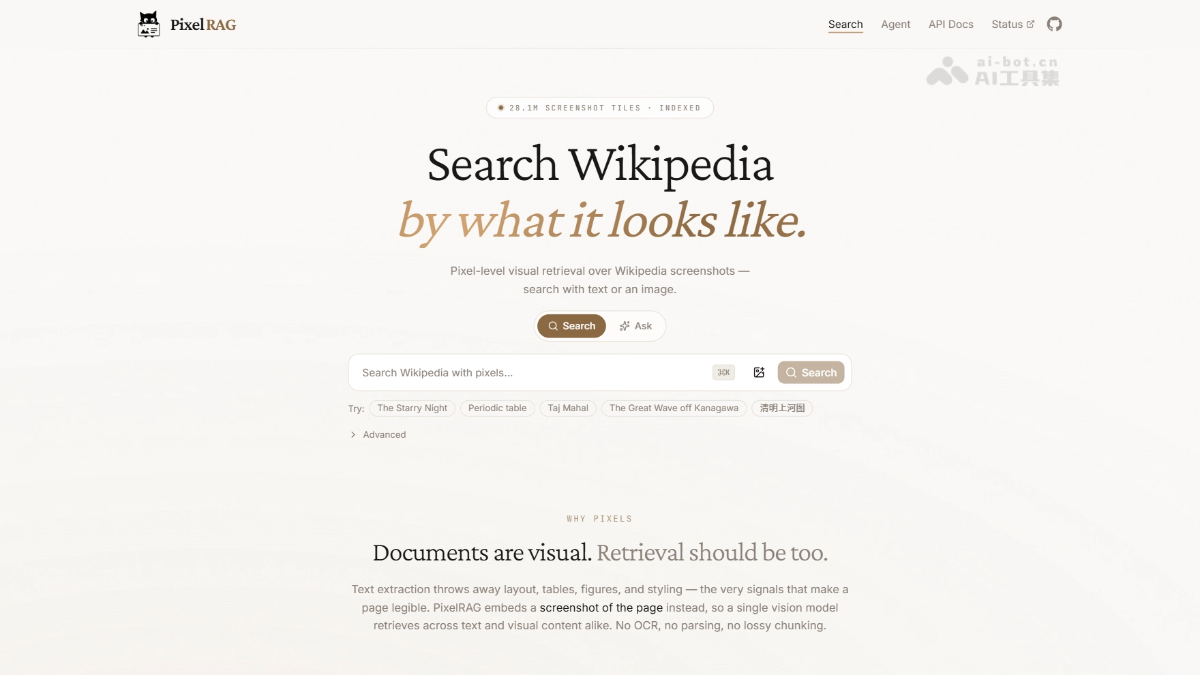
PixelRAG's main features
-
Page rendering (pixelshot): Uses headless Chromium to render web pages and PDFs into screenshot tiles, fully preserving tables, charts, and layouts; Windows/macOS automatically calls the system Chrome, supporting mixed use of URLs and local files.
-
Visual semantic retrieval: Encodes screenshots into vectors, supporting text-to-image search and image-to-image search; locally defaults to FAISS, and can switch to Qdrant at scale (supporting quantization compression, disk storage, and multi-service sharing).
-
Direct pixel reading: Screenshots hit by retrieval are directly fed as image input to the VLM to answer questions, with no text conversion throughout.
-
Hosted search service: Key-free API + web demo, with a built-in pre-built index of 8.28 million Wikipedia pages, ready to search out of the box.
-
Self-built indexing pipeline:
pixelrag index / embed / build-index / serveA full set of commands, can build a database for your own PDFs and sites; Mac (Apple Silicon) can run small-scale. -
Agent integration: Claude Code plugin pixelbrowse, with no MCP dependency, letting Claude screenshot to "see" web pages instead of swallowing incomplete HTML.
PixelRAG's technical principles
- Representation layer — documents as images: Uses headless Chromium to screenshot web pages, convert PDFs to images page by page and split them into tiles, preserving visual structures such as table row-column alignment, charts, and infographics as-is.
- Retrieval layer — visual vector embedding: Based on Qwen3-VL-Embedding-2B, LoRA fine-tuned with contrastive learning data, enabling screenshots to be semantically retrieved, with queries hitting "that block of image" rather than "that passage of text"; vectors are stored locally in FAISS, and can switch to Qdrant at scale.
- Generation layer — VLM reads images to answer: Screenshot tiles hit by retrieval are directly handed as pixel input to the vision-language model, and the model reads numbers and layouts directly from the images, with no intermediate text conversion throughout.
- Scale and efficiency: The first RAG pipeline to cover the full Wikipedia in screenshot form; pixel representation also brings new efficiency levers — lowering screenshot resolution can reduce token cost by up to 3x without accuracy loss, experimentally surpassing text RAG baselines across the board, with up to an 18.1% improvement.

Follow WeChat and reply "open source" to join theAI open-source project exchange group
How to use PixelRAG
- Install: Execute
pip install pixelragto get the core tools (requires Python 3.10+). - Render pages: Run
pixelshot https://example.com -o ./tilesto render web pages or PDFs into screenshot tiles. - Try hosted search: No configuration needed, directly POST a request to
https://api.pixelrag.ai/searchto search the 8.28 million Wikipedia page index, or open pixelrag.ai in a browser to try it online. - Build your own index: Write the
pixelrag.yamlconfiguration (specify document path, embedding model, output directory), executepixelrag index buildAfter building, usepixelrag serve --index-dir ./my_index --port 30001to start the search service (small-scale runs are possible on Mac Apple Silicon; the full Wikipedia index is about 217GB and requires GPU compute). - Integrate with Claude Code: execute
uv tool install pixelragthen install the pixelbrowse plugin (claude plugin marketplace add StarTrail-org/PixelRAGandclaude plugin install pixelbrowse@pixelrag-plugins), allowing Claude to "see" web pages via screenshots, with no MCP required. - Advanced training: If you need to develop your own embedding model, go to the
train/directory (an independent uv project) and follow the README to fine-tune, or directly reuse the officially open-sourced LoRA weights and training data.
PixelRAG's Core Advantages
- Lossless information: by replacing text extraction with screenshots, table rows and columns, charts, and layout are fully preserved, completely solving the pain point of traditional RAG where it seems to have an answer but once the text is extracted it is gone.
- Stronger performance: the paper shows that it comprehensively surpasses text RAG baselines, and is also better on pure-text tasks such as NQ and SimpleQA, with improvements of up to 18.1% on multimodal and Agentic benchmarks.
- Lower cost: pixel representation brings a unique efficiency lever; lowering screenshot resolution can reduce token cost by up to 3 times without sacrificing accuracy.
- Simpler pipeline: it eliminates complex HTML parsing, cleaning, and chunking processes; rendered screenshots can be ingested directly, greatly reducing engineering effort.
- Scale has been verified: it is the first RAG pipeline to cover all of Wikipedia in screenshot form, with a key-free hosted index of 8.28 million pages available to try immediately.
PixelRAG's Project Address
- Project official website:https://pixelrag.ai/
- GitHub repository:https://github.com/StarTrail-org/PixelRAG
- arXiv technical paper:https://arxiv.org/pdf/2606.28344
Comparison of PixelRAG with Similar Competitors
| Comparison dimension | PixelRAG | ColPali |
|---|---|---|
| Publisher | Berkeley SkyLab / BAIR / NLP Group (2026) | Illuin Technology (2024) |
| Base model | Qwen3-VL-Embedding-2B + LoRA fine-tuning | PaliGemma (later with a ColQwen2.5 variant) |
| Retrieval target | Mainly web page screenshots, compatible with PDF | Page images of static documents such as PDFs |
| Embedding granularity | Single vector: each screenshot chunk corresponds to one vector | Late-interaction: each page retains thousands of patch-level vectors |
| Storage cost | Single-vector approach, high storage efficiency, easy to scale | About 256KB per page, high pressure for large-scale deployment |
| Index scale | Verified to cover all of Wikipedia, 30 million screenshots | Public verification is mainly based on benchmarks at the tens-of-thousands page level |
| Retrieval accuracy | Comprehensively surpasses text baselines on open-domain tasks such as NQ, SimpleQA, and MMSearch, with improvements of up to 18.1% | Has an advantage in fine-grained matching accuracy for layout-intensive documents, and has long occupied the top spot on ViDoRe |
| token efficiency | Lowering screenshot resolution can reduce token cost by up to 3 times without sacrificing accuracy | No image compression efficiency lever |
| Engineering ecosystem | Full-stack toolchain: rendering, embedding, indexing, hosted API, Claude Code plugin | Provides models and evaluation code; retrieval services must be built by yourself |
PixelRAG's Application Scenarios
- Financial Report and Data Table Q&A: Directly read figures from financial report pages and statistical tables, avoiding row/column misalignment caused by text parsing.
- Dashboard and Chart Retrieval: Retrieval hits screenshot regions containing charts and KPI panels, letting the model read the images to answer.
- Infographics and Documents with Diagrams: Content such as infographics and flowcharts that traditional text indexing cannot cover becomes searchable.
- Multi-Column Product Pages: Product comparison pages and news pages with complex layouts retain their original layout in retrieval.
- Agent Web Page Reading: Through Claude Code's pixelbrowse plugin, the Agent takes screenshots to "see" web pages rather than swallowing incomplete HTML.