
What is Pix2Gif
Pix2Gif is a motion-guided diffusion model proposed by researchers at Microsoft Research, specifically designed to convert static images into dynamic GIF animations/videos. The model achieves single-image-to-GIF generation through a motion-guided diffusion process, using text descriptions and motion magnitude prompts as input to guide the dynamic changes in image content. In addition, Pix2Gif introduces a perceptual loss to maintain visual consistency and coherence between the generated GIF frames and the target image.
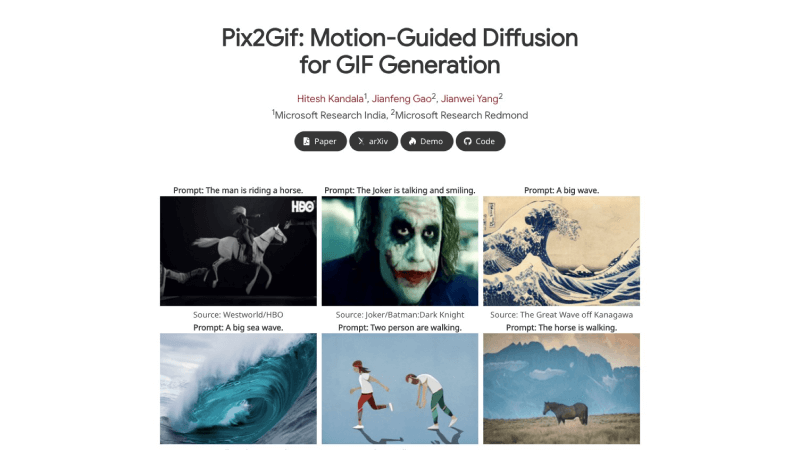
Pix2Gif Official Website Entry
- Official Project Homepage:https://hiteshk03.github.io/Pix2Gif/
- arXiv Research Paper:https://arxiv.org/abs/2403.04634
- GitHub Code Repository:https://github.com/hiteshK03/Pix2Gif
- Online Demo Experience:https://520a83a7524ec7d864.gradio.live/

Pix2Gif Features
- Text-Guided Animation Generation: Users can guide the model to generate GIF animations that match a specific theme or action by inputting text descriptions; the model understands the text content and creates the corresponding dynamic visual effects.
- Motion Magnitude Control: Pix2Gif allows users to specify the motion magnitude, thereby controlling the intensity and speed of the action in the GIF. This provides users with fine-grained motion control capabilities, enabling the creation of different dynamic effects ranging from slow and subtle to fast and intense.
- Motion-Guided Image Transformation: The model uses a motion-guided deformation module to spatially transform the features of the source image based on the text prompt and motion magnitude, creating coherent dynamic frames.
- Perceptual Loss Optimization: To ensure that the generated GIF remains visually consistent with the source image, Pix2Gif adopts a perceptual loss function to maintain the consistency of high-level visual features such as color, texture, and shape.
How Pix2Gif Works
The working principle of Pix2Gif is based on the principles of diffusion models, combining text guidance and motion magnitude control to generate dynamic GIF animations. The following are the detailed steps of how Pix2Gif works:
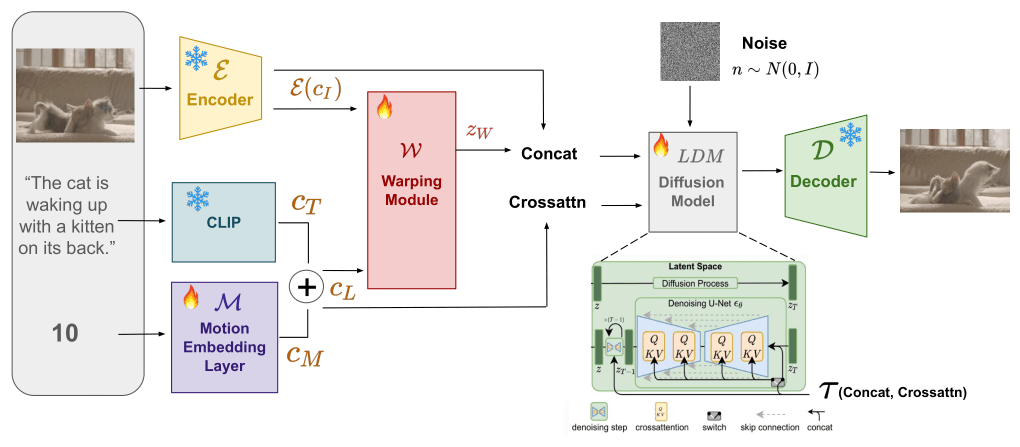
- Input Processing:
- Text Prompt: The user provides a text prompt describing the desired animation content.
- Motion Magnitude: The user can also specify a motion magnitude value, which quantifies the desired intensity of motion to be expressed in the GIF.
- Feature Extraction and Encoding:
- Source Image Encoding: The source image is converted into a vector representation in latent space through an encoder (e.g., VQ-VAE).
- Text Embedding: The text prompt is processed through a pretrained language model (such as CLIP) to obtain the text embedding representation.
- Motion Embedding: The motion magnitude value is also embedded as a vector so that it can serve as conditional input to the model together with the text embedding.
- Motion-Guided Deformation:
- FlowNet (FNet): A subnetwork generates an optical flow feature map based on the text and motion embeddings, which represents the direction and magnitude of motion in the image.
- WarpNet (WNet): Another subnetwork uses the optical flow feature map and the latent representation of the source image to generate a deformed latent representation.
- Latent Diffusion Process:
- Reverse Diffusion: The Pix2Gif model performs a reverse diffusion process in latent space, which is a process of gradually removing noise to generate clear images.
- Conditional Generation: In the reverse diffusion process, the model uses text embeddings and motion embeddings as conditions to guide the generation process to match the user's input prompt.
- Perceptual Loss:
- High-level feature consistency: To ensure that the generated image is visually consistent with the source image, the model uses a perceptual loss function, which typically involves comparing feature maps from a pretrained deep network (such as a VGG network).
- Output Generation:
- Image decoding: Finally, the latent representation output by the model is decoded into image frames in pixel space, forming a dynamic GIF animation.
- End-to-end training:
- Optimization: The entire model is trained in an end-to-end manner, minimizing a loss function defined by the real image, the text prompt, and the motion magnitude.