
What Is Circumferential Travel Traces
Circumferential Travel Traces is an intelligent application focused on travel planning, helping users efficiently and conveniently arrange travel itineraries. Through a concise and intuitive interface design and powerful AI features, users can quickly input information such as destination and time, and automatically generate reasonable and personalized itinerary arrangements. It supports one-click import of links, text, or images from social platforms to quickly generate the same itinerary; provides 3D panoramic map navigation and route dragging functions to help users intuitively plan routes; and makes it convenient for travel companions to jointly edit itineraries with real-time updates. Circumferential Travel Traces integrates real-time traffic data and supports offline map caching, ensuring that users can still use it normally in no-network environments.
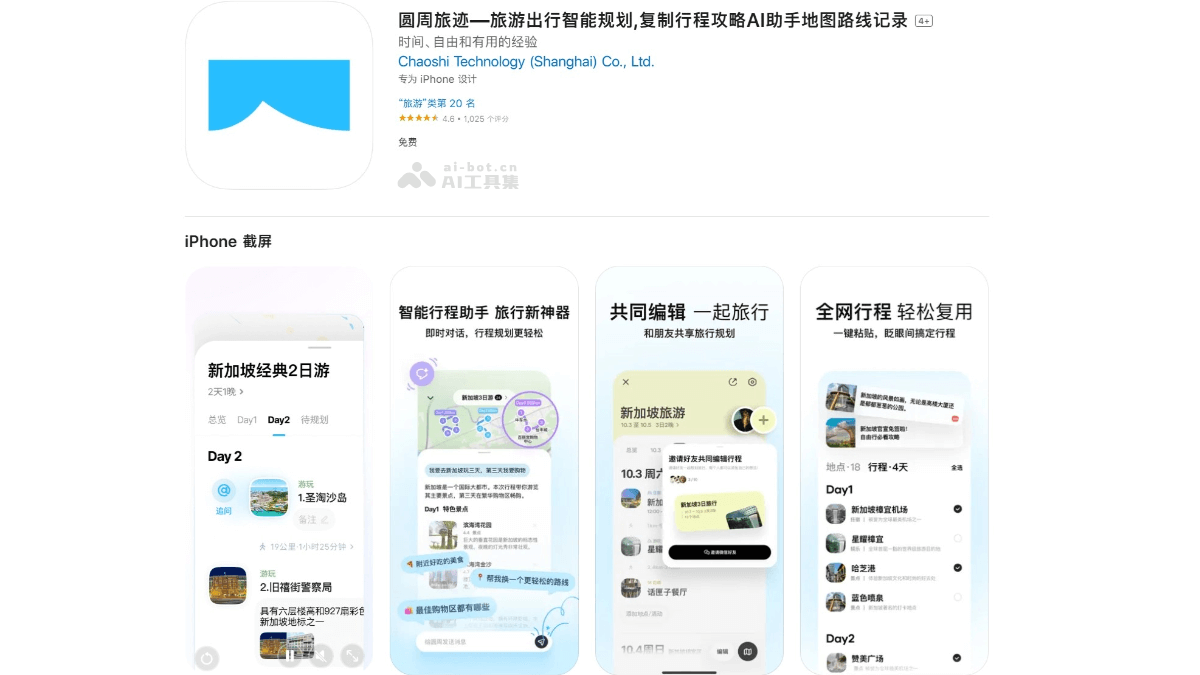
Main Features of Circumferential Travel Traces
-
Itinerary Copying: Supports one-click copying of links, text, or images from social platforms (such as Xiaohongshu, WeChat Official Accounts, etc.) to quickly generate the same itinerary.
-
Intelligent Itinerary Planning: After entering the destination and number of travel days, click "One-Click Planning," and the app will automatically arrange the optimal sightseeing route based on attraction locations and traffic conditions, and display it visually on the map.
-
Multi-Person Collaborative Editing: Users can jointly edit itineraries with travel companions, with real-time update reminders, ensuring everyone is clear about the itinerary arrangements.
-
Map Mode: Provides a world map perspective to intuitively view location distribution, quickly adjust routes and itineraries, integrates real-time traffic information, and clearly displays travel time between locations.
-
Itinerary Sharing: Supports generating posters to share to Moments, or using the itinerary collaboration function to jointly edit with companions, and can also share to social platforms with one click through password sharing, long-image sharing, and other methods.
-
Location Detail Page: Adds real user reviews and provides more comprehensive destination information.
-
Itinerary Overview: Supports map overview, notes, and other key itinerary information, allowing users to quickly obtain an overview of multi-day itinerary arrangements.
-
Travel Inspiration: The homepage provides travel inspiration to help users explore more interesting destinations.
-
Finding Companions and Itinerary Help: Users can post itinerary help requests or look for travel companions.
How to Use Circumferential Travel Traces
- Visit the Official Website: Visit the official website of Circumferential Travel Traces https://www.pitravel.cn/,或者访问圆周旅迹的Official App Store, and choose the app to download and install according to the device model.
-
Itinerary Copying:
-
Find your desired travel guide on platforms such as Xiaohongshu, WeChat Official Accounts, and DeepSeek.
-
Copy the guide link, text, or image and paste it into Circumferential Travel Traces.
-
The app will automatically parse and generate the same itinerary, saving time on manual input.
-
-
Intelligent Itinerary Planning:
-
Enter the destination and number of travel days on the itinerary planning page.
-
Click "One-Click Planning," and the app will automatically arrange the optimal sightseeing route based on attraction locations and traffic conditions, and display it visually on the map.
-
You can also search for and add more places you want to visit in the "My Places" tab, then add them to the itinerary in bulk. Click the magic wand button in the upper right corner, and the app will automatically plan all locations in the itinerary.
-
-
Itinerary Editing:
-
If you are not satisfied with the location or route arrangement, you can move or reorder the locations.
-
You can also decide on the arrangement of locations while referring to information such as location images and types on the itinerary editing page, without having to switch pages back and forth.
-
-
Itinerary Sharing and Collaboration:
-
After completing the itinerary planning, you can generate a poster to share to Moments.
-
You can also use the itinerary collaboration feature to edit the itinerary together with companions, ensuring everyone is clear about the itinerary arrangements.
-
You can share with one click to social platforms such as Xiaohongshu and Douyin through methods such as password sharing and long image sharing.
-
-
Map Mode:
-
Enter the itinerary map to discover nearby good places anytime and anywhere.
-
In the world map view, you can intuitively view the distribution of locations and quickly adjust the route itinerary; integrated real-time traffic clearly displays the travel time between locations.
-
Application Scenarios of Yuanzhou Lvji
-
Travel Inspiration on the Homepage: Users can browse travel inspiration on the homepage and discover more interesting destinations or ways to play, thereby sparking travel ideas.
-
Real-time Traffic Information: The application integrates real-time traffic data, allowing users to clearly see the travel time between locations and avoid delaying the itinerary due to traffic problems.
-
Itinerary Review: After the trip ends, users can quickly review the arrangements of the entire trip through the itinerary overview feature and summarize lessons learned.
- Personal Travel Planning: Users can enter the destination and number of travel days on the itinerary planning page of Yuanzhou Lvji, click "One-click Planning," and the application will automatically generate the optimal touring route based on scenic spot locations and traffic conditions, and display it visually through a map.