
What is PatentFig AI
PatentFig AI is an AI patent drawing software designed for patent attorneys, agents, corporate IP teams, and independent inventors. Users input a text description of the invention's key points, or upload product photos, hand-drawn sketches, CAD screenshots, or 3D models, and it can automatically generate drawings compliant with patent office standards, including line drawings, multi-view drawing sets, exploded/cross-sectional views, 3D renderings, and flowchart diagrams. PatentFig AI has built-in USPTO, CNIPA, EPO, JPO, KIPO, and PCT rules that can be switched with one click, supports conversational editing, version rollback, and pre-submission compliance checks, and exports PDF/PNG/SVG/TIFF.
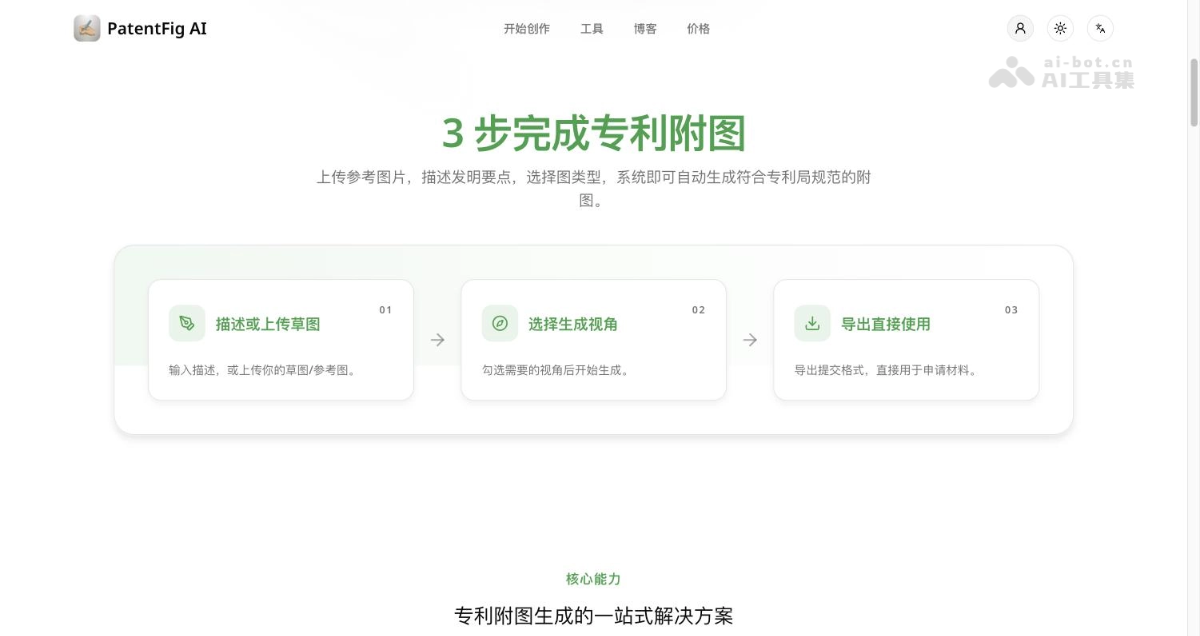
Complete patent drawings in three steps: describe or upload a sketch, select generation viewpoints, export for direct use
Main Features of PatentFig AI
-
Patent Line Drawing Generation: Automatically generate clean and standardized line drawings from photos or 3D models, with automatic addition of lead lines and part numbers.
-
Multi-View Drawing Sets: Generate front, side, top, isometric, exploded, cross-sectional, and other views based on the same anchor image, with consistent numbering and scale throughout.
-
3D Rendering and Design Patents: Generate 3D renderings for structure and design patents, suitable for design patents and utility model descriptions.
-
Flowcharts and Block Diagrams: Generate flowcharts, system block diagrams, and electrical framework diagrams for method, software, and electrical inventions, with automatically aligned numbering.
-
Conversational Editing: Directly edit any drawing using natural language such as "bolden this line" or "add a cross-sectional view".
-
Slot Regeneration and Version Control: Individual drawings can be rerun separately, each generation becomes a new version, and comparison and rollback are supported at any time.
-
Pre-Submission Compliance Check: Automatically verify resolution, line width, annotations, and format before submission to reduce the probability of receiving office actions.
-
Resolution Enhancement and Vectorization: Enhance to 300/600 DPI, and bitmaps can be vectorized into SVG and vector PDF.
-
Multi-Patent Office Format Switching: Switch between CNIPA, USPTO, EPO, JPO, KIPO, and PCT rules with one click, one set of source files usable across multiple offices.
-
Project Management and Confidentiality: Centrally manage drawing sets, versions, and compliance status by application, and provide confidentiality and data retention statements.
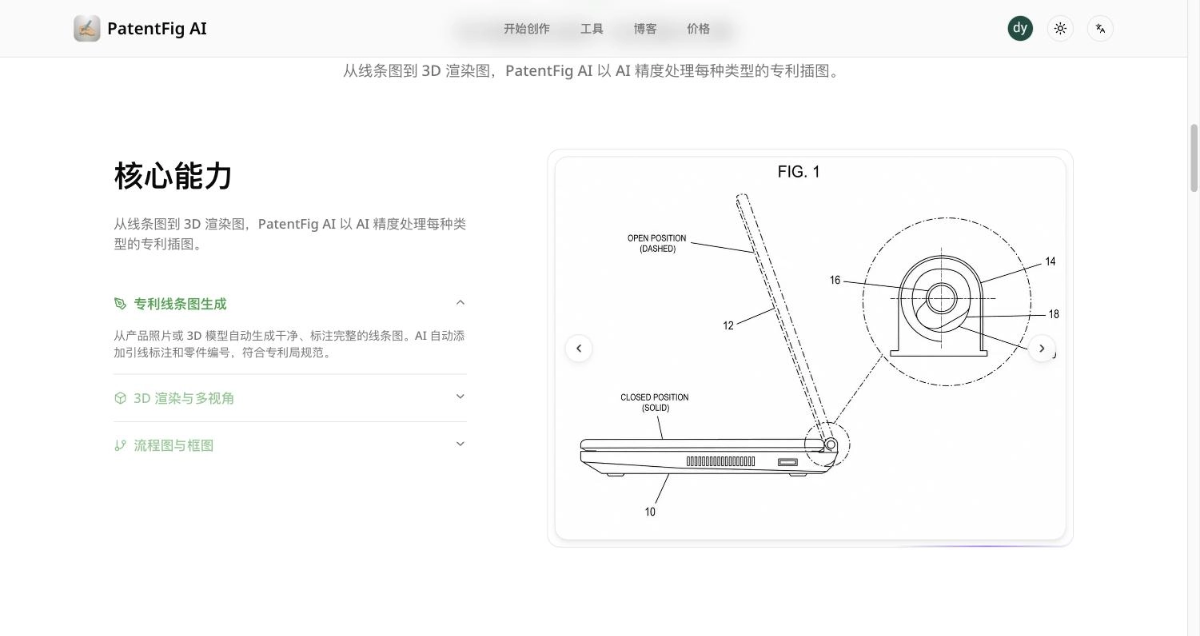
Generated patent line drawings have lead lines and part numbers, with solid lines indicating closed positions and dashed lines indicating open positions
How to Use PatentFig AI
-
Describe or Upload a Sketch: Visit the PatentFig AI official website https://patentfig.ai/zh, and after registration, describe the invention's key points in text, or upload reference photos, hand-drawn sketches, or CAD screenshots.
-
Select Generation Viewpoints: Check the required view types, such as front view, side view, isometric view, exploded view, or cross-sectional view, and select the format rules of the target patent office.
-
Conversational Editing: If unsatisfied with the results, continue adjusting using natural language, or regenerate only a single drawing separately, with each step automatically preserving versions.
-
Check and Export: Use the drawing inspector for pre-submission verification, then export PDF, PNG, SVG, or TIFF according to patent office specifications for direct use.
Core Advantages of PatentFig AI
- Oriented Toward Patent Examination Standards Rather Than General Aesthetics: Generic AI drawing generates illustrations with shadows, gradients, and perspective distortion, which are often rejected when submitted directly. PatentFig AI's output is constrained by patent drawing standards from the very beginning.
- Consistency across the entire drawing set: Multiple views are generated based on the same anchor image, and part numbers and lead line annotations remain consistent across the entire drawing set, which is the most error-prone part of manual redrawing.
- Covers the rules of six major patent offices: Format differences among USPTO, CNIPA, EPO, JPO, KIPO, and PCT are handled by the platform, so multinational applications do not need to be redrawn for each office.
- Extremely low revision cost: The real workload of patent drawings lies in repeated revisions. Conversational editing and slot-based regeneration compress one round of revision from several hours to a few minutes.
- Chinese interface and localized content: Provides a Simplified Chinese interface, with Chinese patent drawing specification explanations written for CNIPA, making it easy for domestic agents to get started.
Comparison of PatentFig AI with similar competitors
| Comparison item | PatentFig AI | Outsourced drafting service | Manual use of CAD / Illustrator |
| Delivery speed | A few minutes | Several days to a week | Several hours to several days |
| Revision cost | Conversational editing, a few minutes | Charged separately for each round | Redrawn for each round |
| Multiple patent office rules | Built-in switching | Depends on the service provider's experience | Specifications must be checked by yourself |
| Numbering consistency | Automatically aligned across the entire drawing set | Depends on manual checking | Depends on manual checking |
| Compliance check | Built-in verification before submission | Usually not included | Must be checked by yourself |
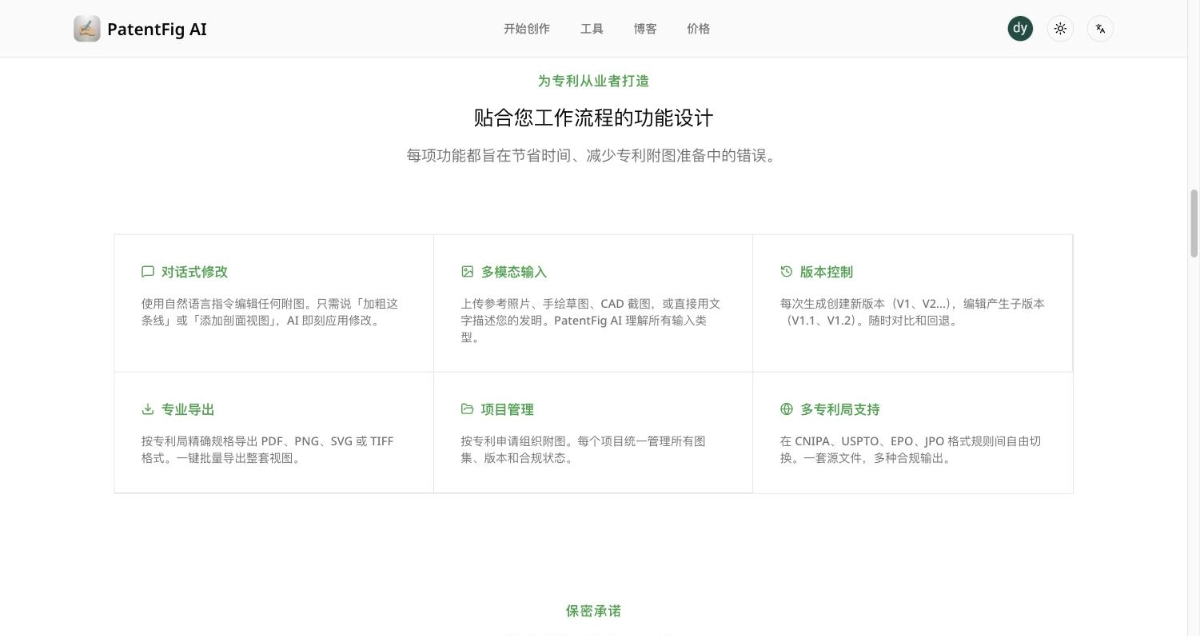
Conversational editing, multimodal input, version control, professional export, project management, and multi-patent-office support
Application scenarios of PatentFig AI
- Invention patent and utility model applications: Generate structural schematic diagrams, component diagrams, and cross-sectional diagrams from technical disclosure documents or product photos, and submit them together with the drawing description in the specification.
- Design patents: Generate six-view drawings and perspective views to meet design patents' requirements for view completeness.
- Method and software patents: Generate method flowcharts, system architecture block diagrams, and electrical framework diagrams, with step numbers corresponding to the claims.
- PCT and national phase entry: One set of source files can be output according to different patent office rules, so there is no need to redraw when entering the national phase.
- Office action responses: Quickly revise and re-export in response to drawing defects pointed out by examiners, shortening the response cycle.
- Self-service applications by independent inventors: When there is no drafting budget, use text descriptions to self-generate a set of submittable drawings.
Frequently asked questions about PatentFig AI
Q1: What is PatentFig AI's official website?
A1:The only official website is https://patentfig.ai,中文入口为 https://patentfig.ai/zh。
Q2: Can the generated drawings be submitted directly?
A2:The platform generates according to each patent office's format rules and provides a compliance check before submission. Whether to ultimately submit is still recommended to be reviewed by an agent based on the specific case.
Q3: Which patent offices are supported?
Q3:USPTO 37 CFR §1.84, CNIPA Examination Guidelines, EPO Rule 46 EPC, JPO drawing rules, KIPO requirements, and PCT Rule 11.
Q4: What can be uploaded as input?
A4:Text descriptions, product photos, hand-drawn sketches, CAD screenshots, and 3D models are all acceptable, or you can start with text alone.
Q5: Which formats are exported?
A5:PDF, PNG, SVG, and TIFF, with support for upscaling to 300 / 600 DPI.
Q6: Is the uploaded technical material secure?
A6:The platform provides procurement-oriented confidentiality, model training, and data retention statements, and the drawings and input materials belong to the user.