
What is Pascal Editor
Pascal Editor is a web-based open-source 3D architectural editor, developed with the assistance of Claude . The tool requires no installation and runs in the browser, using WebGPU technology to achieve high-performance rendering. Pascal Editor supports professional features such as wall drawing, furniture placement, area editing, and linked 2D/3D dual views, and allows drag-and-drop adjustment of building parameters and hierarchical management of multi-floor structures. Compared with professional software such as AutoCAD and Revit, the tool is completely free and open source, suitable for lightweight 3D modeling needs such as interior design and game scene construction.
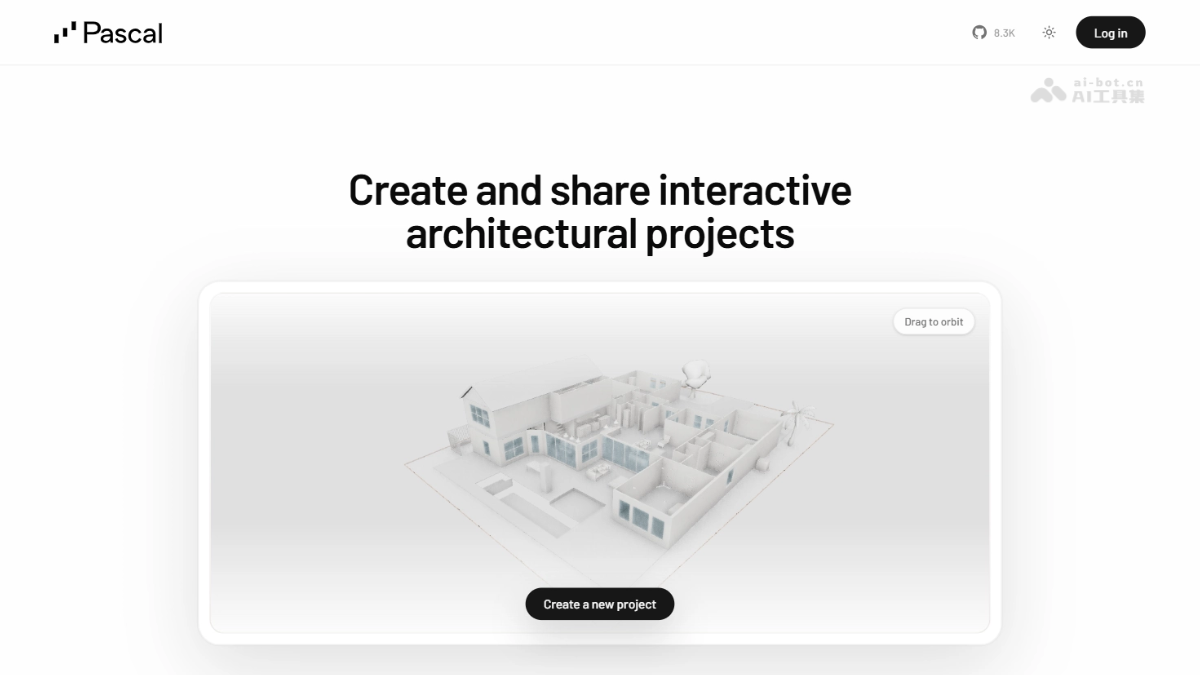
Pascal Editor's main features
- Wall drawing: Supports free drawing and real-time stretching and deformation of walls, floors, and ceilings.
- Furniture placement: Provides a rich library of building components such as furniture, doors, and windows, which can be placed with one-click drag-and-drop.
- Area editing: Features area box selection, making it convenient to quickly adjust spatial layout and divisions.
- Parameter adjustment: All building parameters support visual drag-and-drop adjustment, with no need to manually enter values.
- Dual-view linkage: Pioneering linked editing mode between 2D plan and 3D stereoscopic dual views.
- View switching: Supports 360° free view switching, including top view, left and right side views, and perspective effects.
- Display modes: Provides various professional display modes such as floor stacking, exploded decomposition, and single-floor solo.
- Component visibility: Independently control the display or hidden state of any building component.
How to use Pascal Editor
- Open the app: Visit the Pascal Editor official website https://editor.pascal.app to use it directly, with no need to download or install.
- Get to know the toolbar: The bottom toolbar provides entry points to core functions such as select, build, delete, and 2D view.
- View hierarchy: The left sidebar displays the project hierarchy structure, including nodes such as buildings, floors, and areas.
- Adjust properties: The right-side properties panel can view and edit the detailed parameters of the selected object.
- Switch tools: Click toolbar icons to switch between different tools, such as drawing walls, placing furniture, and box-selecting areas.
- Drag to edit: Directly drag objects in the 3D scene to move, rotate, or scale them.
- Control the view: Use the mouse wheel to zoom the view, and hold the right mouse button and drag to rotate the view.
- Create structures: First create the main building, then add floors, and finally draw walls and place items within the floors.
- Modify parameters: After selecting an object, drag the value sliders in the right panel to adjust size parameters in real time.
- Dual-view editing: Click the 2D button to enable dual-view mode and perform plan and stereoscopic editing synchronously.
- Auto-save: The system automatically saves all operations to the browser's local storage.
- Undo and redo: Use Ctrl+Z and Ctrl+Y to undo and redo.
- Export project: Supports exporting project files for backup or sharing.
Pascal Editor's key information and usage requirements
- Project background: A pure Web 3D building editor developed with Claude's assistance, with 5.3k+ stars on GitHub.
- Core Advantages: Runs directly in the browser, no need to install any software, zero-cost to use.
- Technical Requirements: Requires a modern browser that supports WebGPU (latest versions of Chrome, Edge, etc.).
- Functional Positioning: Suitable for lightweight architectural design, interior layout, and game scene construction; not a replacement for professional CAD.
- Data Storage: Project data is saved in the browser's local IndexedDB; clearing the cache will result in data loss.
Core Advantages of Pascal Editor
- Zero Barrier to Use: The pure web application architecture allows users to start using it immediately upon opening the browser, with no need to download or install any software.
- AI-Driven Development: The entire project's code was written with Claude's assistance, demonstrating an advanced AI-assisted development model and technical implementation capability.
- High-Performance Rendering: Achieves high-performance GPU-accelerated rendering based on WebGPU graphics technology, with smoothness close to the experience of traditional local native software.
- Complete Professional Features: Provides features such as linked 2D/3D dual views, visual parameter editing, and hierarchical scene management that meet professional architectural design needs.
Pascal Editor Project Address
- Project Official Website:https://editor.pascal.app/
- GitHub Repository:https://github.com/pascalorg/editor
Comparison of Pascal Editor with Similar Competing Products
| Comparison Dimension | Pascal Editor | SketchUp Free | Tinkercad |
|---|---|---|---|
| Product Positioning | Open source 3D building editor | Lightweight 3D modeling tool | Entry-level 3D design platform |
| Usage Method | Opens directly in the browser, no installation required | Runs in the browser, requires account registration | Runs in the browser, requires account registration |
| Cost | Completely free and open source | Basic version free, Pro version paid | Completely free |
| Core Features | Architectural wall drawing, floor management, linked 2D/3D dual views | Push-pull modeling, component library, style rendering | Basic geometric modeling, simple combinations |
| Technical Architecture | WebGPU high-performance rendering | WebGL rendering | WebGL rendering |
| Professional Level | Medium, suitable for architectural space design | Relatively high, suitable for architectural and landscape design | Relatively low, suitable for beginners and education |
| Data Storage | Browser local IndexedDB | Cloud storage | Cloud storage |
Application Scenarios of Pascal Editor
- Interior Design: Designers can quickly build house structures, plan spatial layouts, and place furniture to preview decoration plans, without needing to purchase expensive professional software.
- Architectural Design: Architects can create building models, design floor plans, and adjust wall structures to refine conceptual plans, reducing early-stage design costs.
- Game Development: Developers can build game scenes, design level maps, and place prop elements to accelerate prototyping and improve development efficiency.
- Real Estate Display: Real estate agents can create 3D floor plans and generate interactive property viewing models to enhance the customer experience and improve sales conversion.