
Baidu Netdisk AI Photo Retouching
Baidu Netdisk AI Photo Retouching is a commercial-grade AI portrait processing product launched by Baidu, offering a variety of retouching functions including AI beautification, intelligent reshaping, background blemish removal, and clothing wrinkle removal. Through precise recognition and processing, users can easily achieve natural and flawless skin effects and refined contours. Baidu Netdisk AI Photo Retouching also supports batch processing and preset templates, greatly improving retouching efficiency. It is especially suitable for the photography industry, helping photo studios reduce costs and improve work efficiency.
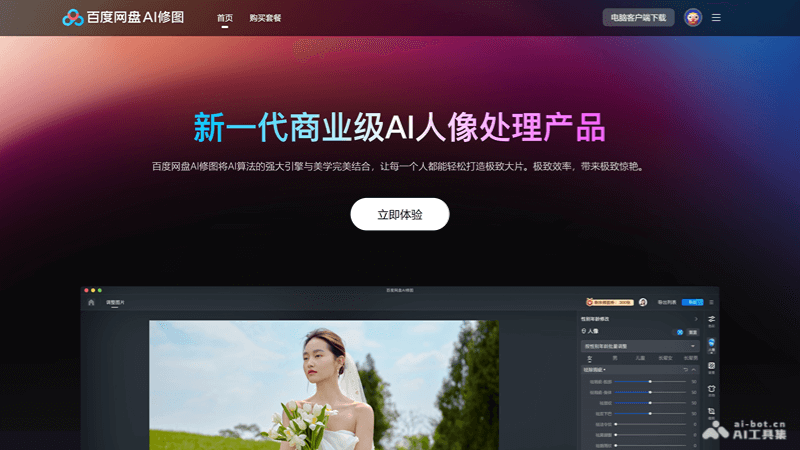
Main Features of Baidu Netdisk AI Photo Retouching
- AI Beautification: Intelligently identifies and removes facial blemishes such as acne, nasolabial folds, oily shine, and dark circles, restoring the natural texture of the skin.
- Intelligent Reshaping: By recognizing body bone joints and posture, it achieves liquefaction processing of the face and whole body, making the contours more natural and refined.
- Background Reshaping: Automatically identifies wrinkles and stains on solid-color backgrounds, eliminating or filling them with one click, making the background purer and enhancing the overall beauty of the photo.
- Clothing Wrinkle Removal: Precisely identifies the light, shadow, and texture of clothing, removes and repairs creases and wrinkles on clothing, making the clothing look smooth as new.
- Neutral Gray Skin Smoothing Technology: Provides industry-leading skin smoothing technology, making skin texture appear real and natural in any scene.
- Ultra-Fast Batch Retouching: Supports batch processing, greatly improving retouching efficiency, suitable for occasions requiring processing of large numbers of photos.
- Single-Person Recognition and Batch Application: Allows fine adjustments to a single photo and quickly applies the effect to other similar photos.
- Massive Preset Templates: Provides a variety of preset retouching templates, allowing users to quickly choose suitable styles as needed.
How to Use Baidu Netdisk AI Photo Retouching
- Product Official Website:pan.baidu.com/aiphoto
- Register and Log In: You can log in directly with a Baidu account/Baidu Netdisk account.
- Experience Now: On the official website homepage, find the "Experience Now" button and click it, which will guide you to the retouching service.
Pricing of Baidu Netdisk AI Photo Retouching
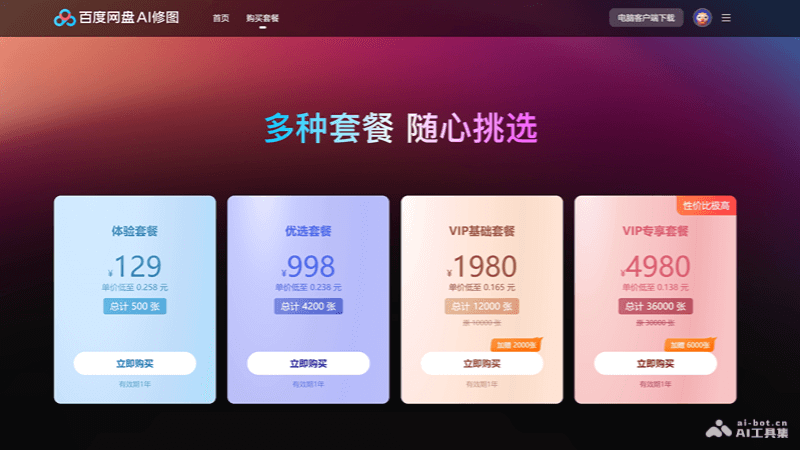
Baidu Netdisk AI Photo Retouching offers four different packages, as follows:
- Trial Package: ¥129, 500 photos, valid for 1 year.
- Preferred Package: ¥998, 4,200 photos, plus an extra 2,000 photos, valid for 1 year.
- VIP Basic Package: ¥1,980, 12,000 photos, plus an extra 6,000 photos, valid for 1 year.
- VIP Exclusive Package: ¥4,980, 36,000 photos, valid for 1 year.
Application Scenarios of Baidu Netdisk AI Photo Retouching
- Individual Users: Individual users can use Baidu Netdisk AI Photo Retouching to quickly beautify personal photos, such as selfies and travel photos.
- Professional Photographers: Photographers can use AI retouching for batch processing to improve post-production work efficiency, for example, processing large numbers of photos from weddings, events, or product photography.
- Photo Studios and Photography Studios: Photo studios can use AI retouching for rapid initial retouching, photo selection, and delivery of customer photos, improving customer satisfaction and work efficiency.
- Advertising and marketing industry: In advertising production and marketing materials, AI photo editing can be used to quickly optimize images, ensuring the appeal and professionalism of advertising images.