
What is Pad.ws
Pad.ws is an innovative online development environment that combines whiteboard functionality with a complete IDE tool. It runs in the browser, requires no additional software installation, and can be accessed anytime, anywhere from any device. It deeply integrates an interactive whiteboard with a code editor, supports drawing with Excalidraw for brainstorming and idea conception, and integrates VS Code and a terminal to meet coding, debugging, and running needs. Its seamless switching design lets developers move between ideas and technical implementation, making it suitable for team collaboration, code review, remote teaching, personal development, and many other scenarios.
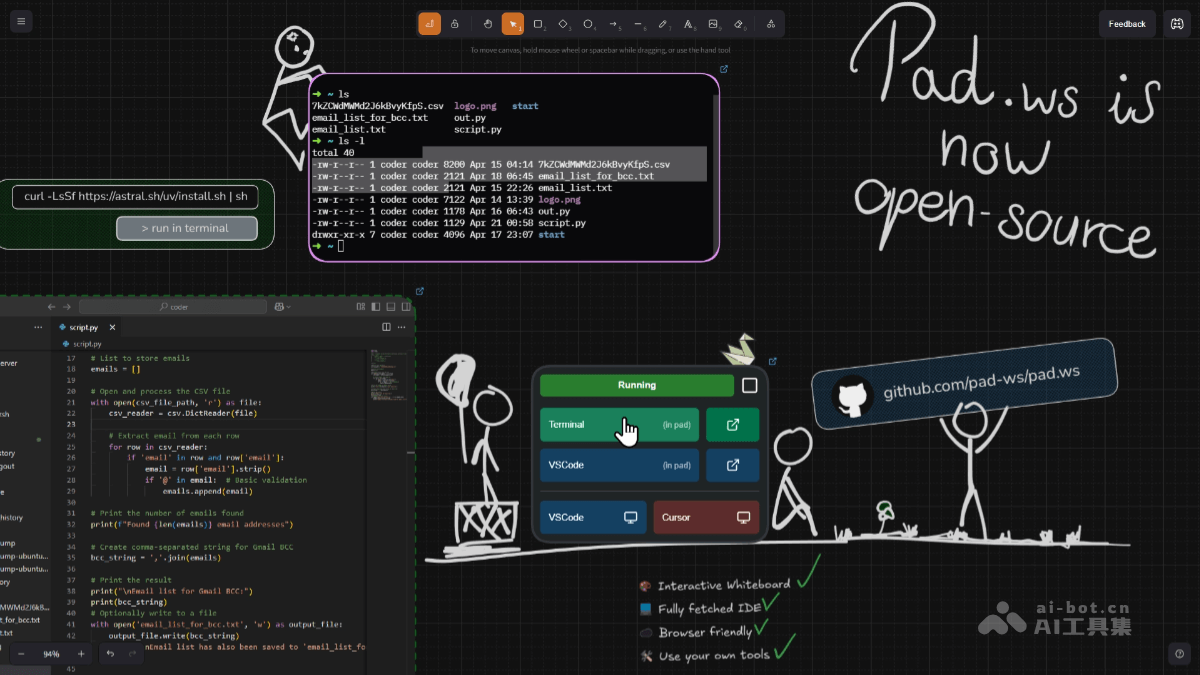
Main features of Pad.ws
- Interactive whiteboard: Based on Excalidraw, it provides powerful drawing tools and supports sketching, flowcharts, mind maps, and more, making it convenient for idea conception and project planning.
- Real-time collaboration: Supports multiple people drawing and editing on the whiteboard at the same time, suitable for team brainstorming and remote collaboration.
- Integrated VS Code: Built-in complete VS Code editor, supports multiple programming languages, and provides syntax highlighting, code autocomplete, debugging, and other features.
- Terminal integration: Built-in terminal lets users directly run code, install dependencies, and execute commands.
- Multiple language support: Supports Python, JavaScript, Java, and many other mainstream programming languages.
- Combination of drawing and coding: Users can seamlessly switch between the whiteboard and the code editor, making it convenient to go directly from idea conception to code implementation.
- Multi-device support: Runs in the browser, requires no additional software installation, and supports access from any device such as computers, tablets, and even phones.
- Self-hosted deployment: Supports deployment on local servers or private clouds, and users can configure it according to their needs.
- Extension tools: Users can connect their own tools and configurations, for example using a desktop client to connect to a virtual machine.
Technical principles of Pad.ws
- Browser-based architecture: Pad.ws is a tool that runs entirely in the browser and is developed using a web technology stack. No additional client software installation is required, and users can access it from any device that supports a modern browser.
- WebSocket real-time communication: Pad.ws uses WebSocket technology to implement real-time collaboration for the whiteboard and code editor. WebSocket provides a full-duplex communication channel and supports real-time, low-latency data transmission between the server and clients.
- Security mechanisms: Pad.ws uses HTTPS to encrypt data transmission, ensuring the security of user data. It supports end-to-end encryption and local deployment, further enhancing data privacy protection.
Pad.ws project address
- Project website:pad.ws
- Github repository:https://github.com/pad-ws/pad.ws
Application scenarios of Pad.ws
- Team collaboration: Pad.ws supports real-time collaboration among multiple people. Team members can draw flowcharts, sketches, or brainstorm on an infinite canvas while writing and running code in the built-in code editor.
- Education scenarios: In the field of education, Pad.ws provides teachers with powerful teaching tools. Teachers can use its whiteboard feature for real-time demonstrations in the classroom, while combining it with the code editor for programming instruction. Students can also engage in interactive learning through Pad.ws, enhancing the learning experience.
- Personal Development and Learning: Pad.ws is suitable for individual developers for project prototyping and coding. The combination of an infinite canvas and code editor provides individual developers with a seamless platform from creative ideation to technical implementation.
- Product Design and Requirements Analysis: Product managers can use Pad.ws's whiteboard feature to organize requirements, draw flowcharts and prototype design diagrams, while combining it with the code editor for rapid validation.