
What is Open-Sora 2.0
Open-Sora 2.0 is a new open-source SOTA (State-of-the-Art) launched by HPC-AI Techvideo generationmodel. Open-Sora 2.0 successfully trained an 11B parameter commercial-grade model with $200,000 (224 GPUs), significantly reducing training costs compared to traditional high-performance video generation models. The model performs excellently in VBench and user preference tests, with performance comparable to or even surpassing mainstream closed-source models such as HunyuanVideo and the 30B parameter Step-Video. Open-Sora 2.0 is based on a 3D autoencoder, 3D full attention mechanism, and MMDiT architecture, combined with an efficient parallel training scheme and a high-compression-ratio autoencoder, significantly improving training efficiency and inference speed.

Main Features of Open-Sora 2.0
- High-Quality Video Generation: Generates smooth videos at 720p resolution and 24 FPS, supports multiple scenes and styles, and performs excellently from natural landscapes to complex dynamic scenes.
- Controllable Motion Amplitude: Adjusts the motion amplitude of people or objects in the video according to user needs, achieving more delicate and precise dynamic performance.
- Text-to-Video(T2V) Generation: Supports directly generating corresponding video content from text descriptions, meeting the needs of creative video production and content generation.
- Image-to-Video (I2V) Generation: Combines with open-source image models to generate videos based on images, further improving generation results and diversity.
Technical Principles of Open-Sora 2.0
- Model Architecture: Efficiently processes video data based on a 3D autoencoder, capturing dynamic information in the temporal dimension. Introduces a full attention mechanism to improve the spatiotemporal consistency of video generation. Combines with a multimodal diffusion (MMDiT) architecture to more precisely capture the association between text and video content.
- High-Compression-Ratio Autoencoder: Based on a 4×32×32 high-compression-ratio autoencoder, significantly reducing inference costs.
- Efficient Training Method: Based on a multi-stage, multi-level data filtering mechanism, ensuring high-quality data input and improving training efficiency. Prioritizes training at low resolution to learn key dynamic features, then gradually increases resolution, greatly reducing computational overhead. Prioritizes training image-to-video tasks, using image features to guide video generation and accelerating model convergence.
- Parallel Training and Optimization: Combines ColossalAI and system-level optimization to improve computing resource utilization. Key technical optimizations include sequence parallelism, ZeroDP, fine-grained Gradient Checkpointing, automatic recovery mechanism, efficient data loading and memory management, etc., ensuring maximum training efficiency.
- Model Initialization and Distillation: Uses the open-source image-to-video model FLUX for initialization, reducing training costs. Distillation-based optimization strategies improve the expressiveness of the autoencoder feature space, reducing the amount of data and time required for training.
Performance of Open-Sora 2.0
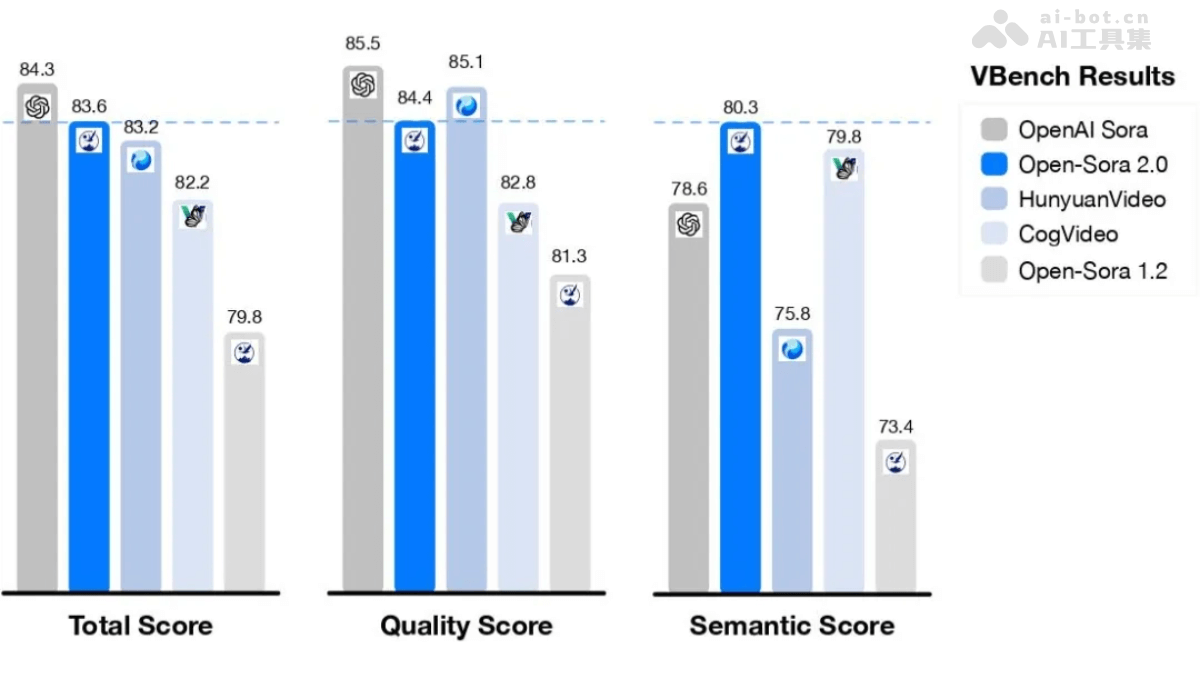
- Comparable to HunyuanVideo and 30B Step-Video: With only an 11B parameter scale, Open-Sora 2.0 achieves a level comparable to mainstream closed-source large models developed at high cost (such as HunyuanVideo and the 30B parameter Step-Video) in VBench and human preference tests.
- User Preference Evaluation: Among the three key dimensions of visual performance, text consistency, and motion performance, Open-Sora 2.0 surpasses the open-source SOTA models HunyuanVideo and the commercial model Runway Gen-3 Alpha on at least two metrics, achieving better performance with fewer resources.
- Strong performance on VBench metrics: According to the evaluation results of the authoritative video generation leaderboard VBench, Open-Sora 2.0's performance is extremely outstanding. After upgrading from Open-Sora 1.2 to version 2.0, the performance gap with the industry-leading OpenAI Sora closed-source model was reduced from 4.52% to only 0.69%, achieving almost complete performance alignment. Open-Sora 2.0's evaluation score has surpassed Tencent's HunyuanVideo, achieving a higher performance level with lower training costs, setting a new milestone for the open-source video generation field.
Open-Sora 2.0 Project Address
- GitHub Repository:https://github.com/hpcaitech/Open-Sora
- Technical Paper:https://github.com/hpcaitech/Open-Sora-Demo/blob/main/paper/Open_Sora_2
Open-Sora 2.0 Generation Results
- Prompt: A tomato surfing on a piece of lettuce down a waterfall of ranch dressing, with exaggerated surfing moves and creamy wave effects to highlight the 3D animated fun.

- Prompt: A drone camera circles a historic church on a rocky outcrop along the Amalfi Coast, highlighting its stunning architecture, tiered patios, and the dramatic coastal views with waves crashing below and people enjoying the scene in the warm afternoon light.

- Prompt: A scene from disaster movie.

- Prompt: Chinese ancient style, realism. A young woman, dressed in an embroidered red qipao, walks along the ancient streets of a bustling Chinese town. The red lanterns hanging above her sway gently in the evening breeze, and her calm, confident stride contrasts with the lively atmosphere of merchants and performers around her.

How to Use Open-Sora 2.0
- Install from Source Code:
- Create a virtual environment (Conda recommended):
conda create -n opensora python=3.9
conda activate opensora-
- Clone the repository:
git clone https://github.com/hpcaitech/Open-Sora
cd Open-Sora-
- Install dependencies:
- According to your CUDA version (e.g., CUDA 12.1), install the basic dependencies:
- Install dependencies:
pip install -r requirements/requirements-cu121.txt-
-
- Install the project:
-
pip install -v . # 或使用开发模式:pip install -v -e .-
-
- Install acceleration-related dependencies(Optional, but recommended):
-
pip install git+https://github.com/hpcaitech/TensorNVMe.git
pip install git+https://github.com/hpcaitech/ColossalAI.git
pip install packaging ninja
pip install flash-attn --no-build-isolation
pip install -v --disable-pip-version-check --no-cache-dir --no-build-isolation --config-settings "--build-option=--cpp_ext" --config-settings "--build-option=--cuda_ext" git+https://github.com/NVIDIA/apex.git- Install with Docker:
- Build the Docker image:
docker build -t opensora .-
- Run the Docker container (ensure the GPU and working directory are mounted):
docker run -ti --gpus all -v .:/workspace/Open-Sora opensoraOpen-Sora 2.0 Application Scenarios
- Video Production: Quickly generate creative videos such as advertisements and animations, reducing production costs.
- Film and Television Post-Production: Auxiliary generation of special effects shots and virtual scenes, improving production efficiency.
- Education: Generate educational videos to enhance the fun and effectiveness of teaching.
- Game Development: Used to generate game animations and virtual scenes, enriching game content.
- VR/AR Applications: Build immersive virtual scenes to improve user experience.