
What is motion-anything
motion-anything is a local-first motion engine open-sourced by the Open Design team, positioned as a free version of Figma Motion + a watermark-free motion video studio. The tool lets motion live directly on real running web pages, WYSIWYG, and after editing it can be deployed live. Users can have an AI Agent generate motion through natural language descriptions, with support for fine-tuning keyframes, and export formats covering code, video, and portable skills.
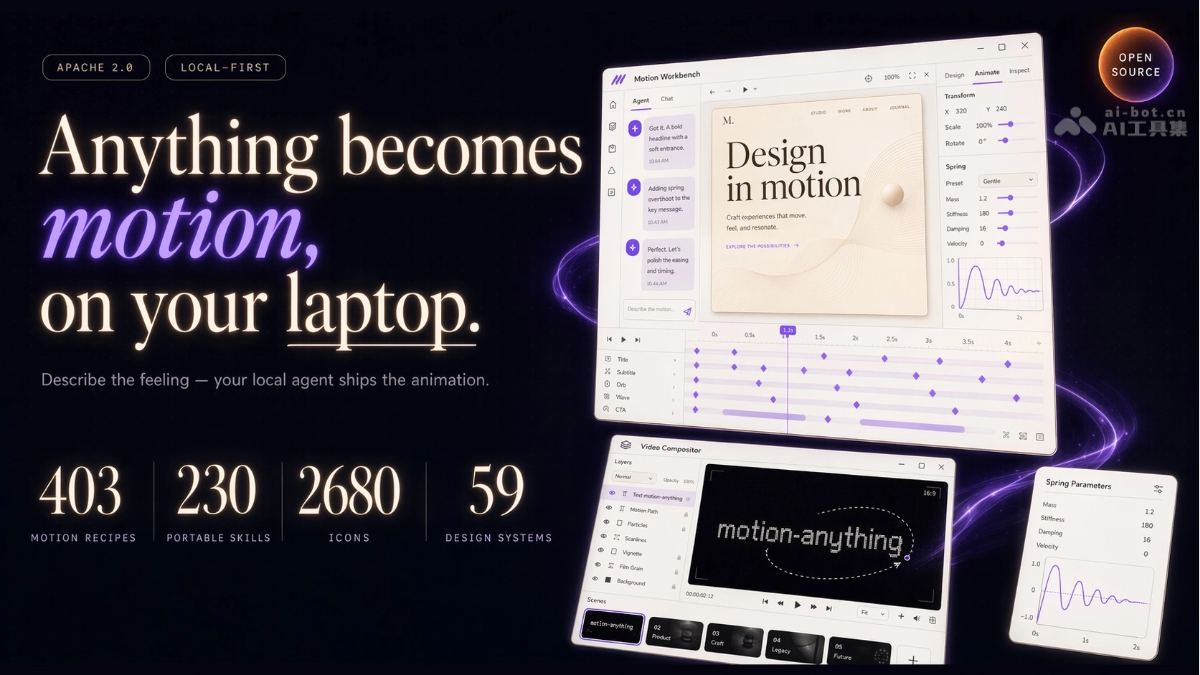
motion-anything's main features
-
Real web motion: the output is directly runnable HTML/CSS/JS, not a design mockup prototype, and can be deployed right after editing.
-
AI natural language generation: motion can be generated by describing the feel, while also supporting fine-tuning of keyframes and spring curves.
-
Curated-grade motion ecosystem: built in 403 motion recipes, 230 Skill sets, 59 design systems, and 2,680 icons.
-
Watermark-free video studio: supports multi-shot sequencing, per-character motion, and path drawing, rendering MP4/GIF locally in the browser.
-
Multi-Agent integration: automatically detects 8+ local code Agents such as Claude Code and Cursor, with support for cloud and BYOK.
-
Restrained engine: recipes come with avoid_when annotations, automatically warning when excessive motion is detected.
-
Seven export formats: supports JSON, CSS, React, Lottie, MP4, GIF, and SKILL.md.

Follow WeChat and reply "open source" to join theAI open-source project exchange group
How to use motion-anything
- Install and start: clone the GitHub repository locally, enter the directory and run
node cli/bin/motion.js serve 4399to start the service, then visitlocalhost:4399in the browser to open the workbench. - Generate a page: enter a page description on the homepage, select a design system and motion style, and click to generate the initial page.
- Component editing: select any component and adjust parameters in the Inspector panel, or describe the desired motion in natural language through the chat box.
- Timeline sequencing: drag and drop components on the bottom timeline to adjust the trigger order, duration, and delay intervals of the full-page motion.
- Export and deliver: after editing is complete, choose JSON, CSS, React, Lottie, MP4, GIF, or SKILL.md format to export and deliver.
- Configure Agent: go to Settings → Execution mode, select an installed local Agent CLI, or configure BYOK and enter an API Key to connect directly to the model.
motion-anything's core advantages
-
Real web motion: the output is directly runnable HTML/CSS/JS, not a static prototype, and can be deployed by writing the changes back to files.
-
Zero-barrier AI creation: design beginners can produce results by describing the feel in natural language, while professional users can fine-tune keyframes.
-
Watermark-free local rendering: video export requires no ffmpeg, does not go to the cloud, and is not charged per use; everything is completed in the browser.
-
Unified ecosystem: one motion model connects design, development, video production, and Agent collaboration, saying goodbye to a fragmented toolchain.
motion-anything's project address
- GitHub repository:https://github.com/nexu-io/motion-anything
Comparison of motion-anything with similar competing products
| Comparison dimension | motion-anything | Figma Motion |
|---|---|---|
| Core positioning | Open-source local-first motion engine; motions run directly on real web pages | Closed-source plugin; motions are mainly previewed within design files |
| Open-source license | Apache 2.0, fully open source and free | Closed-source commercial product, with some features paid |
| AI generation | Supports natural language for Agents to generate and modify motions | Relies on manual configuration, with limited AI capabilities |
| Code output | Directly exports runnable HTML/CSS/JS/React and writes back to files | Requires third-party tools for code conversion, not native |
| Video export | Watermark-free MP4/GIF rendering locally in the browser, with a built-in video workshop | No native video export capability; requires external tools |
| Local-first | Runs fully locally, supports self-hosting and offline use | Cloud-first, depends on the Figma platform and network |
Application scenarios of motion-anything
- Product launch pages: Quickly generate product websites with scroll-triggered and hover motions, and export code for direct deployment.
- Marketing video production: Use multi-shot templates and word-by-word motion effects to create watermark-free product promo clips without external editing tools.
- AI page post-processing: Batch-add interactive motions to AI-generated static web pages, solving the problem that generated pages cannot be modified once created.
- Design system accumulation: Save motion recipes as portable Skills for unified reuse across multiple team projects, maintaining brand motion consistency.
- Front-end development efficiency: Designers directly produce React/CSS code, reducing restoration loss and communication costs between design files and development.