
What is Ok Work
Ok Work is a lightweight AI portable office tool launched by Baidu, focusing on fragmented office scenarios. Ok Work integratesAI PPT、AI writing, AI spreadsheets,AI image generationinto four major functions, with a large number of built-in templates supporting making the same. The product runs on the WeChat ecosystem, requires no download or installation, and is mainly aimed at students and workplace newcomers, providing a light office experience of quickly producing first drafts.
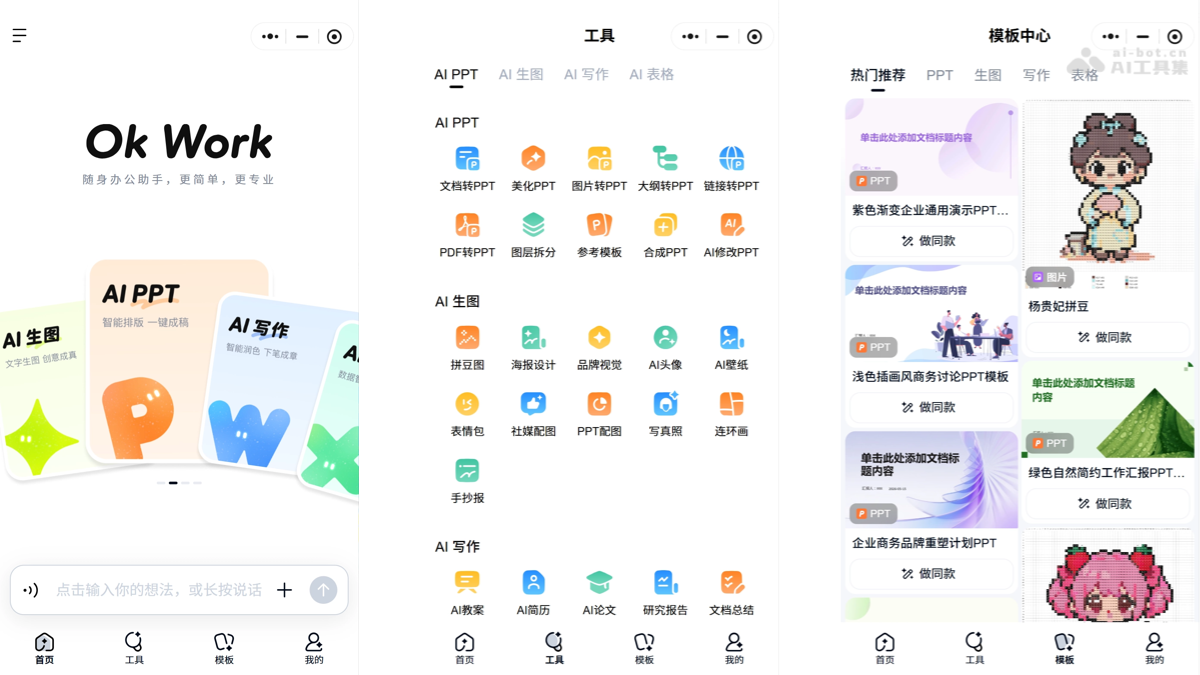
Main features of Ok Work
- AI PPT: Supports converting documents/PDFs to PPT, outline generation, and comes with PPT refinement capabilities such as beautification, layer splitting, and AI modification.
- AI Writing: Covers generation of documents such as resumes, lesson plans, papers, and reports, and also supports document summarization, PDF to Word, and continuation and imitation writing.
- AI Spreadsheets: Focuses on data calculation and intelligent spreadsheet creation, turning data processing needs into conversations and automation.
- AI Image Generation: In addition to conventional generation such as posters and avatars, it includes fun and learning-oriented modes such as perler bead patterns, handwritten newspapers, and comic strips.
How to use Ok Work
- Enter the product: Open WeChat and search for Ok Work in the mini program search bar.
- Select a function module: On the homepage, click the needed function among the four major modules (AI PPT, AI Writing, AI Spreadsheets, AI Image Generation).
- Enter requirements: Describe your needs through conversation or by uploading files, for example "convert this PDF into a PPT" or "help me write a resume".
- Choose a template(optional): Go to the template center to pick ready-made PPT or resume templates, and click make the same to quickly apply them.
- Generate and adjust: Wait for AI to generate a first draft, then fine-tune the content through multiple rounds of conversation or AI modification and beautification features.
- Export and use: After confirming satisfaction, export/save the final file. Some advanced features require consuming AI points or opening a membership.
Core advantages of Ok Work
- Zero-threshold onboarding: Runs in the form of a mini program on the WeChat ecosystem, requires no download or installation, and is ready to use upon opening WeChat.
- Fine functional granularity: Breaks capabilities down into specific small tools such as PPT beautification, layer splitting, and PDF to Word, precisely solving single-point pain points.
- One-stop coverage: Integrates the four major capabilities of PPT, writing, spreadsheets, and image generation, allowing one conversation to complete the entire process from content generation and document conversion to illustration design.
- Templates lower the threshold: Built in with a large number of ready-made PPT and resume templates, the "make the same" feature lets beginners quickly produce finished products.
- Wide range of scenarios and users: Covers workplace reporting, student assignments, teaching preparation, and poster design, serving lightweight office users such as students and workplace newcomers.
Comparison of Ok Work with similar competitors
| Comparison dimension | Baidu OkWork | ByteDance Doubao Work |
|---|---|---|
| Product positioning | Personal fragmented lightweight office toolbox | Enterprise-level AI collaborative office platform |
| Core functions | Four single-point tools: AI PPT, writing, spreadsheets, and image generation | Enterprise office scenarios such as document collaboration, knowledge bases, and team workflows |
| Operating form | WeChat Mini Program, no download or installation required | Standalone App/PC client, requires download and registration |
| Target users | Students, workplace newcomers, and other lightweight office users | Enterprise teams and organized office users |
| Barrier to use | Extremely low, ready to use upon opening WeChat | Relatively high, requires workspace configuration |
| Collaboration capabilities | Not supported, focused on fast single-user drafting | Strong, supports multi-user collaboration and team knowledge management |
| Template ecosystem | Built-in massive PPT and resume templates, supports “make the same” | Leans toward enterprise scenario templates and processes |
| Underlying model | Baidu Wenxin Large Model | ByteDance Doubao Large Model |
| Business model | Membership subscription + AI credit consumption | Primarily enterprise subscription |
| Core advantages | Fast customer acquisition, zero-threshold onboarding, covers both study and work | Deep collaboration, suitable for organized heavy office work |
Ok Work's application scenarios
- Workplace reporting: Quickly turn documents or outlines into PPT drafts, and use AI to beautify and split layers, for rushing weekly reports, monthly reports, and performance review materials.
- Job applications: Use resume templates to “make the same”, combined with AI writing to generate and optimize resume content, quickly producing job application materials.
- Student assignments: Leverage fun features such as AI-generated perler bead images, handwritten posters, and comic strips, as well as AI writing to complete the writing and summarizing of papers and reports.
- Teaching preparation: Teachers use AI PPT and lesson plan generation features to prepare courseware, and use smart spreadsheets to organize student grade data.
- Simple design: Use AI image generation to quickly create lightweight visual materials such as event posters, social media avatars, and promotional images.