
What is OiaWrite
OiaWrite is an online intelligent assisted writing tool launched by Moxing Writing Network, focusing on improving the efficiency and experience of online literature creation. It supports the creation of multiple novel types, including long, medium-length, short, and micro fiction, and provides volume and multi-chapter management functions. OiaWrite has multiple built-in AI large models, such as Tencent Hunyuan-Yuanbao large model and xAI-Grok large model, and can perform intelligent error correction, text completion, outline generation, and other functions. It provides tools such as character settings and work settings to help authors better plan their creation.
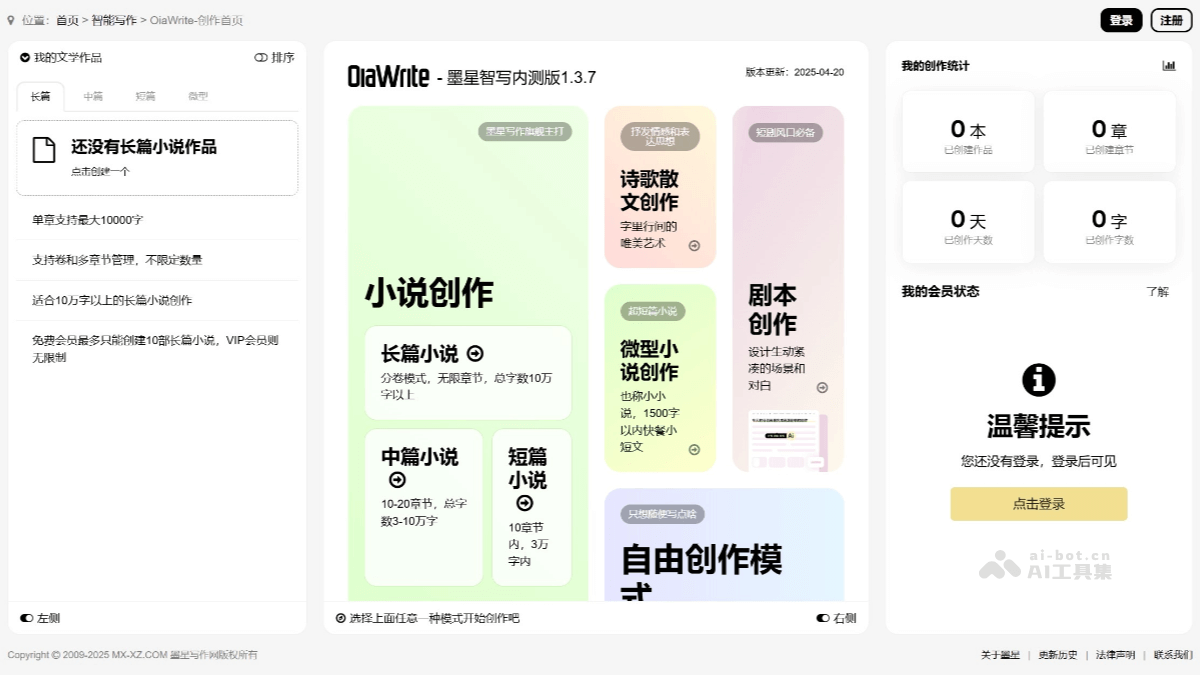
Main features of OiaWrite
-
Support for multiple types of novel creation: OiaWrite supports the creation of long, medium-length, short, and micro fiction, meeting creative needs of different lengths and styles.
-
Intelligent assisted writing function: It provides functions such as intelligent error correction, text completion, and paragraph and sentence completion, helping authors quickly gain inspiration when they get stuck in creation.
-
AI model integration: It has multiple built-in AI models such as Tencent Hunyuan-Yuanbao large model and xAI-Grok large model, and supports users in choosing different models for creation according to their needs.
-
Creation management function: It provides tools such as work settings, character settings, and outline settings to help authors better plan the novel structure and characters.
-
Chapter management and sorting: It supports the management of chapters and volumes, including adding, modifying, deleting, and drag-and-drop sorting functions.
-
Creation notes function: It supports real-time rendering in Markdown format, making it convenient for authors to record creative inspiration and important information.
-
Intelligent error correction upgrade: The intelligent error correction function has been upgraded to version 2.0, and can perform global error correction and correction suggestions on a paragraph basis.
-
Multi-platform support: It supports creation on mobile and PC. The mobile interface has been optimized for a better operating experience.
How to use OiaWrite
- Register and log in: Visit the OiaWrite official website https://www.mx-xz.com/ai-xz/oiawrite/,(点击获取-AI Writing Tools Collection) and click the register button, fill in the relevant information to complete registration. After registration is completed, log in with the registered account and password.
- Create a new work: After logging in, click the "Create New Work" button, enter the work name, and select the work type (such as long novel, medium-length novel, short story, or micro fiction). As needed, select the volume and chapter structure of the work. Long novels support volume and multi-chapter management.
- Work settings: On the work page, click the "Work Settings" button and enter the basic information of the work, such as book title, narrative style, main characters, secondary characters, language style, novel structure, etc. You can upload a novel cover to enrich the visual effect of the work.
- Character settings: Click the "Character Settings" button, add characters and fill in their basic information, such as name, gender, age, occupation, personality traits, etc. Use the AI function to generate detailed background information for the character. The AI will complete the unfilled parts based on the content already filled in.
- Outline settings: Click the "Outline Settings" button and enter the basic framework of the outline, including chapter titles and main content. Use the AI feature to generate a detailed outline, and you can choose different AI models (such as Tencent Hunyuan-Yuanbao large model, xAI-Grok large model, etc.) for generation. The generated outline can be edited and adjusted, with drag-and-drop sorting supported.
- Main Text Creation: In the main text editing area, enter the chapter content. OiaWrite will provide intelligent text completion, paragraph and sentence completion based on the context to help inspire creative ideas. You can use the AI feature at any time to generate continuation content, automatically generating subsequent plot based on the preceding content. It supports multi-chapter management and content polishing, making it convenient to make unified modifications to the entire work.
- Creative Notes: Click the "Creative Notes" button to record inspiration, character settings, plot direction, and other information. It supports real-time Markdown rendering, making it convenient to organize and view note content.
- Save and Export: During the creation process, you can click the "Save" button at any time to save the current progress. After completing the creation, you can export the work in Word, PDF, and other formats for subsequent use.
Application Scenarios of OiaWrite
- Online Literature Creation: Suitable for creating long novels of more than 100,000 words, providing volume and chapter management functions to facilitate authors in planning the overall structure.
- Content Creation and Inspiration Stimulation: Generate ideas and story outlines through AI models to help authors break through creative bottlenecks. During the writing process, when authors get stuck, OiaWrite can provide intelligent completion and text generation to inspire new ideas.
-
Writing Practice: Through AI-generated examples and suggestions, help novice authors learn writing techniques.
-
Style Imitation: Supports multiple writing styles, helping authors explore and improve their own writing style.