
What Is OfficeCLI
OfficeCLI is the world's first open-source command-line Office suite designed for AI agents, launched by the iOfficeAI team. It lets any AI Agent take full control of reading, creating, editing, and automating Word, Excel, and PowerPoint files with just one line of code. The project uses a single self-contained binary with an embedded .NET runtime, requires no installation of Microsoft Office or any dependencies, and runs across macOS, Linux, and Windows. It includes a built-in MCP server and SKILL.md skill file, and after installation it automatically configures itself for mainstream AI coding assistants such as Claude Code, Cursor, and VS Code Copilot, achieving zero-configuration out-of-the-box use.
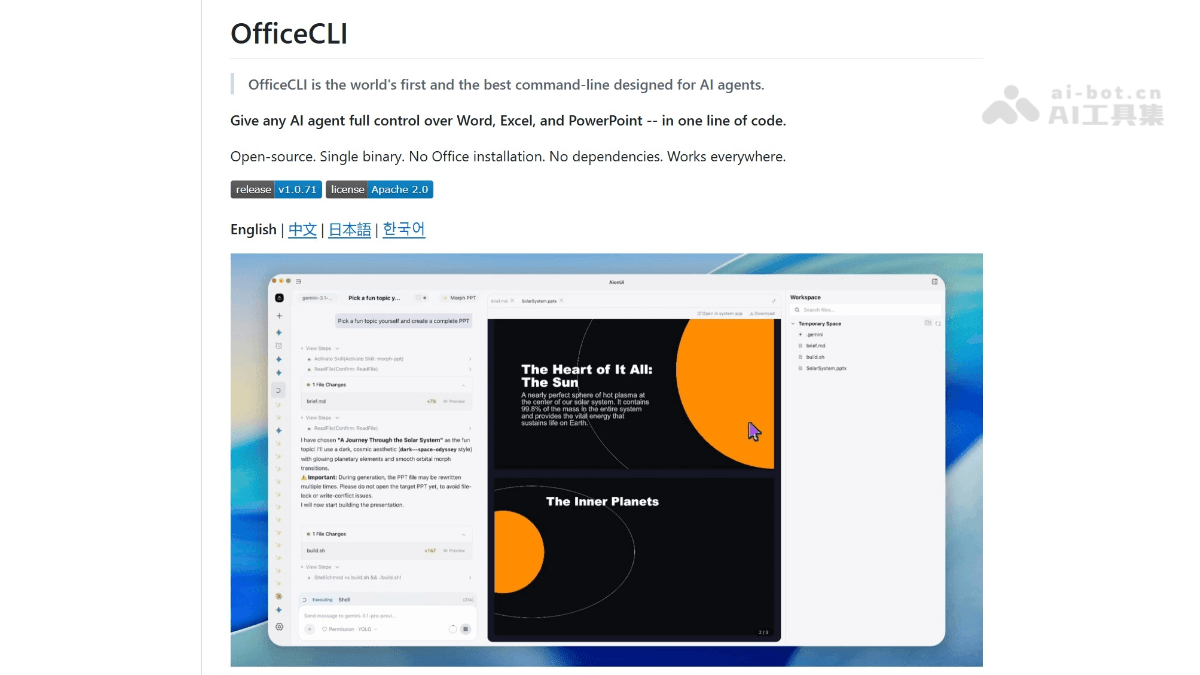
OfficeCLI's Main Features
-
Full-format document operations: Complete support for creating, reading, modifying, and batch processing Word (.docx), Excel (.xlsx), and PowerPoint (.pptx).
-
Three-layer progressive architecture:
-
L1 Read layer: Semantic views, supporting text, outline, statistics, issue diagnostics, and HTML preview
-
L2 DOM layer: Structured element operations (get / query / set / add / remove / move / swap)
-
L3 Raw XML layer: Direct XPath access, serving as a universal fallback
-
-
Live preview mode:
officecli watchstarts a local HTTP server, renders document modification effects in real time in the browser, and supports clicking to select elements with reverse synchronization back to the CLI. -
Built-in MCP server: Exposes all document operation capabilities via JSON-RPC, with one-click registration to Claude Code, Cursor, VS Code Copilot, LM Studio, and more, without requiring shell access.
-
Automatic AI integration: After installing the binary, it automatically detects known AI tool configuration directories and installs the SKILL.md skill file, which agents can read to autonomously learn all commands.
-
Resident memory mode:
officecli openkeeps documents in memory, enabling continuous batch editing with near-zero latency. -
Template merging: Supports
{{key}}placeholder replacement, enabling batch document generation based on JSON data. -
Full command-line help system:
officecli help <格式> <元素>provides complete properties, aliases, examples, and a machine-readable structured schema.
How to Use OfficeCLI
-
Install the binary: On macOS / Linux run
curl -fsSL https://raw.githubusercontent.com/iOfficeAI/OfficeCLI/main/install.sh | bash, on Windows PowerShell runirm https://raw.githubusercontent.com/iOfficeAI/OfficeCLI/main/install.ps1 | iex, or manually download the single executable file for the corresponding platform (macOS/Windows/Linux, x64/ARM64) from GitHub Releases. -
Verify the installation: In the terminal run
officecli --version; if the version number is output, the installation was successful. -
Create a blank document: Run
officecli create deck.pptx、officecli create report.docxorofficecli create budget.xlsxto quickly generate an Office file in the corresponding format. -
Add and edit content: Use
officecli add <文件> <路径> --type <元素> --prop <属性>to add slides, paragraphs, shapes, tables, and more; useofficecli set <文件> <路径> --prop <属性>to modify the style, text, position, and more of existing elements. -
View document structure: Run
officecli view <文件> textto extract plain text,officecli view <文件> outlineto view the outline hierarchy,officecli view <文件> statsto view element statistics,officecli view <文件> htmlGenerate an HTML preview renderable by the browser. -
Start live preview: Run
officecli watch <文件> --port 26315to start a local HTTP server, render the document in real time in the browser, and automatically refresh the page after each add/set/remove operation, with support for clicking to select elements and syncing back to the CLI. -
AI automatic integration: Run
officecli installto automatically scan and configure AI assistants such as Claude Code, Cursor, VS Code Copilot, and LM Studio; or manually runofficecli mcp claude/officecli mcp cursor/officecli mcp vscodeto register the MCP server. -
Manually feed the skill file: If automatic configuration does not cover the current environment, you can run
curl -fsSL https://officecli.ai/SKILL.md -o ~/.claude/skills/officecli.md(using Claude Code as an example) so that the AI can read it and autonomously learn all command syntax and architecture. -
Programming language invocation: In languages such as Python, JavaScript/Node.js, and Go, invoke OfficeCLI commands through
subprocess/child_process, and append the--jsonparameter to obtain structured output for easy program parsing and processing. -
In-memory batch processing: Run
officecli open <文件>to keep the document in memory, then continuously execute multiple add/set/remove commands for near-zero-latency batch editing, with automatic saving upon completion. -
Batch template generation: Prepare a template file containing
{{key}}placeholders, and use OfficeCLI commands together with JSON data to batch replace and generate standardized documents such as contracts, reports, and bids. -
Manage configuration and updates: Run
officecli configto view or modify~/.officecli/config.json; runofficecli config autoUpdate falseor set the environment variableOFFICECLI_SKIP_UPDATE=1to disable automatic updates.
OfficeCLI's official website address
- Github repository:https://github.com/iOfficeAI/OfficeCLI
Key information and usage requirements of OfficeCLI
-
Open source license:Apache 2.0。
-
Runtime environment:macOS、Linux、Windows(x64 / ARM64)。
-
Dependency requirements: Zero dependencies, no need to install Office or a runtime.
-
Installation permissions: Requires permission to write to the system PATH (the automatic installation script will attempt to write to
/usr/local/binor an equivalent path). -
Configuration file path:
~/.officecli/config.json, supportsofficecli configmanagement. -
Automatic updates: By default, updates are automatically checked in the background; this can be disabled via
officecli config autoUpdate falseor the environment variableOFFICECLI_SKIP_UPDATE=1. -
AI skill file: SKILL.md is about 239 lines / 8K tokens, covering command syntax, architecture design, and common pitfalls.
-
MCP registration: Supports Claude Code, Cursor, VS Code / Copilot, and LM Studio; use
officecli mcp listto view the registration status.
OfficeCLI's core advantages
-
AI-native design: Built specifically for AI Agents, path-based addressing lets agents operate on documents without needing to understand XML namespaces.
-
Zero dependencies, ready out of the box: A single binary file with an embedded .NET runtime, no need to install Office, WPS, or a Python environment.
-
Full cross-platform coverage: Supports macOS Apple Silicon/Intel, Linux x64/ARM64, and Windows x64/ARM64.
-
Dual-mode AI integration: Simultaneously supports SKILL.md (natural language instruction set, approximately 8K tokens) and MCP server (secure JSON-RPC calls), adapting to both constrained and rich environments.
-
Real-time feedback loop: Real-time browser preview + CLI commands take effect immediately, enabling extremely high development and debugging efficiency.
-
Production-grade capabilities: Supports 150+ built-in Excel functions, pivot tables, conditional formatting, PPT Morph transitions, 3D models (.glb), OLE objects, and other advanced features.
-
Open source and free: Apache 2.0 license, freely usable in commercial scenarios.
Comparison of OfficeCLI with similar competitors
| Comparison dimension | OfficeCLI | Unoserver | Python-Office library combination (python-docx / openpyxl / python-pptx) |
|---|---|---|---|
| Product positioning | The world's first command-line Office suite designed specifically for AI agents | LibreOffice-based command-line document conversion and listening service | Traditional Python programming libraries for reading and writing Office documents |
| Core capabilities | Creation, reading, fine-grained editing, real-time preview, template filling, and batch automation for Word/Excel/PPT | Document format conversion (e.g. DOCX ↔ PDF, XLSX ↔ CSV), document comparison | Programming-level read/write operations for Word/Excel/PPT, requiring Python scripts to be written |
| AI-native support | Built-in MCP server and SKILL.md; after installation, automatically integrates with Claude Code, Cursor, Copilot, etc. | No native AI integration; requires shell invocation or programming language wrapping | No native AI integration; AI agents need to indirectly call it by generating Python code |
| Usage method | Single binary command line, directly execute officecli add/set/view and other commands |
Need to first start unoserver listening service, then through unoconvert execute conversion |
Need to install Python environment and multiple dependency libraries, write scripts to call APIs |
| Dependency environment | Zero dependencies, single self-contained binary, embedded .NET runtime | Must install LibreOffice and Python environment, relatively heavy dependencies | Must install Python and pip dependencies (pip install python-docx openpyxl python-pptx) |
| Installation complexity | One-line command installation (curl/irm), ready to use out of the box | Need to install LibreOffice + Python + pip install unoserver, configure listening service | Need to separately install multiple Python libraries, handle version compatibility |
| Document editing granularity | Three-layer architecture (semantic view / DOM element operations / raw XML), supports fine-grained editing of paragraphs, tables, charts, animations, formulas, etc. | Only supports whole-document conversion, does not support internal element-level editing | Supports element-level editing, but the API is complex, and different formats require calling different libraries |
| Real-time preview | Built-in officecli watch starts a local HTTP server, real-time rendering in the browser |
No real-time preview capability | No real-time preview capability; need to save and then manually open to view |
| Resident memory mode | Supports officecli open resident memory, near-zero-latency continuous operations |
Avoid repeatedly loading LibreOffice by using listen mode, reducing CPU load by 50%-75% | The library itself has no resident mode, so it must be reloaded on each script execution |
| Cross-platform support | Full platform support for macOS / Linux / Windows (x64 / ARM64) | Primarily targeting Linux/Unix; Windows and macOS support has not been fully tested | Cross-platform, but depends on Python environment configuration |
OfficeCLI use cases
-
Automated report generation: Automatically generate Word/Excel/PowerPoint reports from database or API data, and embed them into CI/CD pipelines.
-
AI presentation generation: Based on a user's natural language prompt, an AI Agent fully automatically creates a PPT, with no template and no manual editing.
-
Batch document processing: Batch find and replace, style updates, format standardization, watermark addition, etc.
-
Structured data extraction: Extract content from Word/Excel/PPT as JSON for downstream systems to consume.
-
Document quality validation: Automatically check documents for formatting issues, broken links, missing elements, etc. before delivery.
-
Financial model construction: Via
officecli-financial-modelskills, build formula-driven Excel models such as three-statement models, DCF valuation, and Cap Tables.