
What is NoteAI
NoteAI is an AI one-stop knowledge extraction tool for students, researchers, professionals, and content creators. It supports rapid summarization and structured processing of YouTube videos, PDFs, web pages, audio, and images. It can transform long content into summaries, transcripts, mind maps, study cards, and translated text. Powered by multiple models including GPT-4o, DeepSeek, and Gemini, it helps users efficiently digest information and accelerate research and learning workflows.
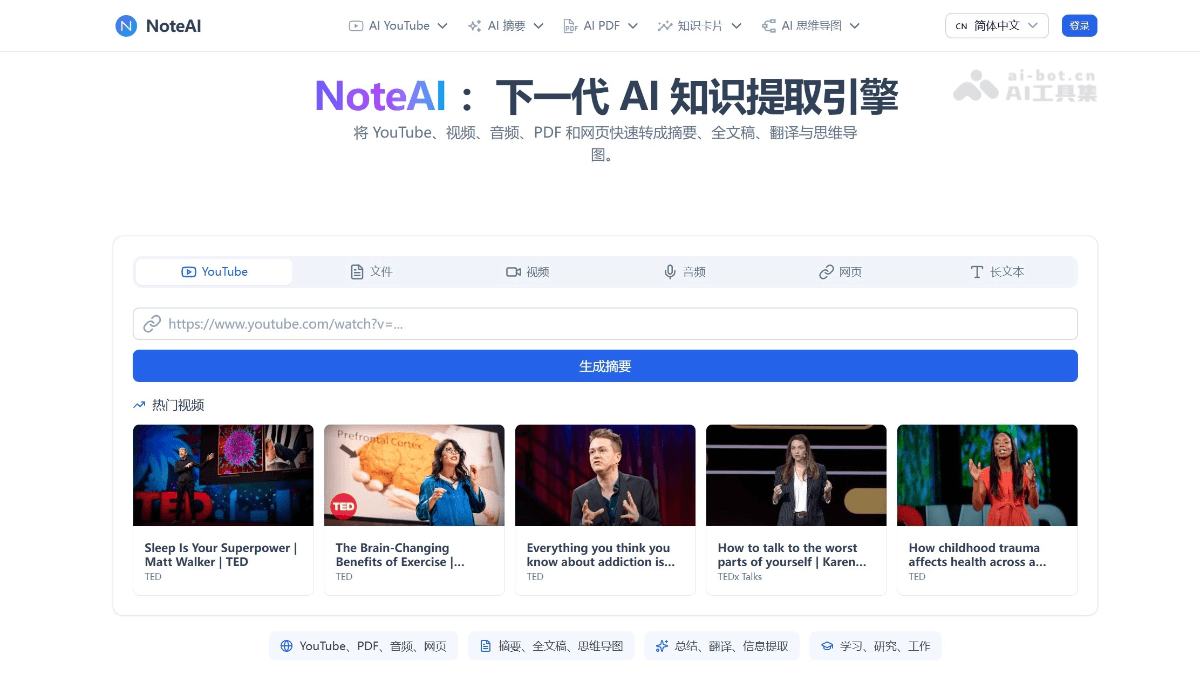
NoteAI's main features
-
AI YouTube summarization and transcription: no duration limit (free version limited to within 30 minutes), automatically generates subtitles with timestamps (SRT/TXT), supports MP3/MP4 export.
-
AI PDF processing: supports PDF translation, reading, Q&A, and OCR; the Pro version has no page limit.
-
AI mind maps: automatically extracts the logical structure of content, generates editable mind maps, and supports export as high-definition images or vector PDFs.
-
Smart study cards (insight cards): transforms core concepts into Q&A-style study cards, making them easy to share and use for team briefings.
-
Cross-language reading: supports 20+ languages, provides translated summaries, and generates notes in your native language with one click.
-
Multi-model powered: integrates mainstream large models such as GPT-4o, DeepSeek, and Gemini to ensure output quality.
How to use NoteAI
-
Visit the official website and enter content: open NoteAI's official website https://www.noteai.io/,粘贴 YouTube video link, or upload PDF, audio, or image files, or directly enter a web page URL.
-
Choose an AI processing mode: choose a processing method such as summary, full transcript, mind map, translation, or Q&A interaction according to your needs.
-
The system automatically analyzes and generates: NoteAI calls AI models such as GPT-4o, DeepSeek, and Gemini to automatically parse content and generate structured results.
-
Online preview and editing adjustments: view the generated summary, timestamped subtitles, or mind map on the page, and edit and fine-tune as needed.
-
Export and reuse (Pro version): after subscribing to the Pro version, you can export the results as SRT/TXT subtitles, MP3 audio, Word/PPT/Excel/MD documents, or high-definition image / vector PDF mind maps.
NoteAI's core advantages
-
Multimodal coverage: simultaneously supports five major content forms: video, audio, PDF, web pages, and images, providing a one-stop solution for knowledge extraction needs.
-
Multi-model integration: integrates mainstream large models such as GPT-4o, DeepSeek, and Gemini to ensure summary quality and multilingual processing capabilities.
-
Blazing-fast processing: the official website is powered by edge computing, so even large files and long videos can be processed quickly with no noticeable waiting delay.
-
Learning loop: from summary → transcript → mind map → study cards, forming a complete knowledge internalization workflow.
Comparison of NoteAI with similar competing products
| Comparison dimension | NoteAI | Notion AI | Otter.ai |
|---|---|---|---|
| Core positioning | AI knowledge extraction and summarization | AI note-taking and team collaboration | AI meeting transcription and summarization |
| Supported content | Video / PDF / Web page / Audio / Image | Documents / Database / Notes | Audio / Live meeting |
| AI automatic summarization | ✅ Multimodal automatic summarization | ⚠️ In-document AI writing assistance | ✅ Automatic meeting summary generation |
| AI mind map | ✅ Automatically generate editable mind maps | ❌ Not supported | ❌ Not supported |
| Subtitle / audio export | ✅ SRT / TXT / MP3 / MP4 | ❌ Not supported | ⚠️ Text export only |
| PDF Q&A and OCR | ✅ Supported | ⚠️ Basic search | ❌ Not supported |
NoteAI use cases
-
Student exam preparation: Quickly organize course videos and textbook handouts into review notes, subtitles, and easy-to-remember summaries.
-
Academic research: Extract key arguments from papers, PDFs, interviews, and recordings to accelerate literature reviews and material organization.
-
Workplace office work: Summarize meetings, reports, webinars, and business documents into action items, briefs, and a searchable knowledge base.
-
Content creation: Turn videos, podcasts, and web content into publishable notes, scripts, subtitles, and an inspiration material library.
-
Cross-language reading: Translate foreign-language videos, papers, and web pages into native-language summaries to lower language barriers.