
What is Moffee
Moffee is an open-source Markdown toPPT toolthat allows users to quickly create professional slides using Markdown syntax. Moffee automatically handles layout, pagination, and styling, and supports live preview and export to PDF or HTML format. Whether you are an ordinary user or a developer, you can easily create high-quality presentations through simple syntax and a variety of built-in themes.
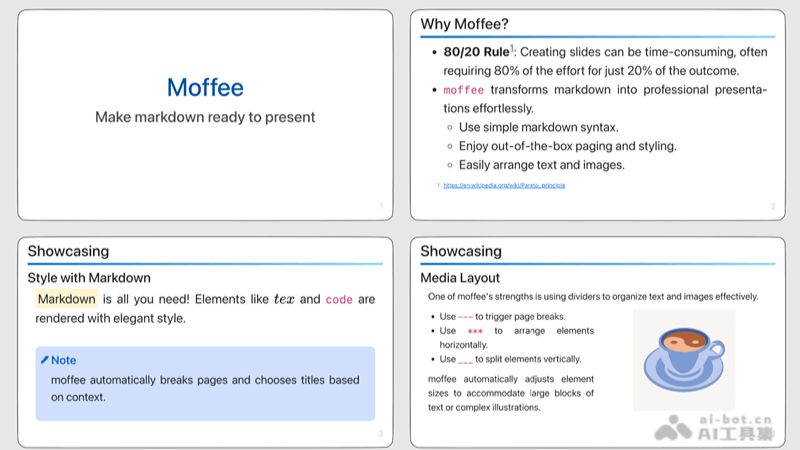
Moffee's features
- Markdown support: Write content using Markdown syntax for fast formatting and content organization.
- Automated layout: Automatically handles slide layout and pagination, simplifying the design process.
- Multiple themes: Built-in multiple PPT themes allow users to choose the appropriate style as needed.
- Live preview: Provides a live web interface preview, making it convenient for users to see the editing effect immediately.
- Export function: Supports exporting slides to PDF or HTML format for easy sharing and printing.
- Easy to learn and use: The syntax is simple and easy to get started with, suitable for all users who want to quickly create slides.
- Developer-friendly: Supports developers in customizing and extending slide styles and functions through code configuration.
- Open-source project: As an open-source tool, Moffee supports users in freely using, modifying, and distributing it.
How to use Moffee
- Install: Clone or download the project locally from Moffee's GitHub repository (BMPixel/moffee)。
- Write Markdown: Write presentation content using Markdown syntax. Markdown is a lightweight markup language that supports writing documents using simple text formatting.
- Choose a theme: Moffee provides a variety of built-in themes, and you can choose one to beautify your slides.
- Live preview: Moffee supports live preview, allowing you to see the real-time effect of the slides while writing Markdown.
- Edit and adjust: Edit and adjust the Markdown content as needed, and Moffee will automatically update the slide layout and styles.
- Export slides: After editing is complete, you can export the slides to PDF or HTML format for easy presentation or sharing.
Moffee's application scenarios
- Education: Teachers and students can use Moffee to quickly create teaching presentations, simplifying lesson preparation and learning.
- Business presentations: Business professionals can use Moffee to create presentations for business plans, product introductions, or market analysis.
- Technical sharing: Developers and technical experts can use Moffee to share their knowledge and experience at technical conferences or seminars.
- Academic reports: Researchers and scholars can use Moffee to prepare presentations for academic papers or displays of research results.
- Personal blogs: Bloggers and content creators can use Moffee to convert their articles or tutorials into slide format, increasing the appeal of the content.