
What is MimicBrush
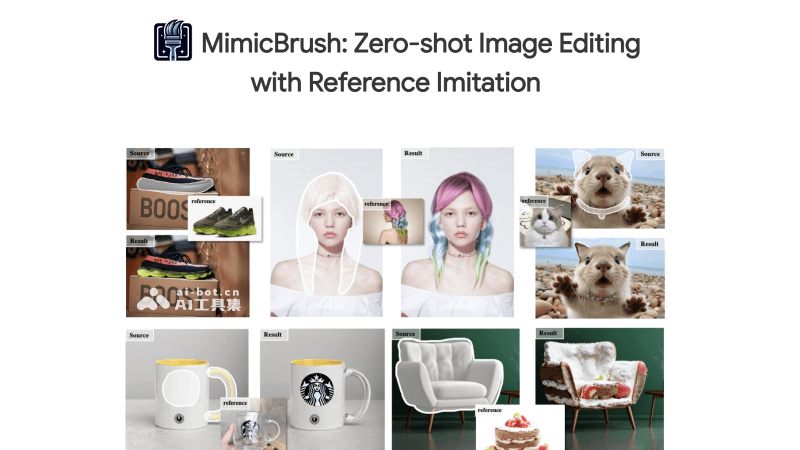
MimicBrush is an AI image editing and fusion framework launched by researchers from Alibaba, the University of Hong Kong, and Ant Group. It allows users to specify the area to be edited on the source image through simple operations and provide a reference image containing the desired effect for image editing. MimicBrush can automatically identify and imitate the visual elements in the reference image and apply them to the corresponding area of the source image. It supports image editing operations such as object replacement, style transfer, and texture adjustment. This technology is particularly suitable for scenarios such as product customization, character design, and special effects production, greatly simplifying the complex process of traditional image editing and improving editing efficiency and flexibility.
MimicBrush's Features
- Reference Image Imitation: The user circles the specific area they want to edit on the source image and provides a reference image containing the desired style or object. MimicBrush can then analyze and imitate the specific visual features in the reference image and seamlessly apply these features to the specified area of the source image, achieving consistency in style or content.
- Automatic Area Recognition: MimicBrush uses advanced image recognition technology to automatically detect and determine the editing area. Users do not need to manually draw masks or perform cumbersome selections, simplifying the preparation work before editing.
- One-Click Editing Application: Users only need to click a button to start the editing process. MimicBrush will automatically execute the entire editing process from area recognition to feature imitation, making the editing operation fast and user-friendly without multi-step operations.
- Diverse Editing Effects: It supports object replacement, such as replacing one object with another; it can achieve style transfer, such as changing the pattern or color of clothing. It can also perform texture adjustment, such as applying the texture of one material to the surface of another object.
- Real-Time Feedback: During the editing process, MimicBrush provides an instant preview function. Users can see the editing effect in real time and make adjustments and optimizations promptly, ensuring that the editing results better meet the user's expectations and needs.
- Flexibility and Adaptability: MimicBrush can adapt to different image content, including complex scenes and diverse styles, and provides multiple editing options, allowing users to make personalized adjustments according to their preferences.
MimicBrush's Official Website Entry
- Official Project Homepage:https://xavierchen34.github.io/MimicBrush-Page/
- GitHub Code Repository:https://github.com/ali-vilab/MimicBrush
- Hugging Face Demo:https://huggingface.co/spaces/xichenhku/MimicBrush
- ModelScope Model:https://www.modelscope.cn/models/xichen/MimicBrush/summary
- arXiv Technical Paper:https://arxiv.org/abs/2406.07547
MimicBrush's Technical Principles
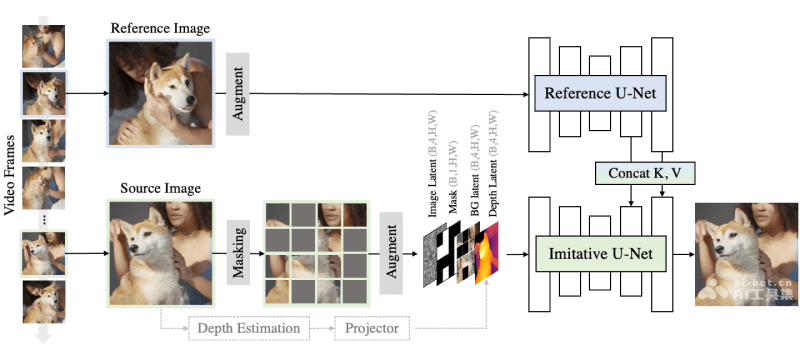
- Self-Supervised Learning: MimicBrush is trained in a self-supervised manner, utilizing the natural consistency and visual variation between video frames. During training, the system randomly selects two frames from a video, one as the source image and the other as the reference image, and learns how to use the information from the reference image to complete the masked part of the source image.
- Dual Diffusion UNets Structure: MimicBrush uses two UNet networks, namely "imitative U-Net" and "reference U-Net". These two networks process the source image and the reference image respectively, and exchange information through shared keys and values in the attention layers, helping the system locate the part of the reference image corresponding to the editing area of the source image.
- Attention Mechanism: In MimicBrush, the attention keys and values extracted by the reference U-Net are injected into the imitation U-Net. This mechanism helps the imitation U-Net more accurately complete the generation of the masked region, ensuring that the generated region blends harmoniously with the background and other elements of the source image.
- Data Augmentation: To increase the variability between the source image and the reference image, MimicBrush applies strong data augmentation techniques during training, including color jittering, rotation, scaling, and flipping, to improve the model's generalization ability to images under different poses, lighting, and viewpoints.
- Masking Strategy: MimicBrush adopts an intelligent masking strategy. It uses SIFT feature matching to determine key regions in the source image and increases the likelihood of these regions being masked, thereby encouraging the model to learn how to find and imitate more meaningful visual elements from the reference image.
- Depth Model: MimicBrush also uses a depth model to predict the depth map of the source image as an optional condition for shape control. This enables MimicBrush to preserve the shape of the source object in texture transfer tasks while applying only the texture or pattern of the reference image to the source object.
- Evaluation Benchmark: To comprehensively evaluate the performance of MimicBrush, the researchers constructed a high-quality benchmark containing partial synthesis and texture transfer tasks, covering a variety of practical application scenarios, such as fashion, product design, and more.
Application Scenarios of MimicBrush
- Product Design: Designers can use MimicBrush to quickly modify product design drawings, for example, changing the color, texture, or shape of a product to match a design concept or meet specific needs.
- Fashion and Apparel: In the fashion industry, MimicBrush can be used to change the patterns, colors, or styles of clothing, helping designers and marketers quickly preview different design options.
- Beauty and Portrait Editing: Individual users can use MimicBrush to beautify portraits, such as changing hairstyles, makeup, or skin tone, without professional image editing skills.
- Advertising and Marketing Materials: Marketers can quickly adjust advertising images to adapt to different markets or promotional campaigns, such as changing product displays or background elements.
- Social Media Content Creation: Social media users can use MimicBrush to enhance or personalize their photos and videos, making their content more eye-catching.
- E-commerce: Online retailers can use MimicBrush to customize product images, display different options or variations, and provide customers with a richer visual experience.